HS50_advance_level 1_20200522_221201 (1).pdf - 第420页
S tud ent Guid e HS-50 A dvanced I E dition 06/2 002 1 1 P neumatic Cutt er and Empty- T ape Du ct 33 11.6 .5 Ex changi ng the Con tro l Un it F ig. 1 1.6.5 Exch ang ing th e C ontro l Un it, A llo cati on of the P lu g-…

Edition 06/2002 Student Guide HS-50 Advanced I
11 Pneumatic Cutter and Empty-Tape Duct
32
NOTE:
Make certain that the midline / open-end wrench surface of the articulated joint is at right angles
to the slide surface of the movable blade (see Fig. 11.6.4 -> 5 and 6) and so that the articulated
joint can slide smoothly in the slot (= prevents turning) in the movable blade. 11
à Fasten the cylinder in this position with 2 screws each (see Fig. 11.6.3 -> 2).
NOTE:
Installing the proximity switch precisely (exactly on, not next to or over the marks) will save you the
need to make a subsequent time-consuming correction (see below "If the switching point of the
proximity switch is not correct..."). 11
à Install the proximity switch (Item no.: see Section 11.2) precisely in the position you marked on
the short-stroke cylinder with the permanent marker (see Fig. 11.6.3 -> 4, 5).
à Connect the compressed air hoses to the one-way restrictor on the cylinder in the correct allo-
cation.
-> Allocation: see Fig. 11.6.3 -> 6, 7, 8).
à For the following steps proceed, as described in Section 11.6.3.2
- to fasten the movable blade on the articulated joint,
- to adjust the spacers for the movable blade,
- to install the holders for the tape deflector (incl. cover plate and tape deflector),
- to install the stationary blade.
à Re-install the empty-tape duct on the machine frame (2 screws each on LH and RH, see Fig.
11.4.1 -> 6, 9).
à Check the gap between the leading edge of the tape deflector and the “empty-tape baffle, in-
side", as described in Section 11.6.8.
à Check the switching points of the proximity switches, as described in Section 11.6.7.
NOTE:
If the tapes are not cut correctly even though the switching points are set properly and the short-
stroke cylinder has been exchanged, complete with the one-way restrictor, the cause of the prob-
lem may be:
Compressed air level incorrect, compressed air connection or Y-socket union leaking, blade in
poor condition, solenoid valve faulty, break in the drive circuit of solenoid valve. 11
à Perform the appropriate “Final Steps” (see Section 11.6.11).
Student Guide HS-50 Advanced I Edition 06/2002
11 Pneumatic Cutter and Empty-Tape Duct
33
11.6.5 Exchanging the Control Unit
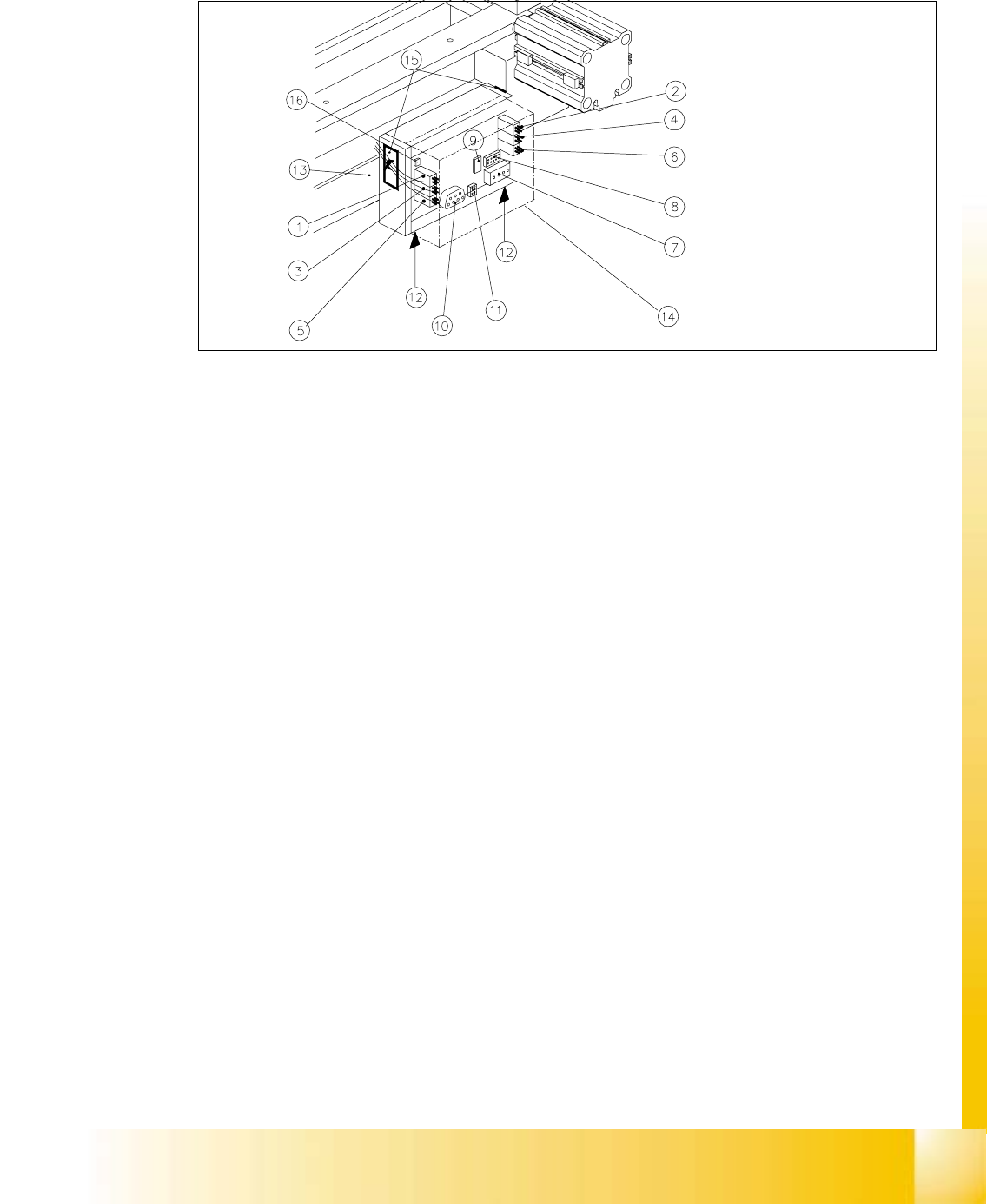
Fig. 11.6.5 Exchanging the Control Unit, Allocation of the Plug-and-Socket Connections
Key:
1. Drive of solenoid valve for cylinder 2 (left)
2. Drive of solenoid valve for cylinder 1 (right)
3. to the proximity switch on cylinder 2, FRONT
4. to the proximity switch on cylinder 1, FRONT
5. to the proximity switch on cylinder 2, BACK
6. to the proximity switch on cylinder 1, BACK
7. Cutter power supply (only busy on S-23 and F5)
8. Drive of cutter (only busy on S-23 and F5)
9. Service plug (to be used exclusively by Siemens)
10. CAN bus
11. Power supply
12. Spring-mounted elements to disconnect the control board box
13. Support bar
14. Cover
15. Fixing pedestal adhesive type (LH and RH) with cable tie
Relieve tensile stress on cable/plug-and-socket connections.
16.Coding plug

Edition 06/2002 Student Guide HS-50 Advanced I
11 Pneumatic Cutter and Empty-Tape Duct
34
WARNING
You might cut yourself on the blades and the tape deflector.
Never reach into the pneumatic cutter from below or into the empty-tape duct from above. 11
The cutter remains installed in the machine. 11
à Turn the machine and then the compessed air ON.
à Disconnect the movable component changeover table from the machine and move it out of the
machine.
à Turn the machine OFF, disconnect the machine from the mains and turn off the flow of com-
pressed air at the compressed air. Actuate the needle valve on the compressed air unit to bleed
the compressed air lines (see DANGER text in Section 11.1).
à Remove the cover from the control board (see Fig. 11.6.5 -> 14).
à Carefully undo the cable ties (left and right) on the outside of the control board box (see
Fig. 11.6.6 -> 10).
-> Do not damage the cables in this process.
à Mark the allocation of all plug-and-socket connectors and disconnect all plug-and-socket con-
nections on the control board (se Fig. 11.6.5).
à Disconnect the control unit (box) from the support bar by pushing both of the spring-mounted
elements away from the bar (see Fig. 11.6.5 -> 12, 13).
à Install the new control unit (Item no.: see Section 11.2), correctly rotated and positioned, on the
bar and engage the unit.
à Mount an adhesive fixing pedestal for cable ties (see Section 11.2 for Item no.) on the outside
LH and RH side of the control board box (see Fig. 11.6.6 -> 10 for location).
à Restore all plug-and-socket connections in the correct allocation (see Fig. 11.6.5).
à Use a cable tie to fasten the cables running to the LH and RH side of the cable pit to the fixing
pedestal (on control board box). The strain on the cables/plug-and-socket connections must
be relieved (see Fig. 11.6.6 -> 8).
à Place the cover back on the control board.
à Perform the appropriate “Final Steps” (see Section 11.6.11).