HS50_advance_level 1_20200522_221201 (1).pdf - 第553页
06/2002 Edition S tudent Gui de HS- 50 Advanced I 20 App endix 26 20.4.4 .4 Func ti ons of t he R V Head in the Holdi ng/Reject Circ uit s – If you wish to tes t the head functions in the hold ing and reject circuits, c …

Student Guide HS-50 Advanced I 06/2002 Edition
20 Appendix
25
– To switch the vacuum on/off, activate the appropriate radio button in the "Vacuum" field.
– To switch the air-kiss function on/off, activate the appropriate radio button in the "Air kiss"
field.
NOTE
Prior to the execution of the functions "Step star axis" and "Vacuum test RV head" described
below, a head reference run must have been performed on the RV head. 20
– To index the star, continue to click on the Step star axis button until the number of the de-
sired (center) sleeve is displayed above the arrow.
– To measure the vacuum values of all nozzles with the vacuum both switched on and off,
click on the Vacuum test RV head button. The measured values are displayed in a dialog
box.
– Close the dialog box by clicking on OK.
– To move the stepper motor into neutral position (starting position), click on the Initialize
stepper motor button.
– To check the vacuum, click on the Test vacuum button.
The values measured with the nozzle both open and closed, are displayed above the but-
ton.
– To measure the current vacuum values in the placement and pick-up circuit, click on the
Measure vacuum button. The measured value is displayed above the button.
06/2002 Edition Student Guide HS-50 Advanced I
20 Appendix
26
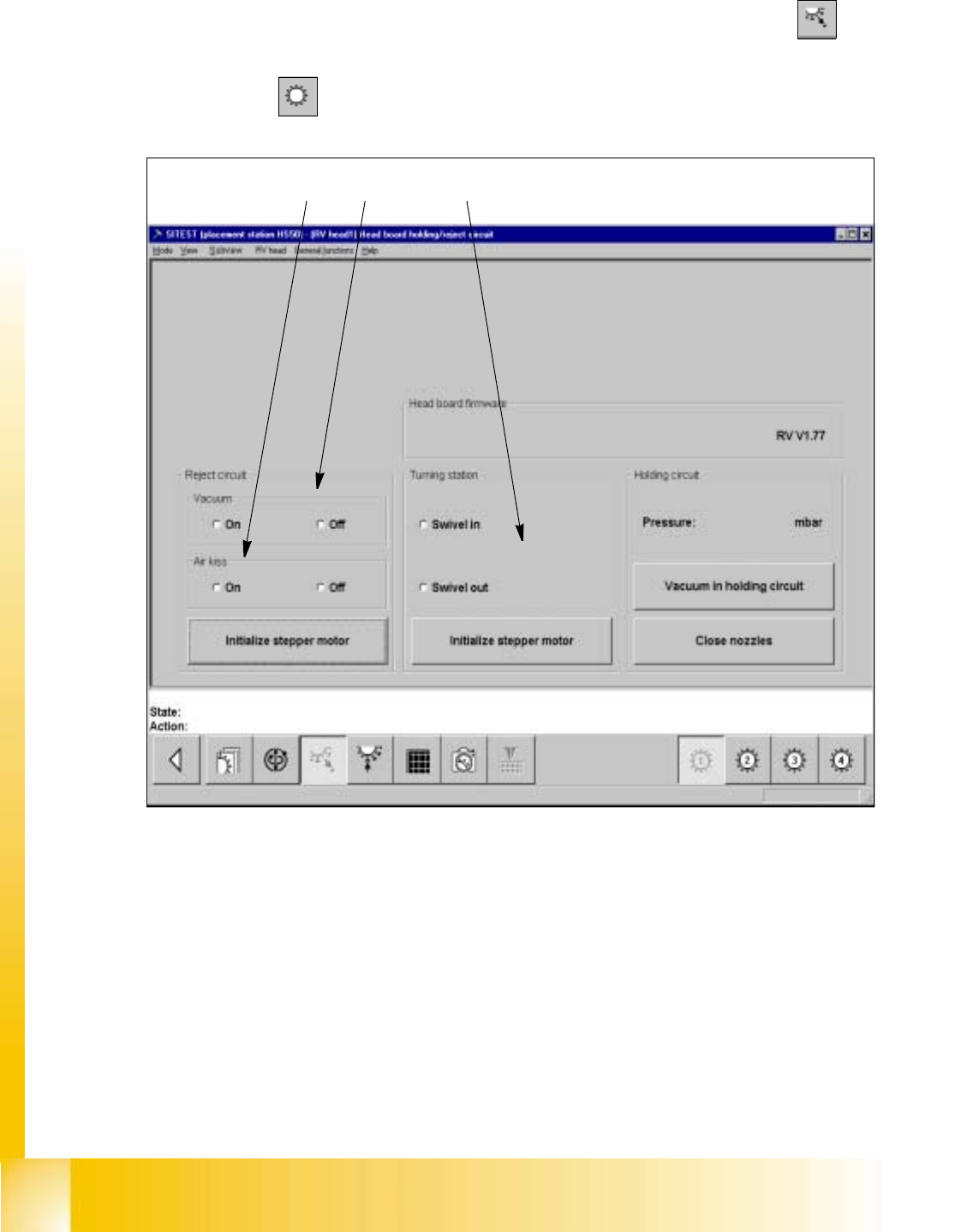
20.4.4.4 Functions of the RV Head in the Holding/Reject Circuits
– If you wish to test the head functions in the holding and reject circuits, click on the icon
in the
"RV head" display to switch to the "Head board RV head, holding and reject circuit".
20
Fig. 20.4 - 2 "Head board RV head, holding/reject circuit" Display
Key:
a to switch the vacuum on/off
s to switch the air-kiss function at the reject station on/off
d to swivel the dp-drive in/out
– If you wish to test, for example, the head functions during the swivel-in motion of the dp-
drive, activate the corresponding radio button in the "Turning station" field.
– To move the stepper motor for the swivel-in mechanism of the dp-station into neutral posi-
12 3

Student Guide HS-50 Advanced I 06/2002 Edition
20 Appendix
27
tion, click on the Initialize stepper motor button in the "Turning station" field.
– To measure the current vacuum values in the holding circuit, click on the Vacuum in hold-
ing circuit button. The measured value is displayed above the button.
NOTE
Prior to the execution of the "Close nozzles" function, a head reference run must have been
performed on the RV head. 20
– If you wish to measure the vacuum with the nozzles closed, click on the Close nozzles but-
ton prior to the start of the vacuum measurement.
20.4.4.5 Functions of the Z axis top and bottom light sensors
The light sensors at the top and bottom positions of the Z axis perform several functions which are
detailed below.
1. Functions of the top-light sensor of the z-axis on the revolver-head?
– To activate the bottom light sensor z-axis when z-axis moves downward.
– To start x/y-axes when z-axis moves upward.
– To reset both light sensors of the z-axis when z-axis moves upward.
– To switch the solenoid which supplies the air pressure.
– To activate the vacuum for nozzles (pick-up process) which are programmed in the file
vak_z.ma.
To activate the vacuum test after pick-up.
– To activate the feeder transport apart from 8mm Schulz. However 8mm Schulz if reduced ac-
celeration is used for z-axis
– To activate the vacuum test after placement to check whether nozzle is leaking.
With the latest software this test is not done with the top light sensor anymore. It is done before
the z-axis moves downward for pick-up.
2. Functions of the bottom-light sensor of the z-axis on the revolver-head?
– To switch vacuum on (pick-up)
– To switch vacuum off and air kiss on (placement)
– To provide the end signal for the z-axis for placement force 1-2 Newton.