3OM-1751-002w_G5S.pdf - 第101页
3OM-1751 1-47 1303-001 5.8 "PCB Recog/Beam" Window The corresponding window enables you to perform the teaching operation for the PEC recognition camera offset (Magnication X(Horizontal), Y(Vertical) and Z(Ang…
3OM-1751
1-461303-001
•
Component Recognition Camera Magnication Teaching Procedure
Procedure
(1) Press the Camera and Head selection buttons and select the camera and head
to be taught.
Note
The teaching operations for four combined patterns are performed.
Camera 1 – Head #1
Camera 1 – Head #2
Camera 2 – Head #1
Camera 2 – Head #2
(2) Press the [Jig Attach Pos Move] button and within 10 seconds, press the
[START] button on the operation panel.
(The head will move to the position where the magnication teaching glass
jig is to be picked up (jig attachment position)).
(3) Setup the nozzle VF02 for middle-size odd shaped nozzle onto this end of the
head moved to the jig setup position and pick up the magnication teaching
glass jig so that the image is within the recognition area.
Note
When the jig is to be picked up using the nozzle, hold the right and left
ends of the jig to pick it up.
Notice
When the vacuum pump is not activated, cancel the test operation
mode or remove a check mark from the item for vacuum pump stop
in the test operation mode window.
(4) Press the [Teach Start] button.
(Based on the captured image, the magnication offset for the component
recognition camera will be calculated.)
(5) Press the [Jig Colct] button and within 10 seconds, press the [START] button
on the operation panel.
(The beam will move to the position where the magnication teaching glass
jig can be removed).
(6) Remove the magnication teaching glass jig.
(7) Press the [Vac OFF] button to turn off the vacuum and remove the nozzle
used for the teaching.
(8) Press the [Save] button to save the teaching results.
5.7 "Cmp Recog Mag" Window
3OM-1751
1-471303-001
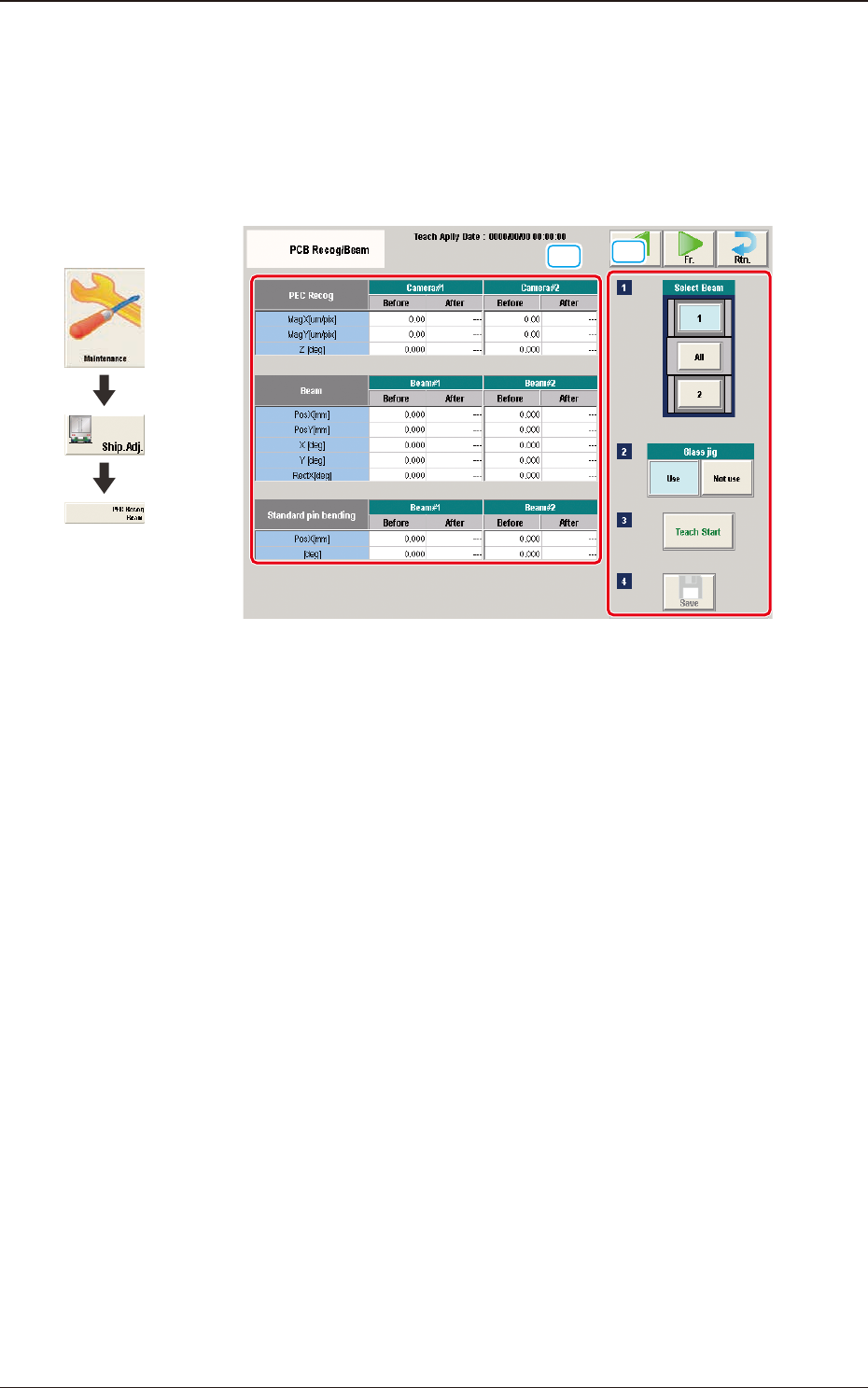
5.8 "PCB Recog/Beam" Window
The corresponding window enables you to perform the teaching operation for the
PEC recognition camera offset (Magnication X(Horizontal), Y(Vertical) and
Z(Angle), Beam offset (Beam X(Horizontal), Beam Y(Vertical), Beam Angle X
and Y).
[1]
[2]
F3A35
[1] Teaching Data Display Section
Displayed are the offset data items for the designated beam.
[2] Teaching Procedure Display Area
Displayed are the buttons to be used for the teaching operations.
Select Beam
Each PEC recognition camera/beam in the graphic image of the machine is
provided with a button function. Select the PEC recognition camera/beam for
which the teaching operation is performed.
Glass Jig
[Use] button
When this button is pressed to use the glass component jig, the color of
the button turns light blue.
[Not use] button
When this button is pressed not to use the glass component jig, the color
of the button turns light blue.
[Teach Start] button
When pressed, this button executes the teaching operation.
Graphic
Development
5.8 "PCB Recog/Beam" Window

3OM-1751
1-481303-001
[Save] button
When this button is pressed, the teaching results are saved.
•
Glass Jig PCB JG-0166 (PEC Recognition Calibration Jig)
For the "PEC Recognition Camera & Beam Offset" teaching, the following
glass jig PCB is used.
Before the teaching operation, position and clamp the glass jig PCB on the PCB
positioning center.
·
Teaching Procedure
Procedure
(1) Select the Beam (1 or 2) for which the teaching is performed.
(2) Press the [Use] button in the "Glass Jig" section.
(3) Press the [Teach Start] button.
The designated beam (1 or 2) will move to the specied recognition mark
position and the following teaching operation will be performed.
•
PEC Recognition Camera Magnication X (Horizontal), Y (Vertical),
Z (Angle) Teaching (Camera 1 or 2)
•
Beam X (Horizontal) and Y (Vertical) Offset Teaching (Beam 1 or 2)
•
Beam Angle Z, Angle Y, Rectangular X Offset Teaching (Beam 1 or 2)
•
Pilot Pin Bending Position X Side, Angle (Beams 1 and 2)
•
When the teaching is performed, the start conditions are checked
and the head except for designated, is evacuated automatically.
•
When any recognition error occurs during the teaching operation or
the [STOP] button is pressed on the operation penal, the machine
is stopped temporarily. In this case, re-start is available.
•
During this temporary stop mode, the selection of any other menu
item is unavailable.
When the teaching is completed, the designated head returns to
the home position automatically.
The teaching results and mark recognition results during the
teaching (XY Angles) are displayed in the display area in the "PEC
Recognition Camera & Beam Offset" window.
5.8 "PCB Recog/Beam" Window