3OM-1751-002w_G5S.pdf - 第250页
3OM-1751 2-82 1303-001 [3] Simultaneous transfer Set-up Select "Enable" or "Disable" to determine whether or not the PCB transfer should be made simultaneously between the input and positioning convey…
3OM-1751
2-811303-001
3.2 "PCB Transfer Mode" Tab Sheet
[3]
[4]
[1]
[2]
F3B76
·
Set-up 1
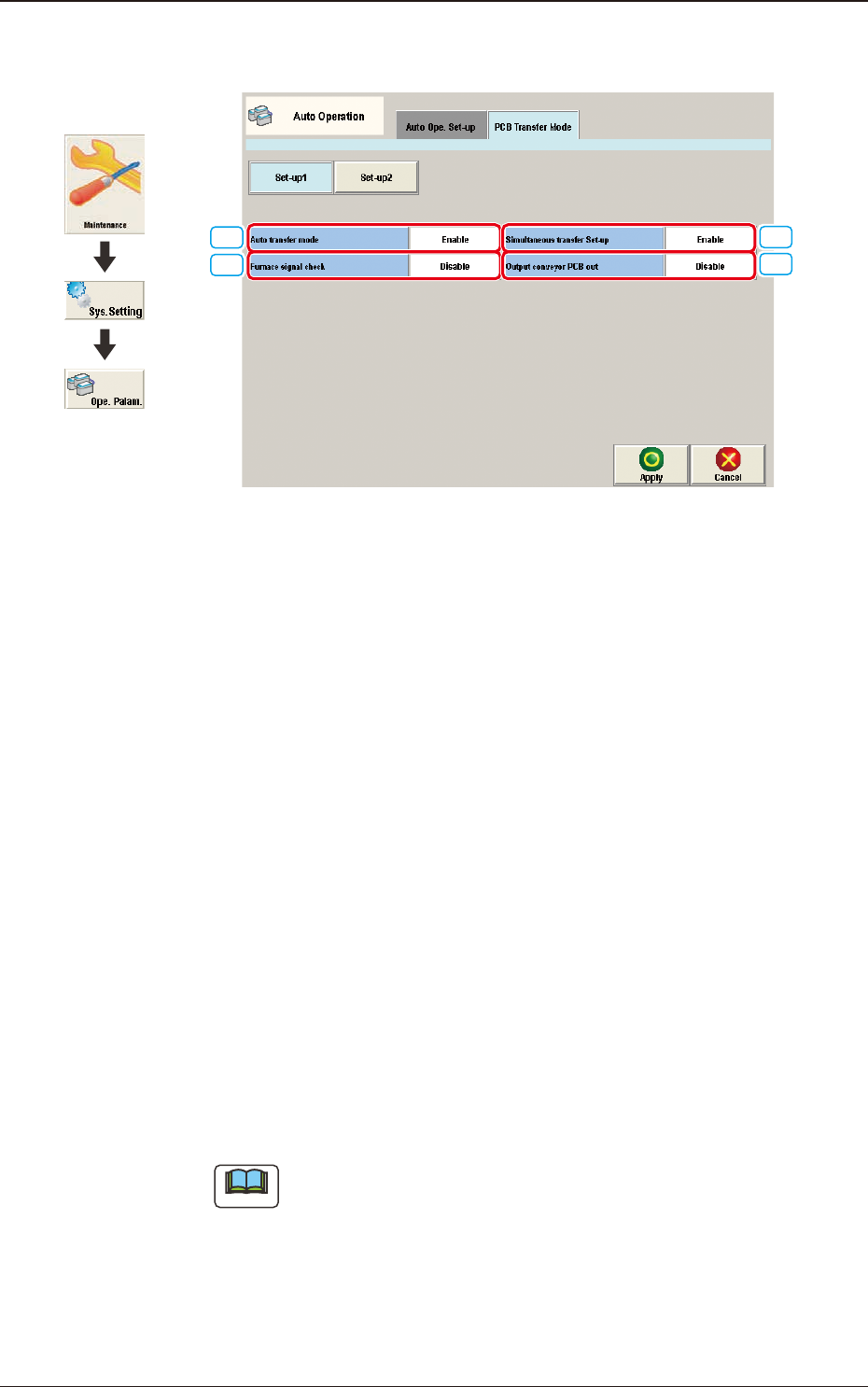
[1] Auto transfer mode
Whether or not the automatic transfer mode in the PCB discharge operation
is used, is set in this selection box.
Enable
The discharge of the PCB where the components have been placed, on the
PCB positioning unit, is performed at the same time of the transfer of the
next PCB to the PCB positioning unit.
Disable
The discharge of the PCB (nished PCB) to the output machine is performed
in this PCB transfer mode, when the components have been placed on the
PCB on the PCB positioning unit and there is no PCB on the buffer section
and the conveyor movement is not started.
[2] Furnace signal check
Set "Disable" or Enable" to determine whether or not the furnace signal
check function should be activated.
Note
When "SMEMA" is set in the "Input mode" text box of the label "Input
Setup" or in the "Output mode" text box of the label "Output Setup", this
function cannot be used.
3.2 "PCB Transfer Mode" Tab Sheet
Graphic
Development

3OM-1751
2-821303-001
[3] Simultaneous transfer Set-up
Select "Enable" or "Disable" to determine whether or not the PCB transfer
should be made simultaneously between the input and positioning conveyors
and between the positioning and output conveyors.
[4] Output conveyor PCB out
Set "Disable" or "Enable" to determine whether or not a disengaged PCB
should be detected in the output conveyor section.
3.2 "PCB Transfer Mode" Tab Sheet
3OM-1751
2-831303-001
·
Set-up 2
[1]
[2]
[3]
[4]
[5]
[6]
[7]
[8]
[9]
[10]
[11]
F3B77
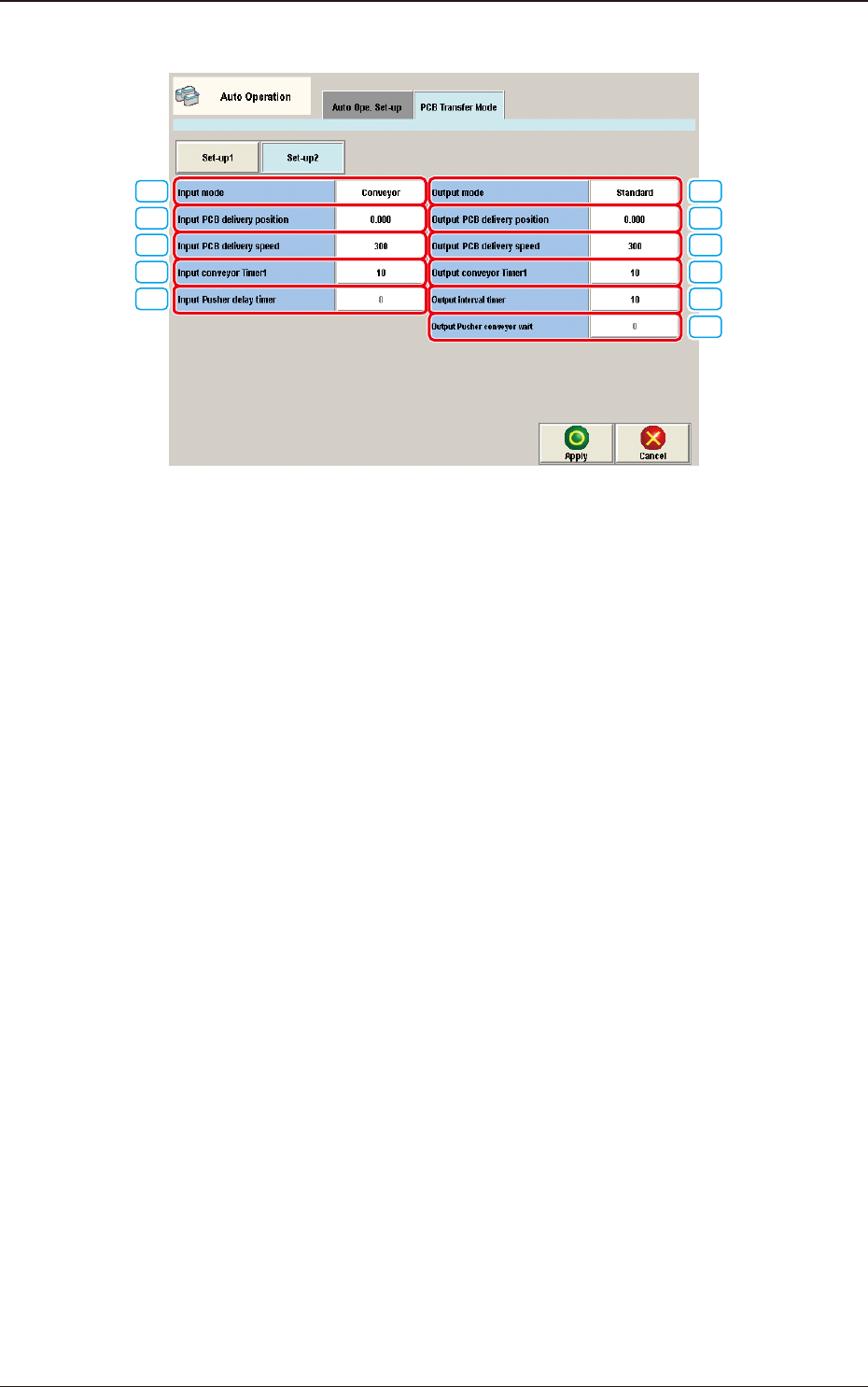
[1] Input mode
Select a parameter according to the PCB unloading system of the input
machine.
Conveyor
The input machine is activated to receive a PCB from the input machine
when the PCB transfer signal is received from the input machine.
Pusher
The pusher of the input machine forces a PCB out to the input conveyor of
the machine.
When the PCB detection sensor (for the pusher) is not provided at the inlet
side of the input conveyor, do not set "Pusher" in the text box.
SMEMA
PCBs are transferred according to the "SMEMA" standard.
[2] Input PCB delivery position [mm]
Set the PCB delivery position.
[3] Input PCB delivery speed [mm/sec]
Set the PCB delivery speed.
•
Default
: 300 [mm/sec]
3.2 "PCB Transfer Mode" Tab Sheet