3OM-1751-002w_G5S.pdf - 第254页
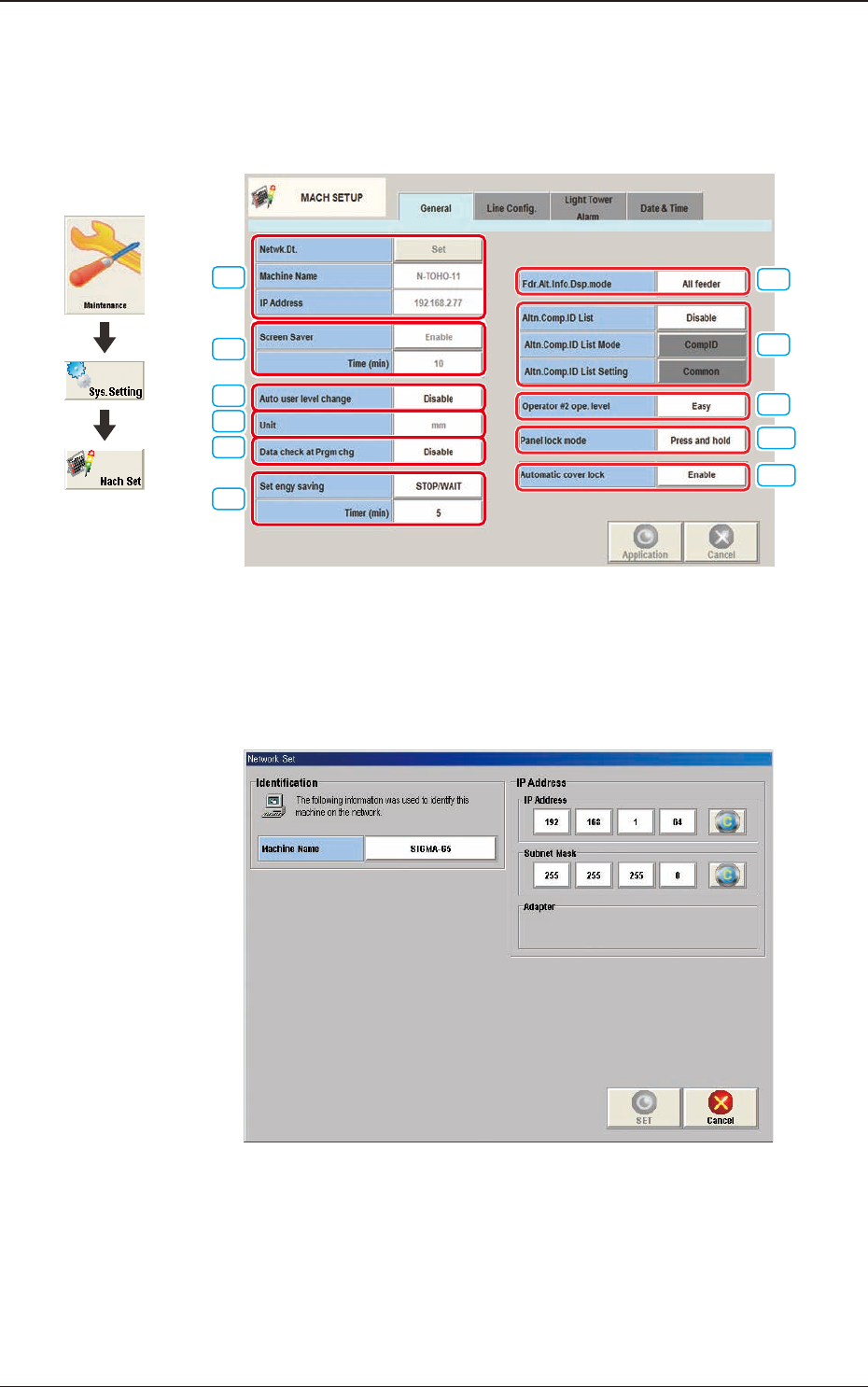
3OM-1751 2-86 1303-001 4. "MACH SETUP" Window 4.1 "General" T ab Sheet [1] [2] [3] [5] [4] [7] [6] [9] [10] [11] [8] F3B78 [1] Netwk.Dt. [Set] Button When this button is pressed, the "Netwk Setup…

3OM-1751
2-851303-001
[7] Output PCB delivery position [mm]
Set the PCB delivery position.
[8] Output PCB delivery speed [mm/sec]
Set the PCB delivery speed.
•
Default
: 300 [mm/sec]
Note
When the unloading system of the output machine is used in a mode other
than the standard one and the PCB transfer speed of the output machine
is slow, the transfer speed must be adjusted to one on the output machine
side.
[9] Output conveyor Timer #1 [sec]
Set the time to limit the operating time (PCB reception by the output
machine) of the output conveyor.
Note
Add 2 seconds (approx.) to the time required for PCB reception by the
output machine and set the time in the text box.
[10] Output interval timer [sec]
When "Interval" is set in the "Output mode" text box, set the time as interval
time for PCB unloading actions.
[11] Output Pusher conveyor wait [sec]
When "SMEMA" is set in the "[9] Output mode" text box, the output
conveyor wait time is set in this text box.
3.2 "PCB Transfer Mode" Tab Sheet
3OM-1751
2-861303-001
4. "MACH SETUP" Window
4.1 "General" Tab Sheet
[1]
[2]
[3]
[5]
[4]
[7]
[6]
[9]
[10]
[11]
[8]
F3B78
[1] Netwk.Dt.
[Set] Button
When this button is pressed, the "Netwk Setup" window appears.
F3B79
[Machine Name] Button
Using this button, the machine name is set to identify it on the network.
IP Address
The IP address and subnet mask used on the network are set in this section.
4. "MACH SETUP" Window
Graphic
Development

3OM-1751
2-871303-001
[SET] Button
Using this button, the entered value is applied.
[Cancel] Button
Using this button, the entered value is canceled and the original data value is
returned.
Machine Name
In this data box, the machine name is displayed.
IP Address
The IP address allocated to this machine is displayed in this text box.
[2] Screen Saver
When the machine is left for a certain period of time, this function is
activated to protect the touch screen.
Set this function to "Enable" or "Disable".
Time (min)
The time for starting the screen saver function is set in this text box.
[3] Auto user level change
In the case that the login user level is Supervisor or Operation 1, the login
user level is demoted to Operator 2 when the mode is returned from the
screen saver operation.
[4] Unit
The unit to be used in the machine is set in this data box.
[5] Data check at Prgm chg
"Enable" or "Disable" is selected for the pattern program check in the
program change operation, in this text box.
[6] Set engy saving
"STOP" or "STOP/WAIT" is selected for vacuum pump operation when the
machine is stopped or in the READY status and a certain time elapsed.
Time (min)
The time for starting the set engy saving function is set in this text box.
4.1 "General" Tab Sheet