3OM-1751-002w_G5S.pdf - 第256页
3OM-1751 2-88 [7] Fdr . Alt. Info. Dsp. mode All feeder When selected, the machine information is displayed whenever the "Alternate" operation is performed. Last feeder When selected, the machine information is…

3OM-1751
2-871303-001
[SET] Button
Using this button, the entered value is applied.
[Cancel] Button
Using this button, the entered value is canceled and the original data value is
returned.
Machine Name
In this data box, the machine name is displayed.
IP Address
The IP address allocated to this machine is displayed in this text box.
[2] Screen Saver
When the machine is left for a certain period of time, this function is
activated to protect the touch screen.
Set this function to "Enable" or "Disable".
Time (min)
The time for starting the screen saver function is set in this text box.
[3] Auto user level change
In the case that the login user level is Supervisor or Operation 1, the login
user level is demoted to Operator 2 when the mode is returned from the
screen saver operation.
[4] Unit
The unit to be used in the machine is set in this data box.
[5] Data check at Prgm chg
"Enable" or "Disable" is selected for the pattern program check in the
program change operation, in this text box.
[6] Set engy saving
"STOP" or "STOP/WAIT" is selected for vacuum pump operation when the
machine is stopped or in the READY status and a certain time elapsed.
Time (min)
The time for starting the set engy saving function is set in this text box.
4.1 "General" Tab Sheet

3OM-1751
2-88
[7] Fdr. Alt. Info. Dsp. mode
All feeder
When selected, the machine information is displayed whenever the
"Alternate" operation is performed.
Last feeder
When selected, the machine information is displayed only when the
"Alternate" operation is performed where only one "Alternate" available
feeder is left.
[8] Altn. Comp. ID List
Whether or not the alternative component list is to be used, is set in this data
box.
When the alternative component list is to be used, the alternative component
is compared in the pattern program check in the pattern program change
operation and whether or not the alternative component can be used, is
checked.
Altn. Comp. ID List Setting
The alternative component list reference procedure is specied in this data
box.
Common
: When selected, the list of the alternative components
common to the product models, is used.
Pattern Program
: When selected, the list of the alterative components set
for each product model, is used.
[9] Operator #2 ope level
When selected, the window is changed to one specially for Operator 2.
Normal
: When selected, the normal window is displayed.
Easy
: When selected, the window is changed to a special main window
for production start, stop and component reload, etc., where the
number of operation buttons is less than those on the normal
window.
[10] Panel lock mode
The panel lock mode is setup in this data box.
[11] Automatic cover lock
The automatic cover lock at the time of the cover open/close, is setup in this
data box.
1303-001
4.1 "General" Tab Sheet
3OM-1751
2-891303-001
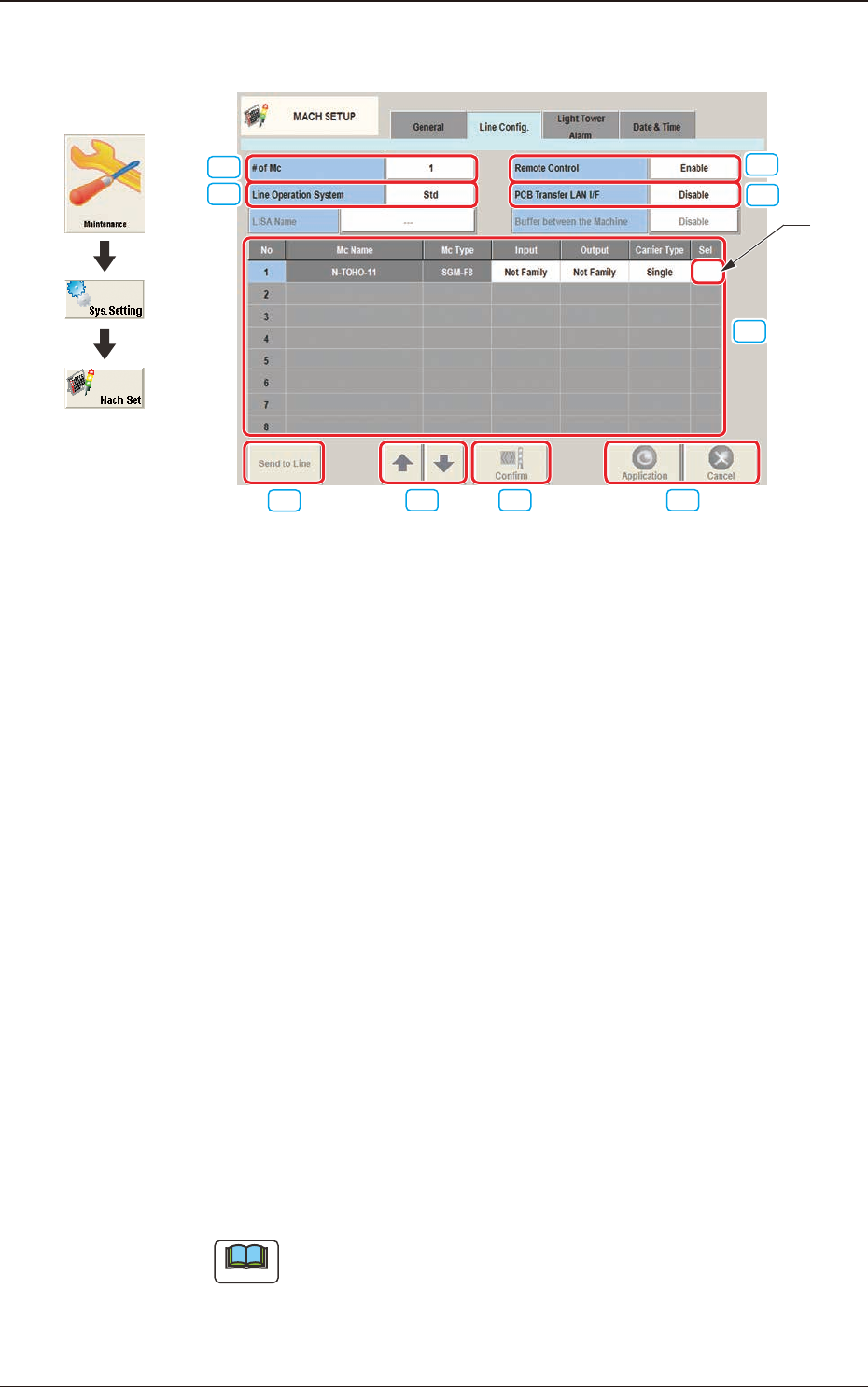
4.2 "Line Cong." Tab Sheet
[3]
[1]
[2]
[6]
[7] [8] [9]
Moving Cells
[4]
[5]
F3B80
[1] # of Mc
The number of machines in the line is set in this text box.
[2] Line Operation System
The operation system in the line is selected from the following items and
setup.
Std
: Usually, this is selected.
LISA
: When the NA02001 LISA System Software SIGMA Series (Option)
is purchased and used, this is selected.
[3] PCB Transfer LAN I/F
Whether or not the LAN is to be used, is set up in this data box.
Enable
: When selected, LAN is enabled.
Disable
: When selected, LAN is disabled.
[4] Remote Control
"Enable" or "Disable" is set for the remote control operation from a machine
in the line.
Enable
: When selected, the remote control is enabled.
Disable
: When selected, the remote control (line start, etc.) is disabled from
a machine in the line.
Note
The PCB discharge operation, etc., is enabled.
4.2 "Line Cong." Tab Sheet
Graphic
Development