3OM-1751-002w_G5S.pdf - 第74页
3OM-1751 1-20 1303-001 [6] [Log demand (Cont)] Button When this button is pressed, the linear measure trace data of the Log Nos. 0 to 15, is displayed. [7] Chart of Linear Meas Trace Displayed is a chart of the linear me…
3OM-1751
1-191303-001
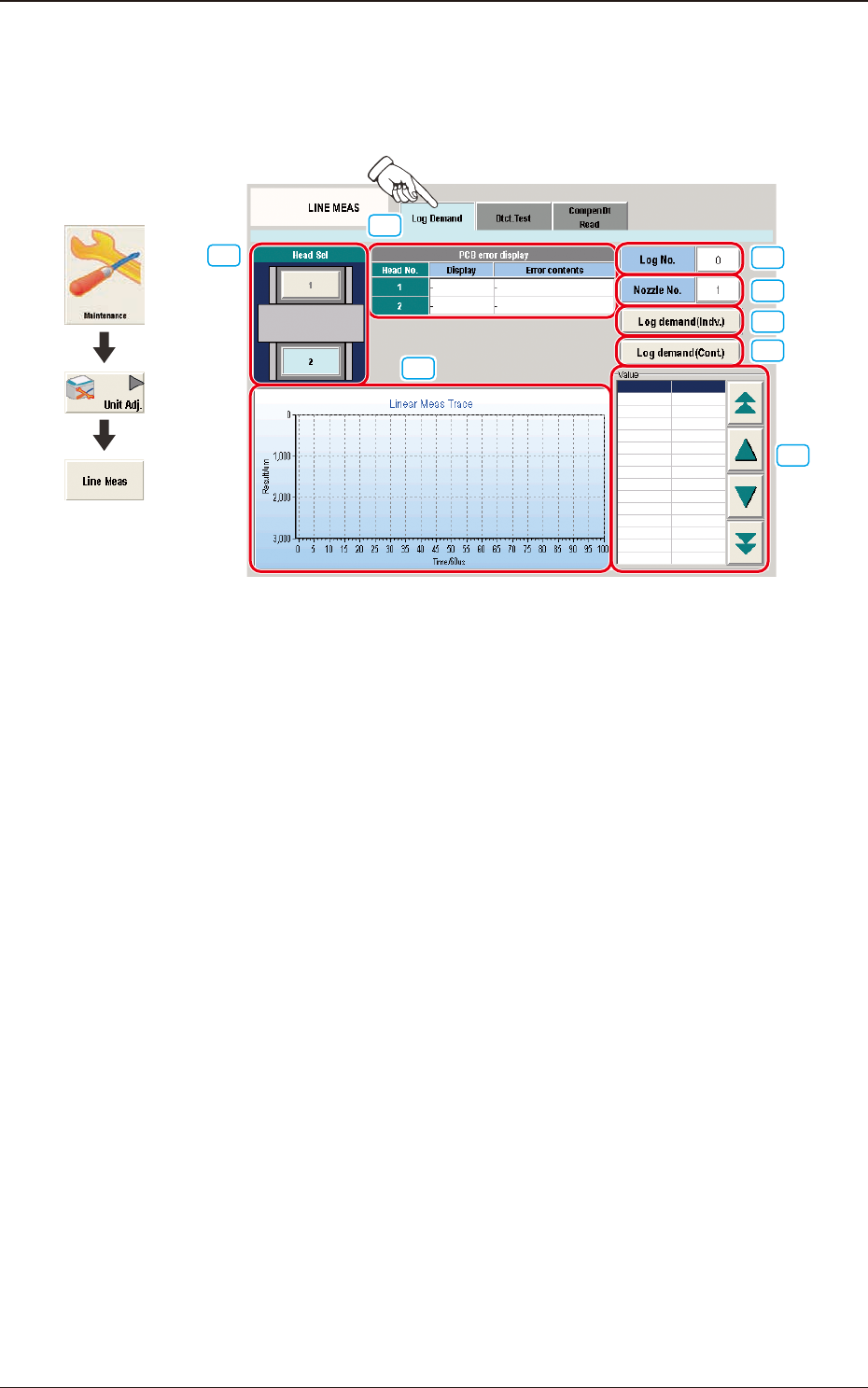
4.2.1 "Log Demand" Tab Sheet
This tab sheet enables the operator to demand the log of the linear measure sensor
E/NR traces.
[3]
[4]
[5]
[6]
[8]
[7]
[1]
[2]
F3A16
[1] Head Sel
Each head section in the graphic image of the machine is provided with a
button function.
Select the head for which the log of the linear measure sensor E/NR traces is
demanded.
[2] PCB error display
Displayed are the codes and contents of errors that have occurred for each
head.
[3] [Log No.] Button
When pressed, this button opens the "Log No." entry window.
Specify the number of the log for which the measured results should be
displayed.
[4] [Nozzle No.] Button
When pressed, this button opens the "Nozzle No." entry window.
Specify the number of the nozzle for which the measured results should be
displayed.
[5] [Log demand (Indv.)] Button
When pressed, this button displays the progress data of the E/NR traces for
the specied log No.
Graphic
Development
4.2 "LINE MEAS" Window

3OM-1751
1-201303-001
[6] [Log demand (Cont)] Button
When this button is pressed, the linear measure trace data of the Log Nos. 0
to 15, is displayed.
[7] Chart of Linear Meas Trace
Displayed is a chart of the linear measure sensor E/NR traces.
[8] "Value" Group Box
Displayed are the numerical values that represent the E/NR trace of the linear
measure sensor.
The data to be displayed can be scrolled up or down with the arrows on the
right vertical scroll bar.
4.2 "LINE MEAS" Window
3OM-1751
1-211303-001
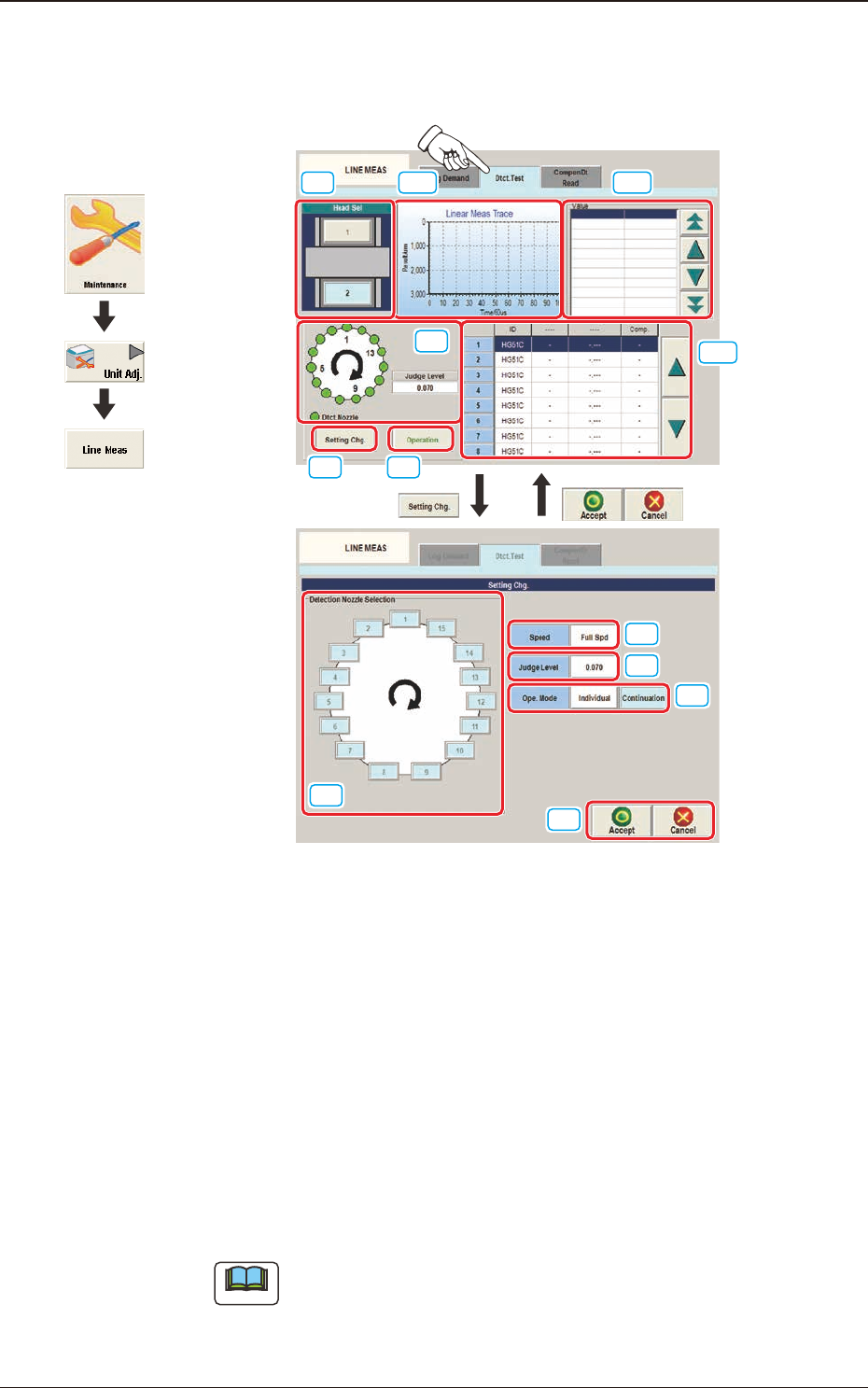
4.2.2 "Dtct.Test" Tab Sheet
This tab sheet enables the operator to perform the nozzle detection test.
[1] [10]
[9]
[2]
[3]
[7]
[4]
[5]
[6]
[8]
[11]
[12]
F3A17
[1] Head Sel
Each head section in the graphic image of the machine is provided with a
button function.
Select the head for which the nozzle detection test is performed.
[2] Setting Display Section
The set contents are displayed in this section. The judgment level can be
changed also in the display section.
[3] [Setting Chg.] Button
When this button is pressed, the "Setting Chg." Tab sheet appears.
Note
The setting is performed with items [4] to [8].
Graphic
Development
4.2 "LINE MEAS" Window