3OM-1751-002w_G5S.pdf - 第77页
3OM-1751 1-23 1303-001 [12] Nozzle Selection Area Displayed is the nozzle in the selected head. When the nozzle No. is pressed, the nozzle can be selected or cancelled. When the detection test is performed, the results a…
3OM-1751
1-221303-001
4.2 "LINE MEAS" Window
[4] Speed
The speed reduction rate is selected from the following items.
Full Spd, 10 to 90 Dclr (Selectable by 10s), Cancel
[5] Judge Level
Initial Value :
70
Note
When the [Operation] button is pressed to detect all the nozzles, and the
resultant value exceeds the judgment level, "NG" is indicated in the nozzle
selection section.
[6] Ope. Mode
Individual
: When selected, any one nozzle can be selected.
The setting is performed in the [7] Detection Level
Selection Section.
Continuation
: When selected, all nozzles are selected and set.
[7] Detection Nozzle Selection
In the case that "Individual" has been selected in [6] Ope.. Mode, the nozzle
to be detected can be selected.
[8] [Accept] Button, [Cancel] Button
[Accept] Button
: Using this button, the contents displayed in [4] to [7]
items are accepted and the "Dtct. Test" tab sheet is
returned.
[Cancel] Button
: When this button is pressed, the changed contents are
cancelled and the "Dtct. Test" tab sheet is returned.
[9] [Operation] Button
When this button is pressed, the nozzle detection is performed under the set
conditions.
[10] Linear Meas Trace
Displayed are the linear measure sensor E/NR traces for the nozzle selected
in "[12] Nozzle Selection Area" graphically.
[11] "Value" Group Box
Displayed are the linear measure sensor E/NR traces for the nozzle selected
in "[12] Nozzle Selection Area" numerically.
The data to be displayed can be scrolled up or down with the arrows on the
right vertical scroll bar.

3OM-1751
1-231303-001
[12] Nozzle Selection Area
Displayed is the nozzle in the selected head.
When the nozzle No. is pressed, the nozzle can be selected or cancelled.
When the detection test is performed, the results are displayed here.
When the result display area is pressed, the detection results for the nozzle
selected in "[4] Linear Meas Trace" and "[5] "Value" Group Box", are
displayed.
4.2 "LINE MEAS" Window
3OM-1751
1-241303-001
4.2.3 "CompenDt Read" Tab Sheet
[1]
[2]
[3]
[4]
F3A18
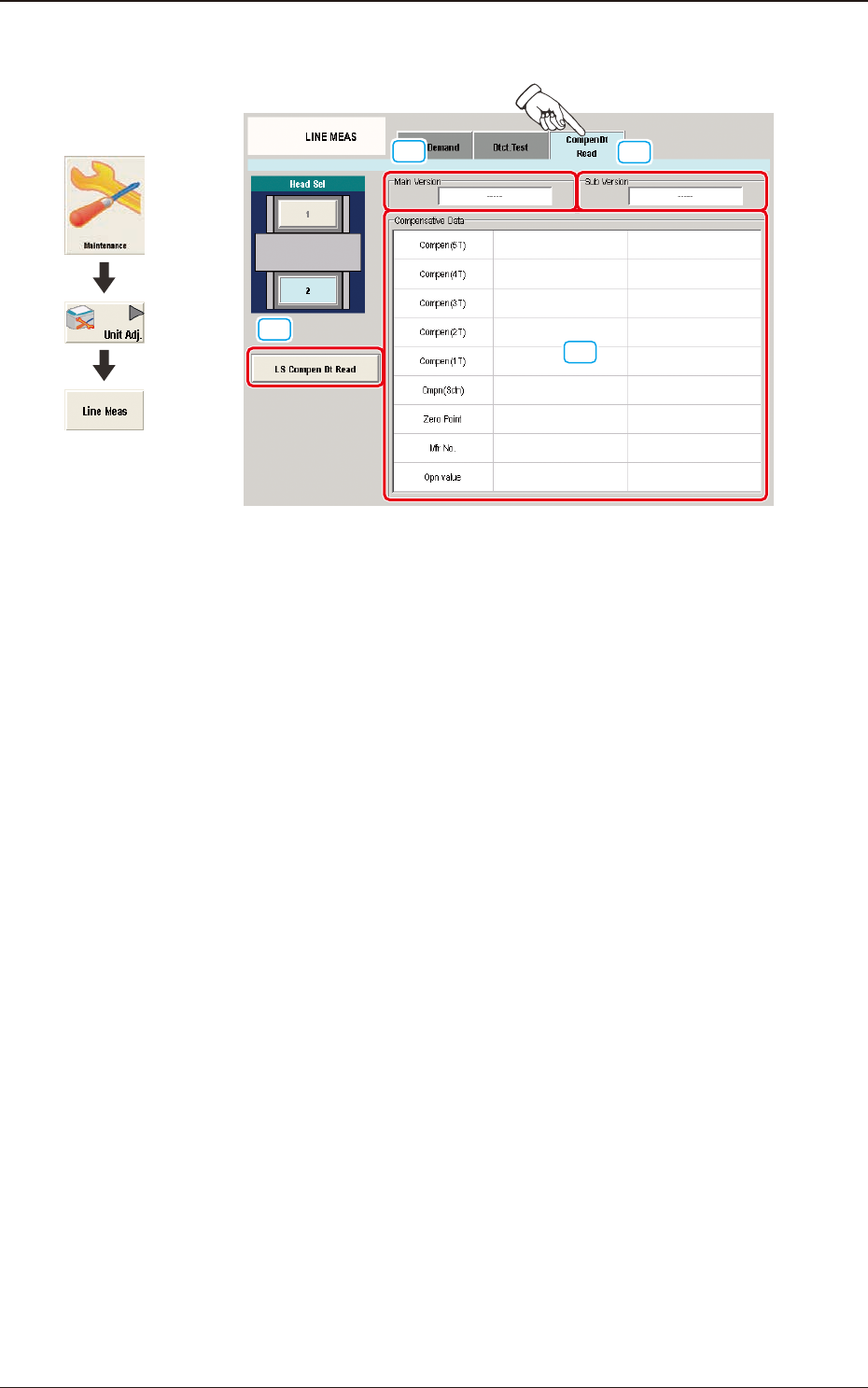
[1] [LS Compen Dt Read] Button
When pressed, this button reads the compensative data of the linear measure
sensor for the specied head from the linear measure sensor amplier.
[2] "Main Version" Group Box
Displayed in this group box is the main version of the data which was read
with the [LS Compen Dt Read] button.
[3] "Sub Version" Group Box
Displayed in this group box is the sub version of the data which was read
with the [LS Compen Dt Read] button.
[4] "Compensative Data" Group Box
Displayed in this group box are the contents of the data which was read with
the [LS Compen Dt Read] button.
Graphic
Development
4.2 "LINE MEAS" Window