3OM-1751-002w_G5S.pdf - 第90页
3OM-1751 1-36 1303-001 5.4 "Cmp Recog Light" Window The corresponding window enables you to perform a teaching operation on the lighting of the component recognition camera. [1] [2] [4] [3] F3A27 [1] Camera Sel…
3OM-1751
1-351303-001
5.3 "Shute LV" Window (Shipment/exchange)
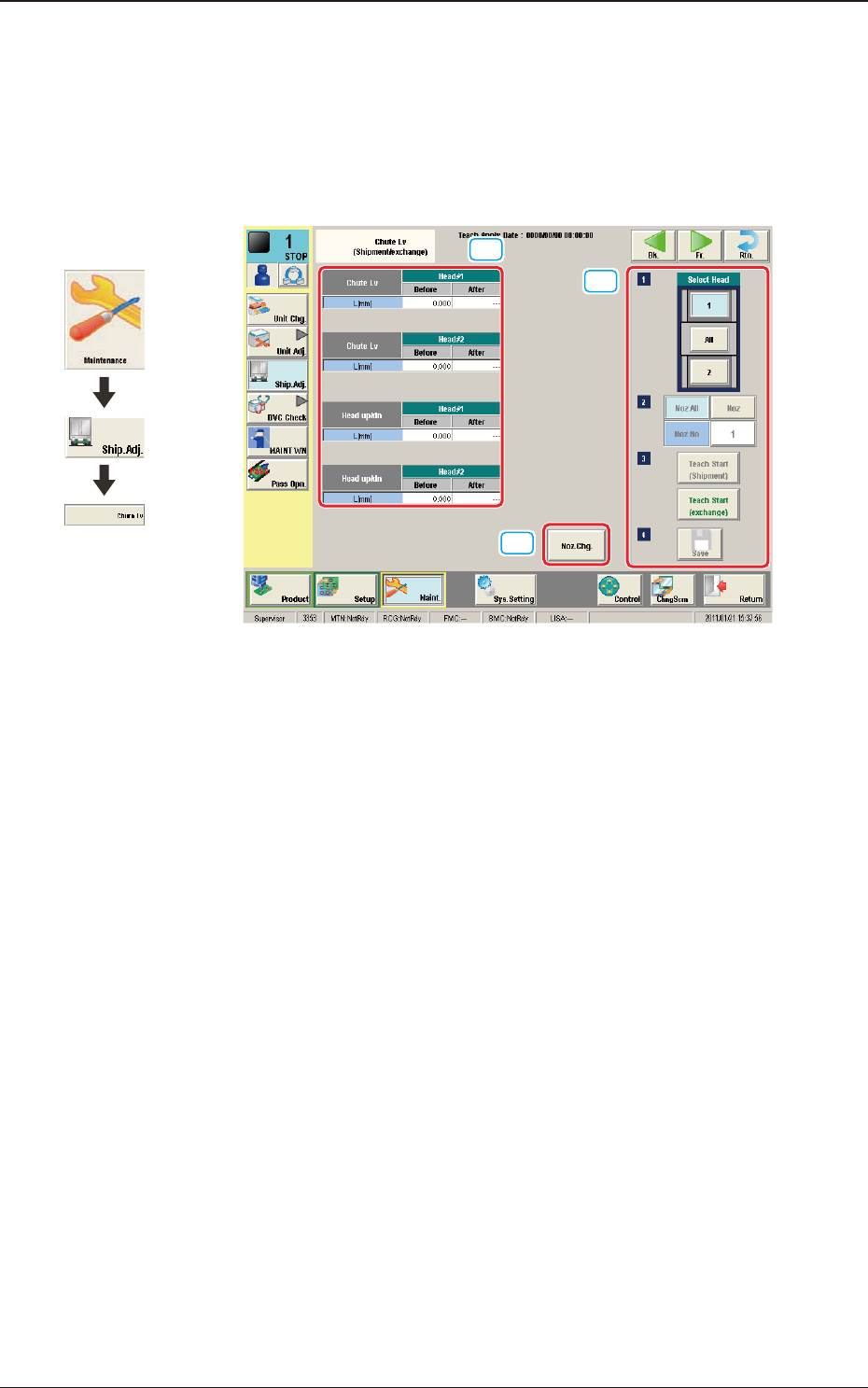
This teaching function enables the operator to calculate the head up/down offset
in this window, by means of measuring the chute level when the head is changed,
and calculating a difference between the values before the head change and after
head change.
[1]
[2]
[3]
F3A26
[1] Teaching Data Display Section
Shute Lv Head Up Down
The data measured before the machine delivery is displayed in the "Before"
data box.
[2] [Noz. Chg.] Button
When pressed, the nozzle is changed.
[3] Select Head
Using these buttons, the head for which the teaching operation is performed,
is selected.
[Noz All] Button
When pressed, the teaching for all the nozzles is performed.
[Noz] Button
Using this button, the nozzle where the teaching is to be performed is
selected.
When the [Nozzle] button is pressed, the data input window appears.
[Teach Start] Button
When the [Teach start (exchange)] button is selected, the teaching is
performed.
[Save] Button
When this button is pressed, the teaching results are saved.
Graphic
Development
5.3 "Shute LV" Window (Shipment/exchange)
3OM-1751
1-361303-001
5.4 "Cmp Recog Light" Window
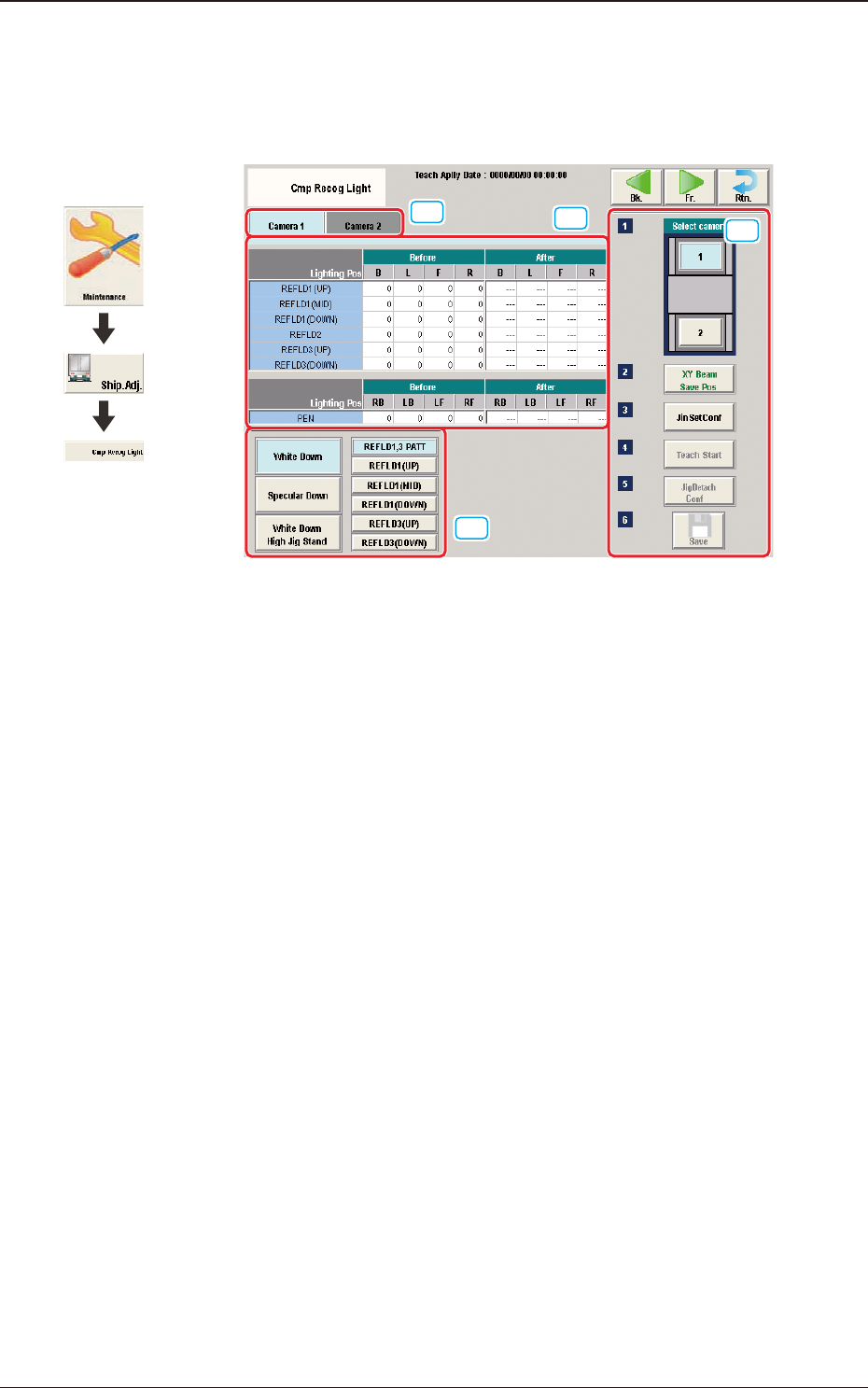
The corresponding window enables you to perform a teaching operation on the
lighting of the component recognition camera.
[1]
[2]
[4]
[3]
F3A27
[1] Camera Selection Tab
When either of the tabs is selected, the camera to be taught is selected.
[2] Teaching Data Display Section
Displayed are offset data items for each lighting pattern for the designated
camera.
[3] Lighting Pattern Selection
The lighting pattern is selected from the following items.
[White Down] Button
"REFLD 1,3 PATT", "REFLD 1 (UP)", "REFLD1 (MID)", "REFLD 1
(DOWN)", "REFLD 3 (UP)", "REFLD 3 (DOWN)"
[Specular Down] Button
"REFLD 2"
[White Down High Jig Stand] Button
"PEN"
Graphic
Development
5.4 "Cmp Recog Light" Window

3OM-1751
1-371303-001
[4] Teaching Procedure Display Area
Displayed are the buttons to be used for the teaching operations.
Select camera
Each camera in the graphic image of the machine is provided with a button
function. When a button is pressed, the corresponding camera is selected for
the teaching operation
[XY Beam Save Pos] Button
When pressed, this button moves the XY beam to the escape position.
[Jin Set Conf]
This button is used to conrm the jig attachment.
[Teach Start] Button
When pressed, this button performs the teaching operation for the selected
camera.
[Jig Detach Conf]
This button is used to conrm the jig removal.
[Save] Button
When this button is pressed, the teaching results are saved.
5.4 "Cmp Recog Light" Window