03229208-01-01 All Purpose Clamping (APC) Manual DEPDFA.pdf - 第101页
3 APC-SOFTWARE EINSTELLUNG UND EMPFOHLENE EINSTELLUNGEN 3.2 SOFTWARE EINSTELLUNG PARAMETER EIGENSTÄNDIGES HANDBUCH UNIVERSALKLEMMEN (APC) 12/2019 101 3.2.3 Klemmdruck Die Over-The-Top-Klemme wird über das Substrat gelegt…
3 APC-SOFTWARE EINSTELLUNG UND EMPFOHLENE EINSTELLUNGEN
3.2 SOFTWARE EINSTELLUNG PARAMETER
100 EIGENSTÄNDIGES HANDBUCH UNIVERSALKLEMMEN (APC) 12/2019
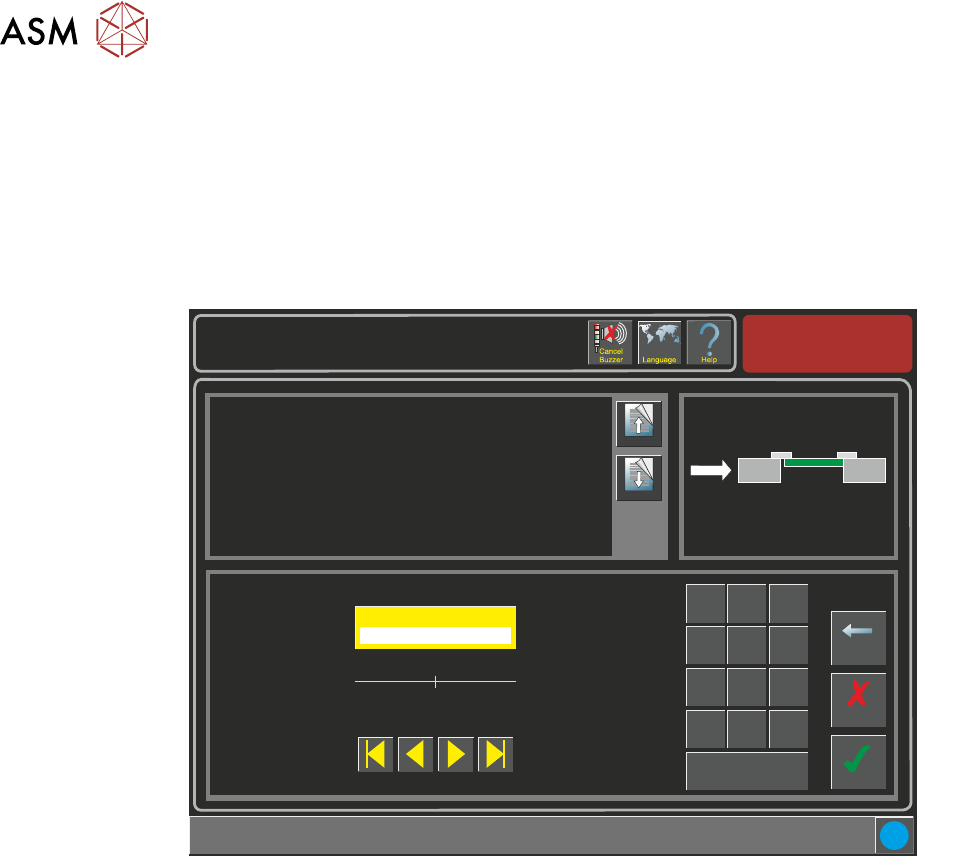
3.2.2 Snug Kraft
Wenn das Substrat in die Maschine geführt wird und der Snugger läuft, wird das Substrat zurück-
behalten. Es kann eine Mindesteinstellung von 20 und eine Maximaleinstellung von 60 Newtons
erfolgen.
HINWEIS
Die Snug-Kraft Drehmomentwerte müssen kalibriert werden, ehe dieser Parameter angewendet
wird. Siehe "Kalibration" später in diesem Kapitel für Einzelheiten hierzu.
Setup \ Tooling
Page Up
Page
Down
This parameter sets the force applied by the snugger to hold the board in
place whilst printing.
Additional information:
Ensure that the torque values have been properly calibrated before applying
this parameter.
Accept
Cancel
Snugging Force ( newtons )
40
Backspace
Min
20
Max
60
7
8 9
4
5
6
1 2
3
0
.
+/-
Apply
i
3 APC-SOFTWARE EINSTELLUNG UND EMPFOHLENE EINSTELLUNGEN
3.2 SOFTWARE EINSTELLUNG PARAMETER
EIGENSTÄNDIGES HANDBUCH UNIVERSALKLEMMEN (APC) 12/2019 101
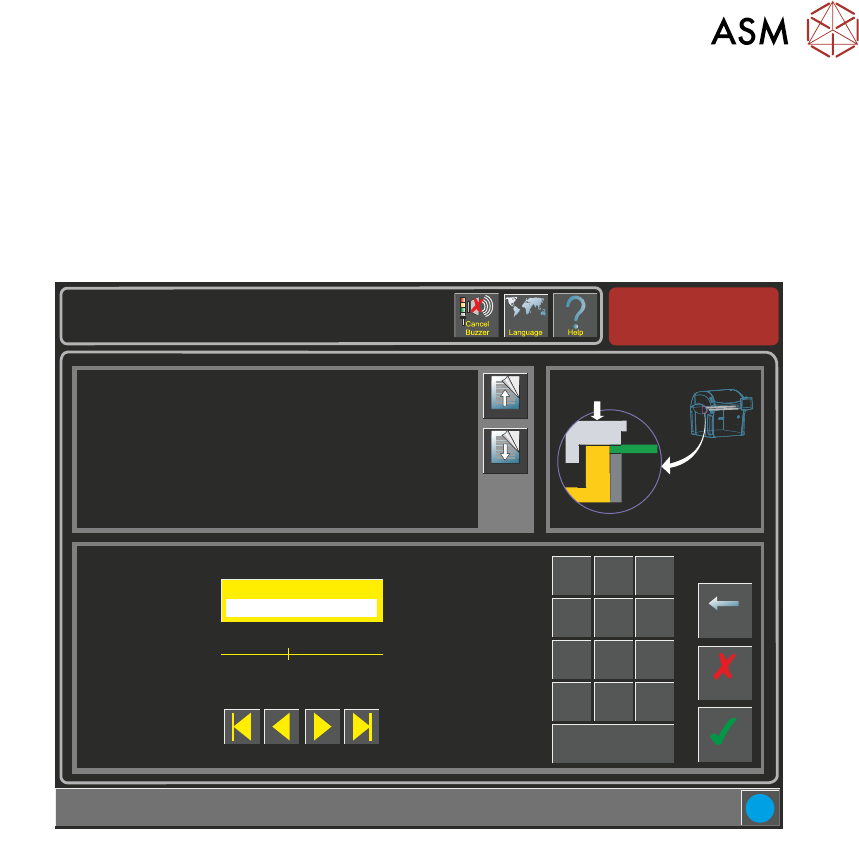
3.2.3 Klemmdruck
Die Over-The-Top-Klemme wird über das Substrat gelegt und es wird Druck ausgeübt, damit,
wenn das Substrat in die Maschine eingeführt wird und der Snugger läuft, die Oberseite des Sub-
strat gerade mit dem Snugger gehalten wird. Ein Mindestdruck von 1,5 und ein Maximaldruck von
5 Bar können eingestellt werden. 1,5 Bar Druck sind erforderlich, um das Balance Ventil zu über-
winden.
Setup \ Tooling
Page Up
Page
Down
This parameter represents the pressure applied to flatten the board before
snugging.
Accept
Cancel
Clamp Pressure ( bar )
3.0
Backspace
Min
1.5
Max
5.0
7
8 9
4
5
6
1 2
3
0
.
+/-
Apply
i
3 APC-SOFTWARE EINSTELLUNG UND EMPFOHLENE EINSTELLUNGEN
3.2 SOFTWARE EINSTELLUNG PARAMETER
102 EIGENSTÄNDIGES HANDBUCH UNIVERSALKLEMMEN (APC) 12/2019
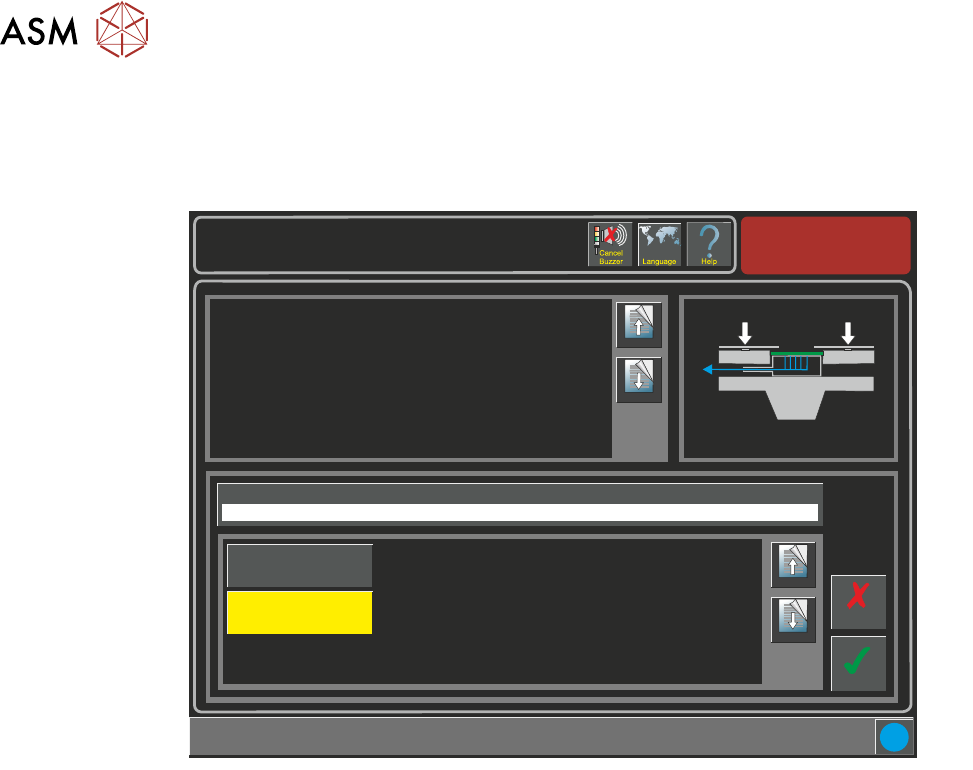
3.2.4 OTS-Vakuum-Modus
Wenn ein Vakuum Werkzeug montiert ist, dann kann das Vakuum eingestellt werden dass es akti-
viert, entweder bevor oder nachdem das Substrat festgeklemmt wird/Snug ist.
Setup \ Tooling
Page Up
Page
Down
This parameter sets determines if the vacuum is to be applied before or
after snugging and clamping the board.
If the board snuggers are applied and the board becomes dislodged it
cannot be clamped. To prevent any movement, the vacuum is applied
beforehand.
The options are:
Before
The product is held by the vacuum prior to snugging and clamping taking
place.
After
The board edges are flattened by the clamps before the vacuum is applied.
Accept
Cancel
i
OTS Vacuum Mode
Before
Page Up
Page
Down
After
Before