M4serviceManual_e.pdf - 第25页
2 Periodical Checks 2-1 2 Periodical Checks
1 Installation
1-16
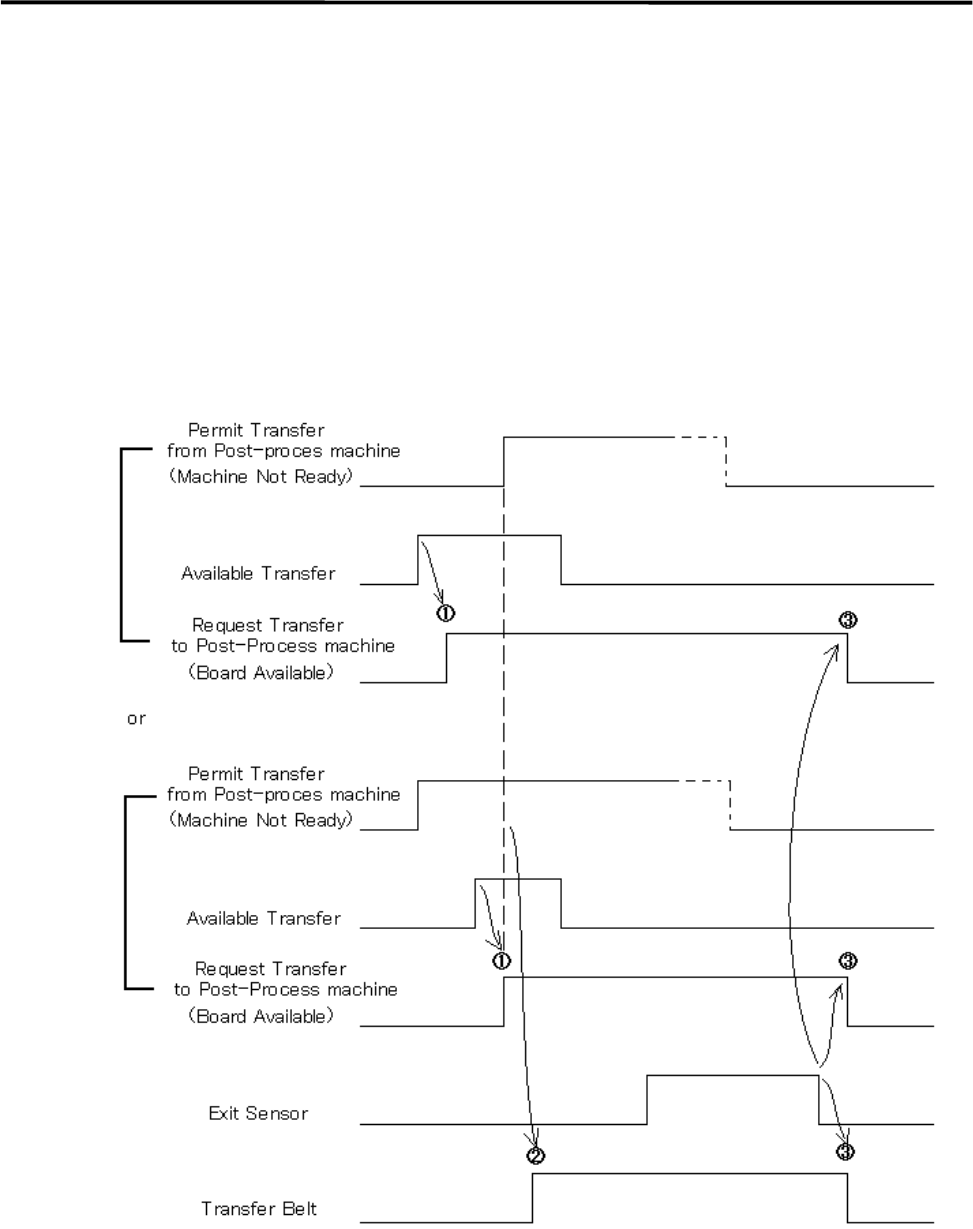
Sequence of Sending PC board (SMEMA Interface spec.)
① When the machine is ready to send PC board, the Request Transfer (Board Available) is sent to
Post-process machine.
② The transfer belt will be activated when the Permit Transfer (Machine Not Ready) is received from
Post-process machine and the Request Transfer is sent.
③ The transfer belt will be deactivated and the Request Transfer will be sent-off when the Exit Sensor
turns off after the sensor turned on at the PC board arrival and it passed under the sensor.
④ “Conveyor Trouble” error happens if the Permit Transfer does not receive-off.
⑤ Pressing START button restarts the operation paused by the error.

2 Periodical Checks
2-1
2
Periodical Checks

2 Periodical Checks
2-2
Daily Checks
Visual Check
Check the followings before turning on the main switch and power switch of the mounter.
NOTE: Power source and air supply must be in the ON state.
ITEM DESCRIPTION
Temperature and Humidity
Check the temperature and humidity.
Ambient Temperature: Accuracy assurance 23 +/-2 degrees centigrade
Operation assurance 5 to 40 degrees centigrade
(The average over a period of 24 hours does not exceed 35
degrees C.)
Relative Humidity: 45 to 60 percent, non-condensing
Room Environment
If air is dusty, check air filters.
If mounter surface rusts as a result of corrosive gas, check vents, reflow ovens,
and board cleaners.
Air Supply
Make sure air pressure of regulator is 0.49 MPa (5kg/cm
2
).
If drain cock contains water, drain it. (Adjusting temperature of dry air may be
required.)
If drain contains oil, investigate the cause.
Reject Tray (Front & Rear)
Make sure of the setting direction of the reject tray.
Make sure that the ends of the reject tray and the tape guide (on which station No.
sticker is placed) meet.
Make sure that the reject tray sits properly and is not lifted by electronic
components.
Conveyor
Make sure conveyor width of all the peripherals are the same.
Make sure no obstacles are on conveyor.
Head Moving Range
Make sure no obstacles are in head moving range, e.g. on the adjust plate.
Scan Camera
Check mirror and lens for dirt and flaw. Clean if dirty.
Note: If dust settles or condensation occurs on the mirror, the reflectance drops,
causing illumination to need to be brighter. This may lead to a drop of recognition
rate. To avoid this, always keep the mirror clean.
)
”Camera” in 3 Mechanical Section.
Fixed Camera
(Optional for M4e/M4s)
Make sure no obstacles are on half mirror, lens, or lens filter of fixed camera, and
check those parts for dirt. Clean if dirty.
)
”Camera” in 3 Mechanical Section.
ANC
Make sure no obstacles are around ANC tower.