OM-1241-005_w.pdf - 第114页
3-7 AIX-ML T-ID (C02_02) Component ID Set component IDs in the text boxes. (C02_03) C Set control commands in the text boxes. Notice If a control command other than the following ones is used, the step becomes invalid. -…
3-6
AIX-MLT-ID
(C02) Tray Data
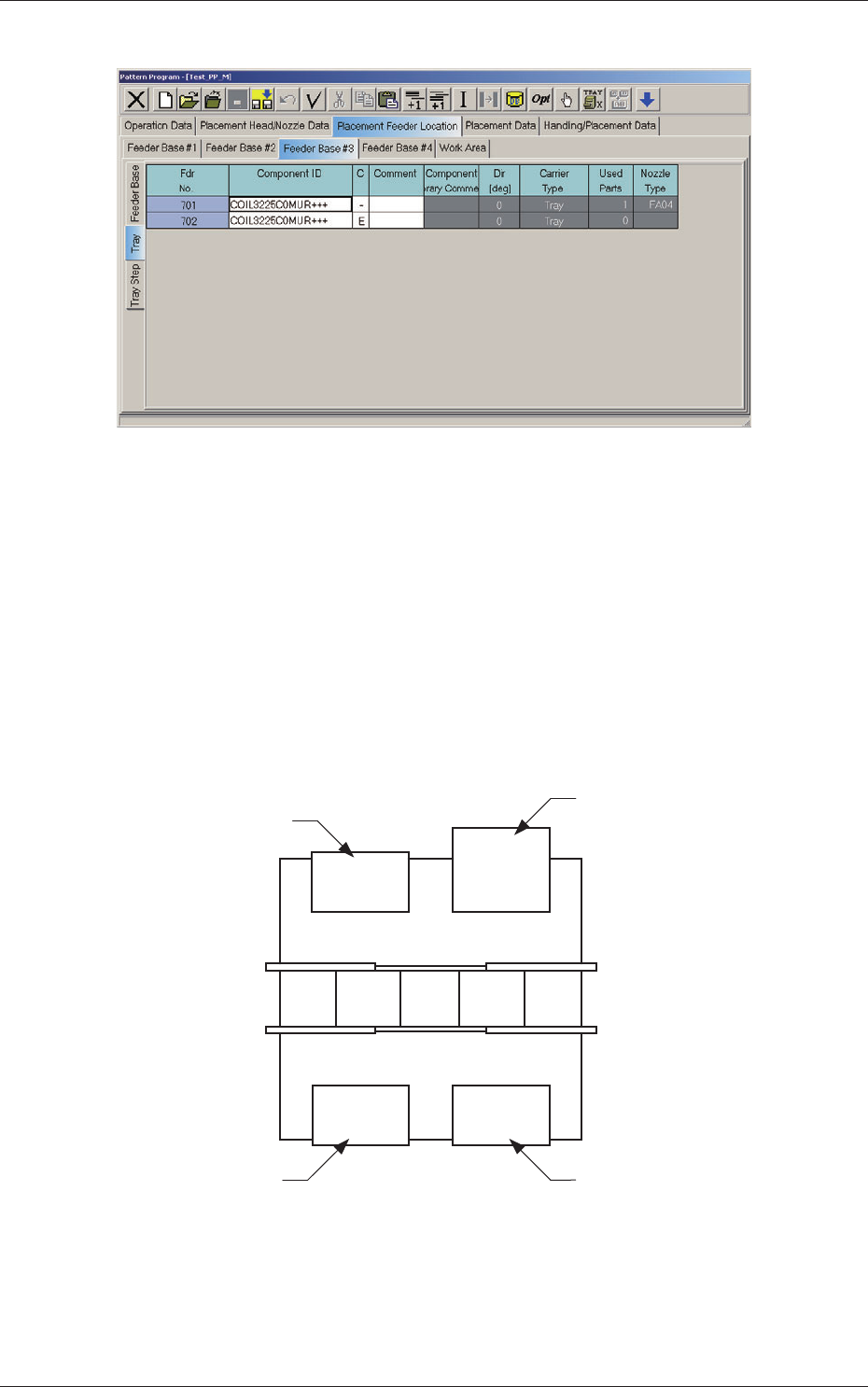
Fig. C4-1 "Tray" Edit Window
(C02_01) Fdr No.
Shown are the feeder Nos. in the placement feeder location data.
When the multi-layer tray feeder is connected, the feeder Nos. (Fdr
Nos.) become as follows.
Multi-Layer Tray Feeder #1 :
501 to 599
Multi-Layer Tray Feeder #2 :
6
01 to 699
Multi-Layer
Tray Feeder #3 :
701 to 799
Multi-Layer Tray Feeder #4 :
801 to 899
101 to 150 701 to 799
201 to 250 401 to 450
Front Side of Machine
Rear Side of Machine
Feeder Base #1
Feeder Base #2
Feeder Base #3
(Multi-Layer Tray Feeder)
Feeder Base #4
Fig. C5 Multi-Layer Tray Feeder #3 Connected
0804-004
2.1 Description of Pattern Program

3-7
AIX-MLT-ID
(C02_02) Component ID
Set component IDs in the text boxes.
(C02_03) C
Set control commands in the text boxes.
Notice
If a control command other than the following ones is used, the step
becomes invalid.
- (hyphen) :
This command handles the steps as those for the
placement feeder location data.
E :
This command shows the end of the placement feeder
location data.
The step where "E" is set is valid.
S :
This command invalidates the steps specied as
placement feeder location data.
X :
This command invalidates the steps specied as
placement feeder location data and shows the end of the
data.
(C02_05) Component Library Comment
Displayed are the comments entered in the component library data.
(C02_06) Dir [deg], Carrier Type
Displayed is the data specied in the component library data.
(C02_07)
Used Parts
Displayed is the number of components to be used for one unit PCB.
0705-003
2.1 Description of Pattern Program
3-8
AIX-MLT-ID
(C03) Tray Step Data
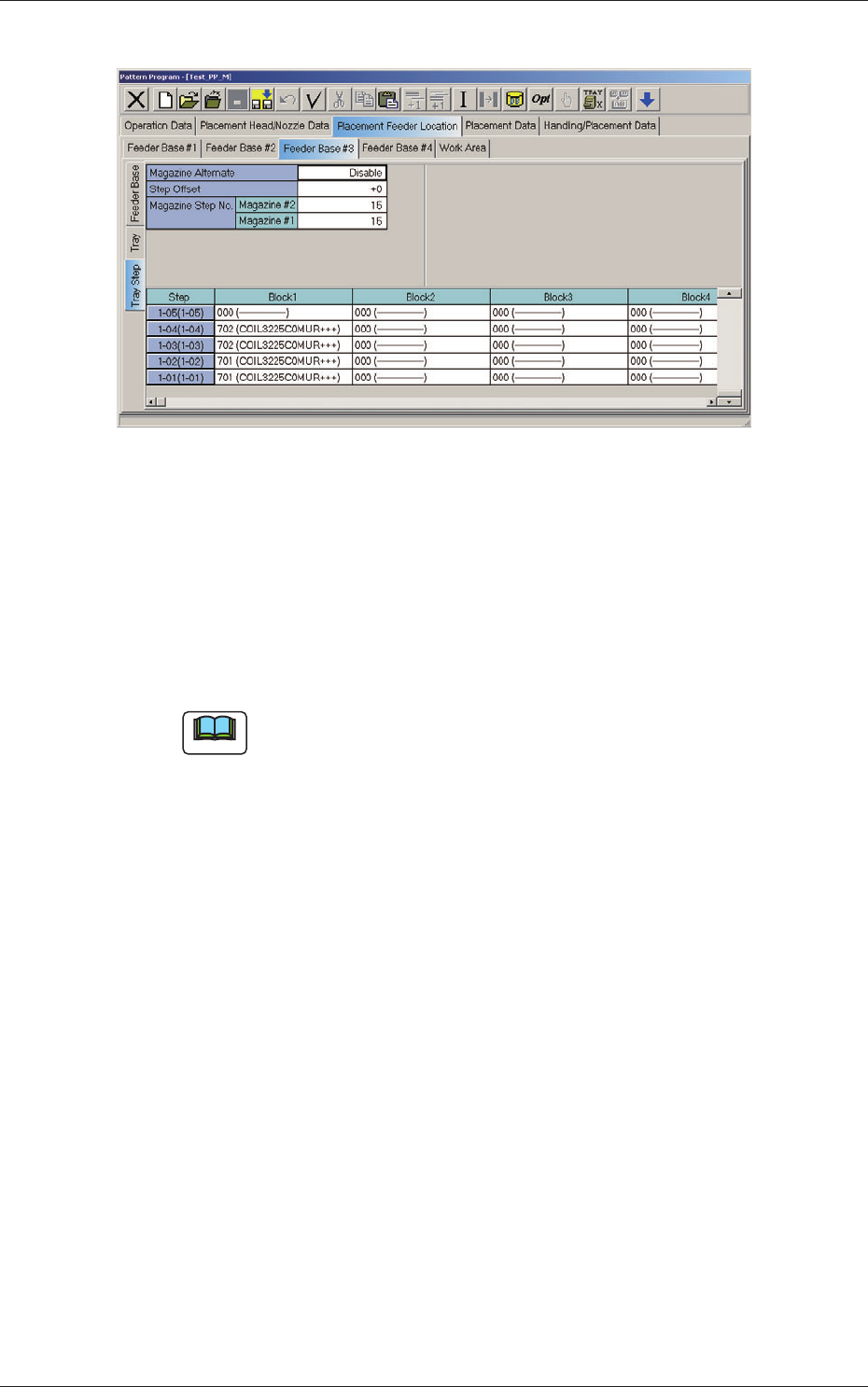
Fig. C5-1 "Tray Step" Edit Window
(C03_01) Magazine Alternate
This alternate function can be activated between Magazine #1 and #2 in
the same tray unit.
When "Enable" is set in the "Magazine Alternate" text box, the machine
continues running with the magazine (spare one) automatically changed
and set ready for use right after the previously connected magazine gets
empty of the components required by the main machine.
Note
(a) It is not necessary to equally allocate the component allocation spots (step
and block Nos.). The need for the spare steps and blocks, etc., can be
determined freely for each individual magazines.
(b) The magazine alternate function is activated when a magazine gets empty of
the required types of components.
When components of the same type are set in several steps (stages), the
pallet alternate function is activated prior to this function.
(C03_02) Step Offset
Set the offset value for the component allocation to the multi-layer tray
feeder.
The set parameter is added to the step No. designated in the step data.
(C03_03) Magazine Step No.
The number of magazine steps can be set for Magazines #2 and #1.
(C03_04) Step
Shown are the step Nos. of the magazine.
The step Nos. have a button function. When one of these buttons is
pressed, the corresponding "Tray Step Information" window opens.
(C03_05) Block 1 through 9
Specify where in each step and block various components specied in
the tray data should be arranged.
0804-004
2.1 Description of Pattern Program