00196429-0102 - AI Head Reconfiguration Kit SX12 C&P20A_de_en.pdf - 第48页
Installing the C&P20A Placement Head Disassembling the CPP Placement Head Saving the Existing Machine Data 48 Assembly Instructions / Mont ageanleitung Head Reconfiguratio n Kit C&P20A Saving the Existing Ma chin…
Installing the C&P20A Placement Head
Configuration of the Placement Heads in SIPLACE Pro Before Disassembling the Placement Head
Assembly Instructions / Montageanleitung Head Reconfiguration Kit C&P20A 47
Installing the C&P20A Pla cement He ad
3 Installing the C&P20A Placement Head
Before installing the C&P20A placement head you have to save the current configuration and machine
data first and then remove the placement head to be replaced.
If you replace a CPP head by a C&P20A head, start with sections "3.1 Before Disassembling the Place-
ment Head" [ ➙ 47] and "3.2 Disassembling the CPP Placement Head" [ ➙ 48].
If you replace a TwinHead by a C&P20A head, start with sections "3.1 Before Disassembling the Place-
ment Head" [ ➙ 47] and "3.3 Disassembling the TwinHead" [ ➙ 50].
If you install the C&P20A head on a gantry with no head installed so far, start with sections "3.1 Before
Disassembling the Placement Head" [ ➙ 47] and "3.4 Assembly of the C&P20A Placement Head" [ ➙
53].
Before Disassembling the Placement Head
3.1 Before Disassembling the Placement Head
Configura tion of the Place ment Heads in SIPL ACE Pro
3.1.1 Configuration of the Placement Heads in SIPLACE Pro
► In SIPLACE Pro stop all jobs on the line.
► Back up all SIPLACE Pro data.
NOTICE
It is recommended to enter the new head (cameras and nozzles) into the setup at this point in
time and to perform an optimization for the setups.
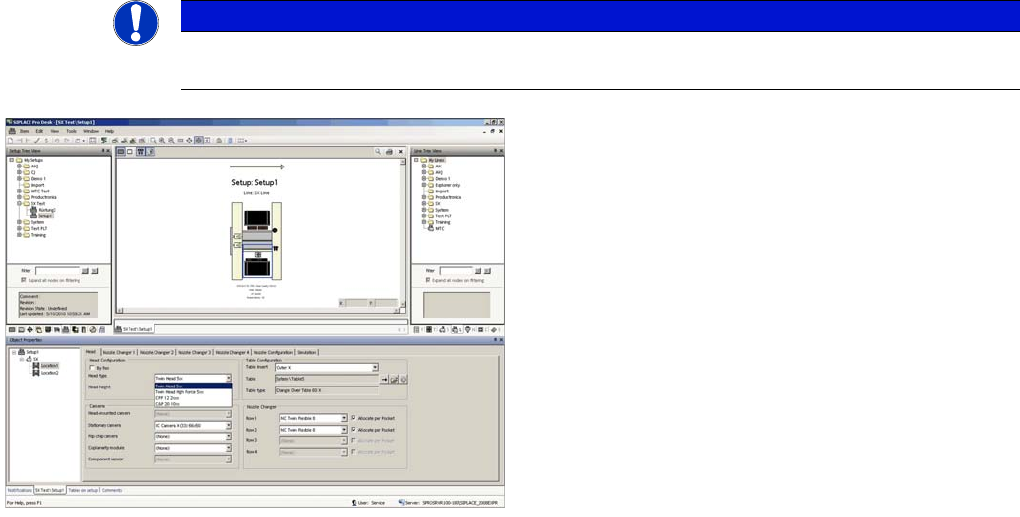
► In the Setup Properties dialogue enter the type of the
placement head, the camera type and the nozzle
changer configuration for the relevant machine loca-
tion.
► Re-optimize the setup in SIPLACE Pro. Make sure to
set correct head height.
Installing the C&P20A Placement Head
Disassembling the CPP Placement Head Saving the Existing Machine Data
48 Assembly Instructions / Montageanleitung Head Reconfiguration Kit C&P20A
Saving the Existing Machine Data
3.1.2 Saving the Existing Machine Data
► Insert a USB stick or another appropriate storage medium into the USB slot of the station computer.
► Save the machine data to the storage medium. Select Service --> Archive machine data...
Docking Out the Component Trolley and Switching Off the Machine
3.1.3 Docking Out the Component Trolley and Switching Off the Machine
► Dock out the component trolleys.
► Shut down the station computer and switch off the machine at the main switch.
► Disconnect the machine from the main power and the pneumatic supplies.
► Always secure the machine against unauthorized reactivation. See "1.2 Preparatory Work..." [➙ 38].
Disassembling the CPP Placement Head
3.2 Disassembling the CPP Placement Head
Disconnecting Data and Pneumatic Lines
3.2.1 Disconnecting Data and Pneumatic Lines
CAUTION
► You must wear the ESD armband during all work on the placement head.
Disconnecting data and pneumatic lines
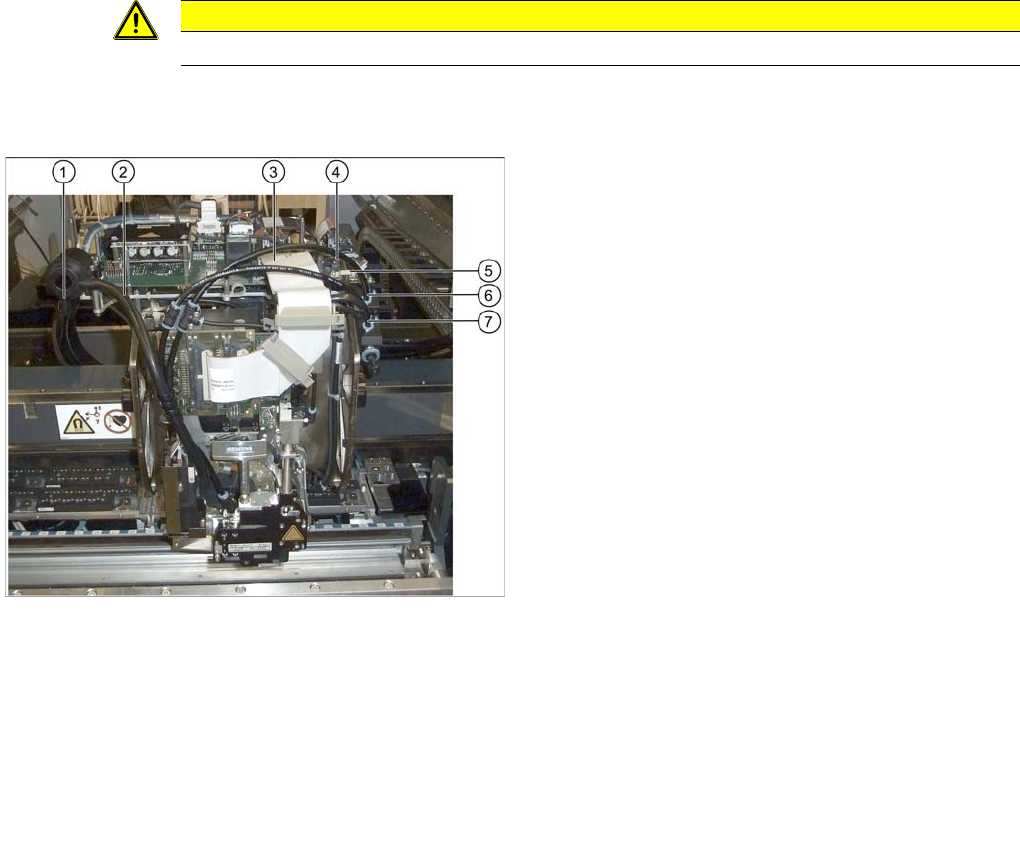
Legend
1. Cover cap on the silencer
2. Discharged air hose to silencer
3. Flat ribbon cable to the head adapter
4. Component camera connector
5. Cable holder of the component camera cable
6. Pneumatic hose of the pickup / placement circuit
7. Pneumatic hose of the holding circuit
► Disconnect the discharged air hose (2) on the silenc-
er.
► Remove the cover cap when converting to a Twin-
Head (1).
► Unplug the flat ribbon cable from the head adapter
(3).
► Disconnect the two connectors from the component
camera (4).
► Remove the cable holder (strain relief) of the compo-
nent camera cable (5).
► Disconnect the pneumatic hoses of the pickup /
placement circuit (6) and the holding circuit (7) from
the compressed air distributor.
► Remove all blanking plugs on the compressed air dis-
tributor when converting to a TwinHead.
Installing the C&P20A Placement Head
Removing CPP Head Disassembling the CPP Placement Head
Assembly Instructions / Montageanleitung Head Reconfiguration Kit C&P20A 49
Removing CPP Head
3.2.2 Removing CPP Head
Further Aspects for the C onfigurati on
3.2.3 Further Aspects for the Configuration
The following points have to be observed when replacing a CPP head by a C&P20A head:
▪ The existing head adapter can be kept.
▪ The CPP nozzle magazines are to be replaced by DC&P20A nozzle magazines. The basic nozzle
changer body on SX machines is identical for both head types.
▪ The reject bin and the nozzle station can still be used.
Continue with section "3.4 Assembly of the C&P20A Placement Head" [ ➙ 53].
CAUTION
► Firmly hold the placement head at its handle when loosening the fixing screws to prevent
the head from falling and avoid a possible damage.
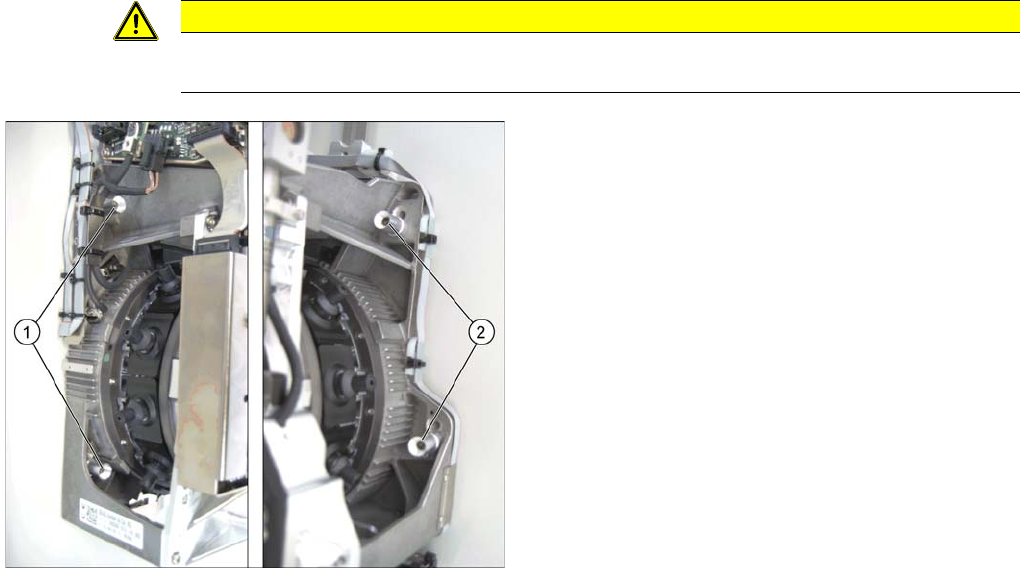
Legend
1. Fixing screws on the left side
2. Fixing screws on the right side
In this graphic the fixing screws are shown in the "head
top" position.
► Loosen the four fixing screws of the CPP head (the
screws stay in the sockets).
► Lift the CPP head out of the machine.