Horizon UserManualV6.pdf - 第309页
5. Using the Next key (F4) select the Paste Dispense Speed. Save Next Previous Incr. Decr. Exit 6. Using the Incr. and Decr. keys (F6 - F7) set the required speed. Save Next Previous Incr. Decr. Exit 7. Press Exit (F8). …
To Enter Paste
Dispense Parameters
From the Status Page
1. Press Setup (F6).
Run Open
Cover
Paste
Load
Clean
Screen
Adjust
Setup
Monitor Maint.
2. Press Edit Data (F3).
Mode Load
Data
Edit
Data
Setup
Squeegee
Change
Screen
Change
Tooling
Change
Language
Exit
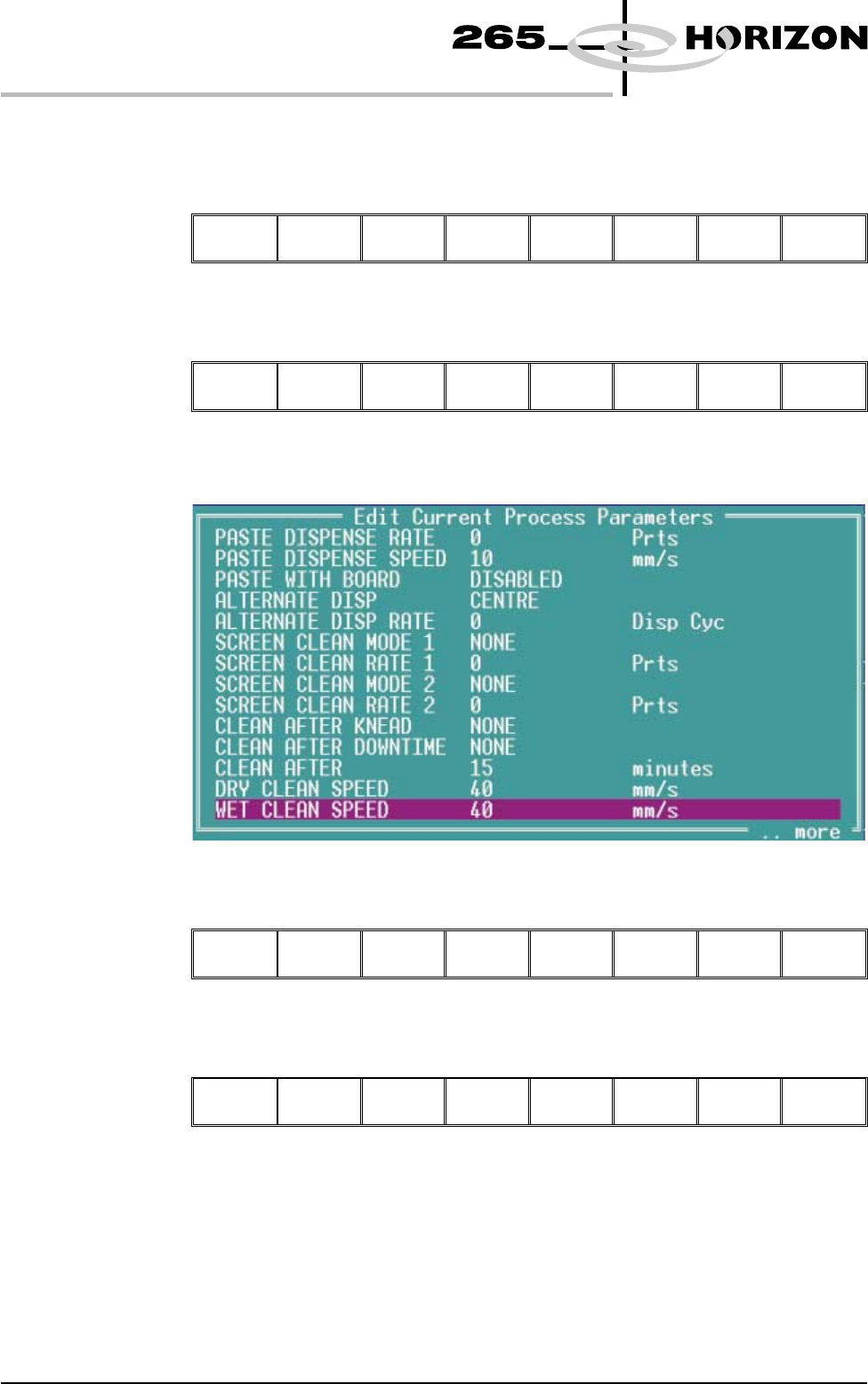
The following window is displayed:
3. Using the Next and Previous keys (F4 - F5) select the Paste Dispense Rate.
Save
Next Previous
Incr. Decr. Exit
4. Using the Incr. and Decr. keys (F6 -F7) set the required rate.
Save Next Previous
Incr. Decr.
Exit
9.8 User Manual Software Version 6
CONSUMABLE REPLENISHMENTS
PASTE LOADING
5. Using the Next key (F4) select the Paste Dispense Speed.
Save
Next
Previous Incr. Decr. Exit
6. Using the Incr. and Decr. keys (F6 - F7) set the required speed.
Save Next Previous
Incr. Decr.
Exit
7. Press Exit (F8).
Save Next Previous Incr. Decr.
Exit
8. Press Exit (F8).
Mode Load
Data
Edit
Data
Setup
Squeegee
Change
Screen
Change
Tooling
Change
Language
Exit
Dispensing Paste at
Random Intervals
The operator can cycle the paste dispenser at random intervals and before a print
run in addition to any preprogrammed cycles.
To load paste prior to a print run:
1. Press Paste Load (F3).
Run Open
Cover
Paste
Load
Clean
Screen
Adjust Setup Monitor Maint.
2. Press Auto Dispense (F1).
Auto
Dispense
Manual
Load
Load
Cart.
Print
Directn
Exit
3. If the paste dispenser has sufficient paste the dispenser carries out an
automatic dispense, go to Step 13. If the paste dispenser is low on paste a
warning window is displayed. The warning window varies, depending on
the setting of the consumable action option in set preferences. If the set
preference is set to warn, continue with Step 4. If the set preference is set to
pause or suspend go to Step 8.
Software Version 6 User Manual 9.9
CONSUMABLE REPLENISHMENTS
PASTE LOADING
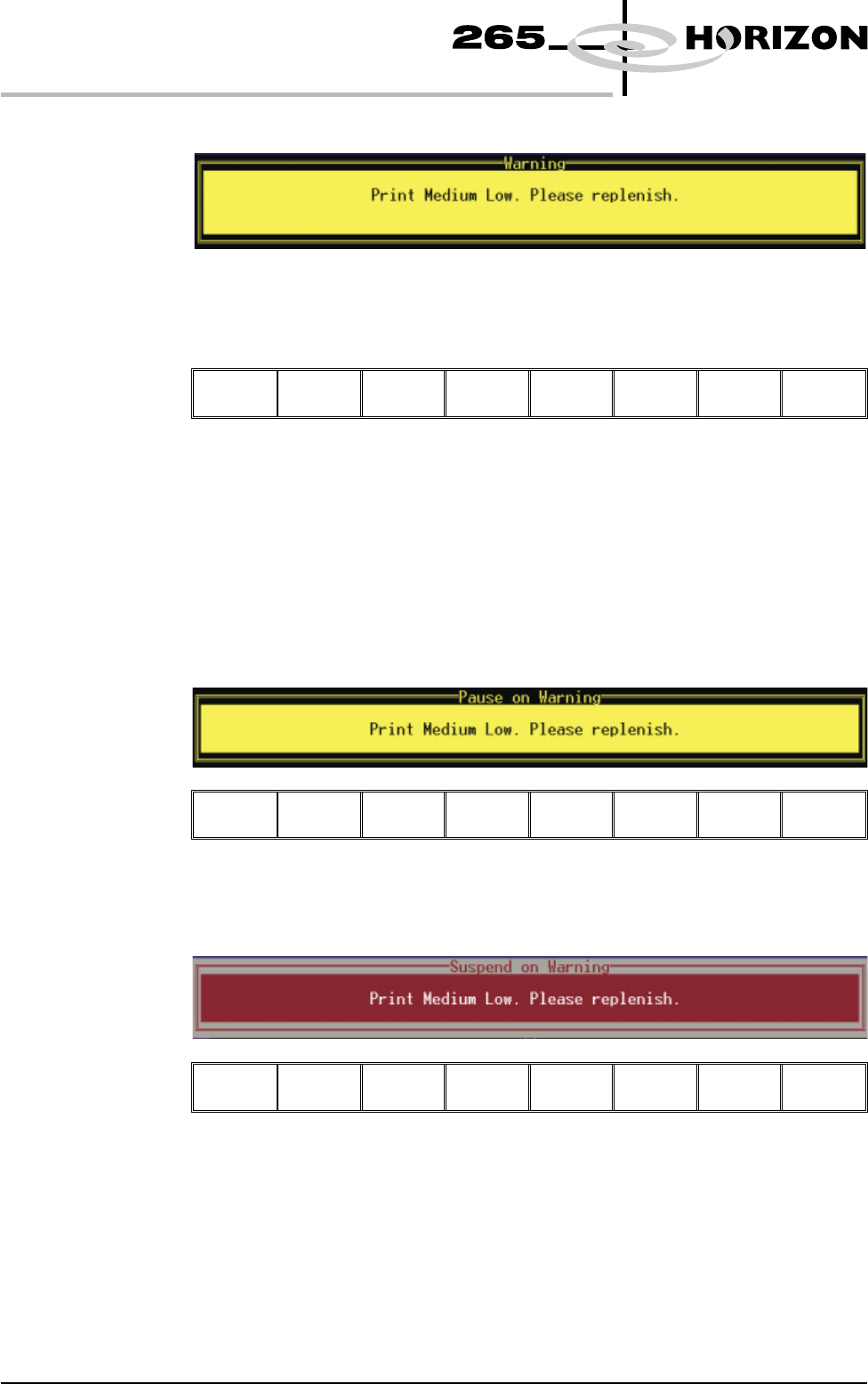
4. If the set preference is set to warn, the following window is displayed:
The tricoloured beacon shows amber/green.
5. Select Confirm (F1).
Confirm
6. To replace the paste cartridge carry out the Fitting a New Paste Cartridge
procedure, later in this section.
7. Repeat Steps 1, 2 and 13.
8. If the set preference is set to pause, the following window and menu bar is
displayed:
Refill
Paste
Cancel
If the set preference is set to suspend, the following window and menu bar is
displayed:
Refill
Paste
Cancel
In both cases the tricoloured beacon shows red.
9.10 User Manual Software Version 6
CONSUMABLE REPLENISHMENTS
PASTE LOADING