Horizon UserManualV6.pdf - 第354页
PROFLOW ProFlow Cassette Change It is necessary at intervals to fit a new ProFlow cassette into the ProFlow transfer head. If the cassette is empty at the end of a print stroke, the warning window ‘Print Medium Low. Plea…
Feedback Option 14. Press Calibrat Heights (F2).
Change
Squeegee
Calibrat
Heights
Exit
The message ‘Ensure correct squeegees are fitted!’ is displayed.
15. Press Continue (F1).
Continue
Restore
Defaults
Exit
The message ‘Calibrating Pressure Heights - DO NOT Open Covers!’ is
displayed.
16. Press Exit (F8).
Continue Restore
Defaults
Exit
17. Press Exit (F8).
Mode Load
Data
Edit
Data
Setup
Squeegee
Change
Screen
Change
Tooling
Change
Language
Exit
Software Version 6 User Manual 9.53
CONSUMABLE REPLENISHMENTS
SQUEEGEES
PROFLOW
ProFlow Cassette
Change
It is necessary at intervals to fit a new ProFlow cassette into the ProFlow transfer
head. If the cassette is empty at the end of a print stroke, the warning window
‘Print Medium Low. Please Replenish.’ is displayed.
NOTE
When using a ProFlow transfer head for the first time or if the transfer head
conditioning chamber has been cleaned, ie free from solder paste. The
conditioning chamber must be primed first with the print medium. Two ProFlow
cassettes are required, the first ProFlow cassette is used to prime the
conditioning chamber. The second ProFlow cassette is fitted ready for machine
operation.
The ProFlow cassette can be fitted or changed prior to and during a print run.
Prior to a Print Run The ProFlow cassette can be fitted or changed prior to selecting Run.
1. If ProFlow is in the home position continue from Step 2. If ProFlow is in the
contact position go to Step 19.
2. Select Setup (F6).
Run Open
Cover
Knead
Paste
Clean
Screen
Adjust
Setup
Monitor Maint.
3. Select Setup ProFlow (F4).
Mode Load
Data
Edit
Data
Setup
ProFlow
Change
Screen
Change
Tooling
Change
Language
Exit
9.54 User Manual Software Version 6
CONSUMABLE REPLENISHMENTS
PROFLOW
WARNING
SOLDER PASTE AND SOLVENTS. WHEN USING OR HANDLINGAN
Y
SOLDER PASTE OR SOLVENT FORMULATION THE
MANUFACTURERS' RECOMMENDED SAFETY PRECAUTIONS
MUST BE STRICTLYADHERED TO.
WARNING
PROTECTIVE CLOTHING. APPROVED PROTECTIVE CLOTHIN
G
SHOULD BE WORN BY SOLDER PASTE AND SOLVENT HANDLERS
AT ALL TIMES TO ELIMINATE FUME INHALATION, EYE
CONTACT, SKIN CONTACTAND INGESTION.
4. Select Load Cassette (F4).
Change
ProFlow
Load
Cassette
Exit
The message ‘Has the ProFlow unit’s base cover been removed?’ is
displayed.
5. If the ProFlow unit’s base cover is still fitted continue with Step 6. If the
ProFlow unit’s base cover has been removed go to Step 12.
6. Select Remove Cover (F8).
Yes
Remove
Cover
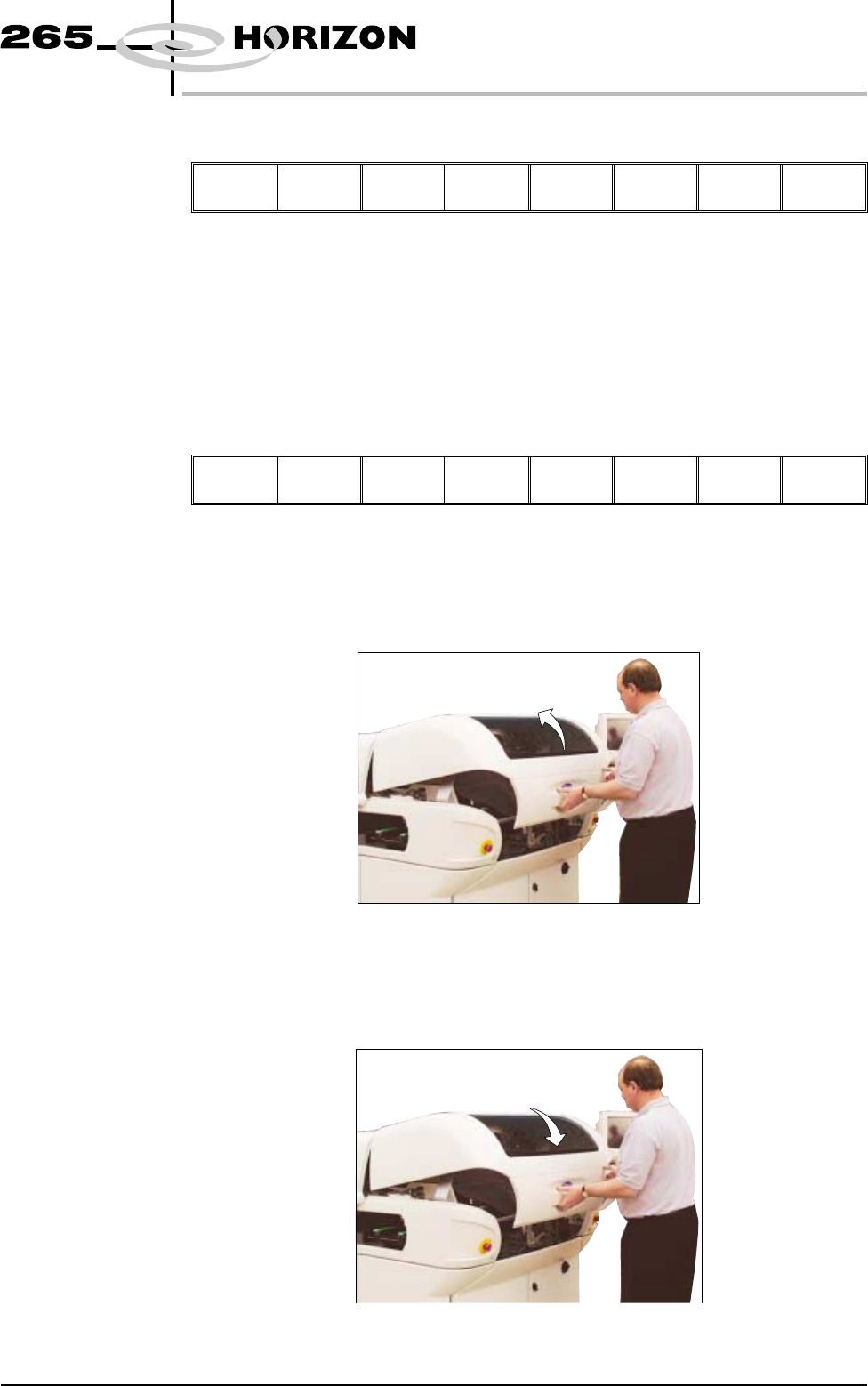
The message ‘Open the printer cover and remove the ProFlow unit’s
base cover’ is displayed.
7. Open the front printhead cover.
8. Remove the ProFlow unit’s base cover.
9. Close the front printhead cover.
Software Version 6 User Manual 9.55
CONSUMABLE REPLENISHMENTS
PROFLOW