StackShotManual_1_5.pdf - 第10页
10 3.3.4 Loading/Saving Settings StackShot automatically saves the last settings used, but sometimes it is more convenient to save different configurations for differen…
9
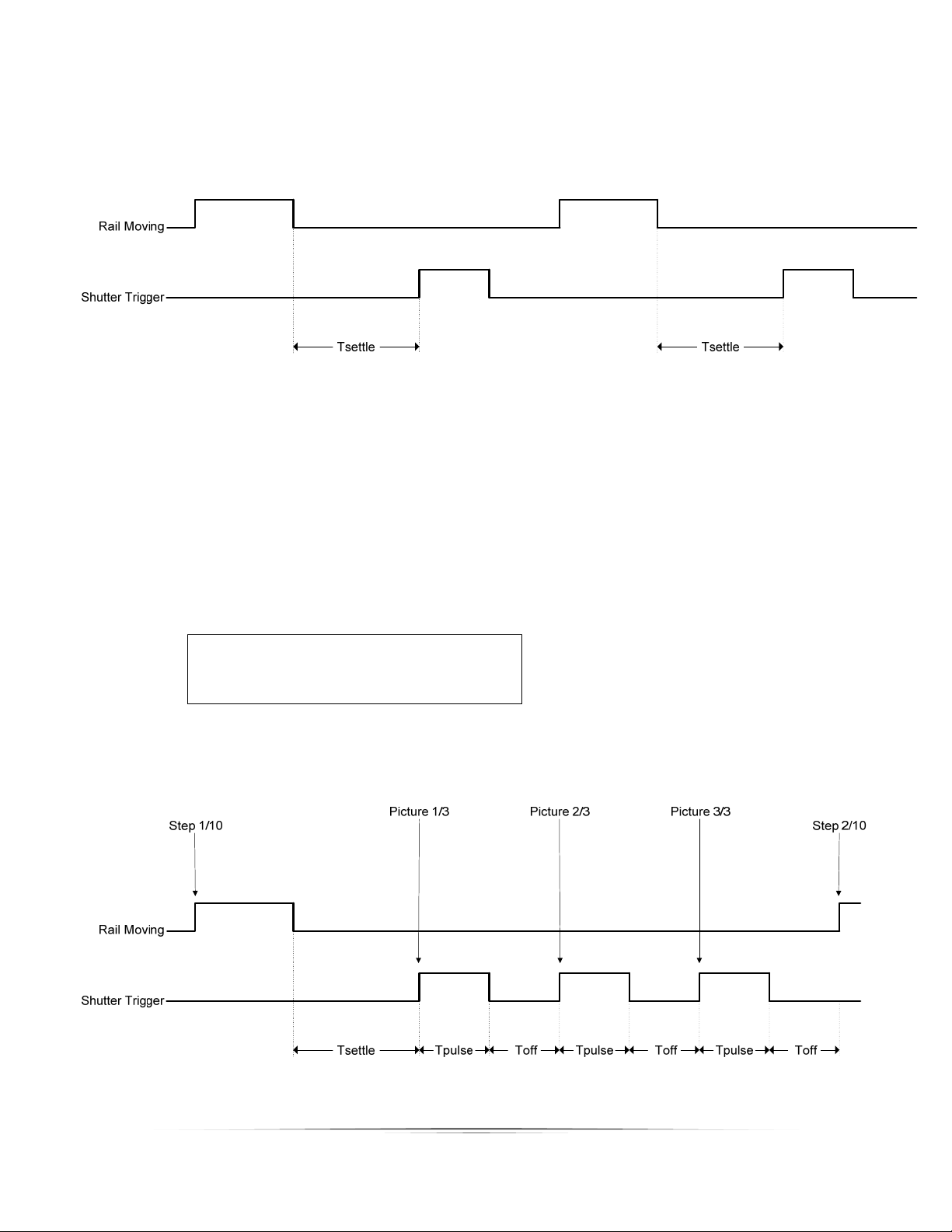
Figure3belowshowswherethesettlingtimetakesplace.
Figure3‐SettleTime
3.3.3 TimeOffBetweenPictures
Timeoff(“Toff”)isthetimebetweenmultiplepictures.Thisonlyapplieswhenthenumber
ofpictures(“#pics”)isgreaterthanoneunlesstheoperatingmodeissetto“Continuous”.
In“Continuous”mode,“Toff”isthetimebetweenpictures.
== Global Config ==
# pics: 3
Tsettle: 500.0 ms
Toff: 500.0 ms ->
>
Seebelowtodemonstratewhere“Tsettle”,“ Toff”,and“Tpulse”allcomeintoplaywhen
takingmultiplepictures.
Figure4‐TotalTimingDiagram

10
3.3.4 Loading/SavingSettings
StackShotautomaticallysavesthelastsettingsused,butsometimesitismoreconvenientto
savedifferentconfigurationsfordifferentsetups(oneconfigurationforinsects,forflowers,
orevenspecificlenses).Toloadorsavethesettings,presstheSELECTbuttonuntilthe
cursorisnextto“Load/SaveConfig”and presstheUPorDOWNbuttontoenterthenext
screen.
== Global Config ==
> Load/Save Settings
Auto Return: No
Speed: 800 mils/sec ->
Fromthisscreenyouhavetwooptions–toeitherloadorsavetheconfiguration.Pressthe
SELECTbuttontochangebetweenthetwooptions.Underthe“Load”screen,youwillsee
thefollowing:
== Load Config ==
1. <empty>
Up/down to select.
UsingtheUPorDOWNbuttons,youcanscrollthroughthetenavailableconfigurationsto
retrieve.Iftheyhaveneverbeenloadedwithaconfigurationbeforeitwillsho wupas
“empty”otherwiseitwillshowthenameyouhadpreviouslysaved.Onceyouhave
highlightedthedesiredconfigurationtoload,presstheSELECTb utton.Thiswilltakeyouto
themainscreenforthisconfiguration.Youcanaborttheloadingscreenbysimplypressing
theCONFIGbutton.
Theprocessissimilarforsavingaconfiguration.Once“Save”isselected,youwillseethe
followingscreen:
== Save Config ==
1. <empty>
Up/down to select.
UsetheUPorDOWNbuttonstoselectwhichconfigurationyouwouldliketosave.Youcan
overwritepreviouslystoredconfigurations.Oncethedesiredconfigurationisselected,
presstheSELECTbutton.Atthispointyoucanente raname.Thecursorunderlinesyour
currentposition.TheUPandDOWNbuttonsmaybeusedtochangethecharacters.Each
timeSELECTispresseditwilltakeyoutothenextcharacterposition.Keeppressingselect
11
untilallthecharactershavebeenentered(Atotalof12maybeused).Notallspacesneed
tobefilled,justkeeppressingselecttofinishtheentry.Uponsavingtheconfigurationthe
screenwillshow:
== Save Config ==
1. 5X Spiders
Saved. Cfg exits.
Up/down to select.
Inthiscasethesettingnamewassetto“5XSpiders”.PresstheCONFIGbuttontoexittothe
mainscreen.
3.3.5 AutomaticReturn
WhenStackShotfinishesaseriesofstepsyouhavetheoptionofreturningtothebeginning
positionautomatically(“AutoReturn”setto“Yes”).Thisisusefulifyouwanttochangea
camerasettingandbeginanothersetofpictures.Tochangethissetting,usetheUPor
DOWNbuttons.Whensetto“No”,StackShotwillleavethecameraatthefinalposition.
== Global Config ==
Load/Save Settings
Auto Return: No
Speed: 800 mils/sec ->
>
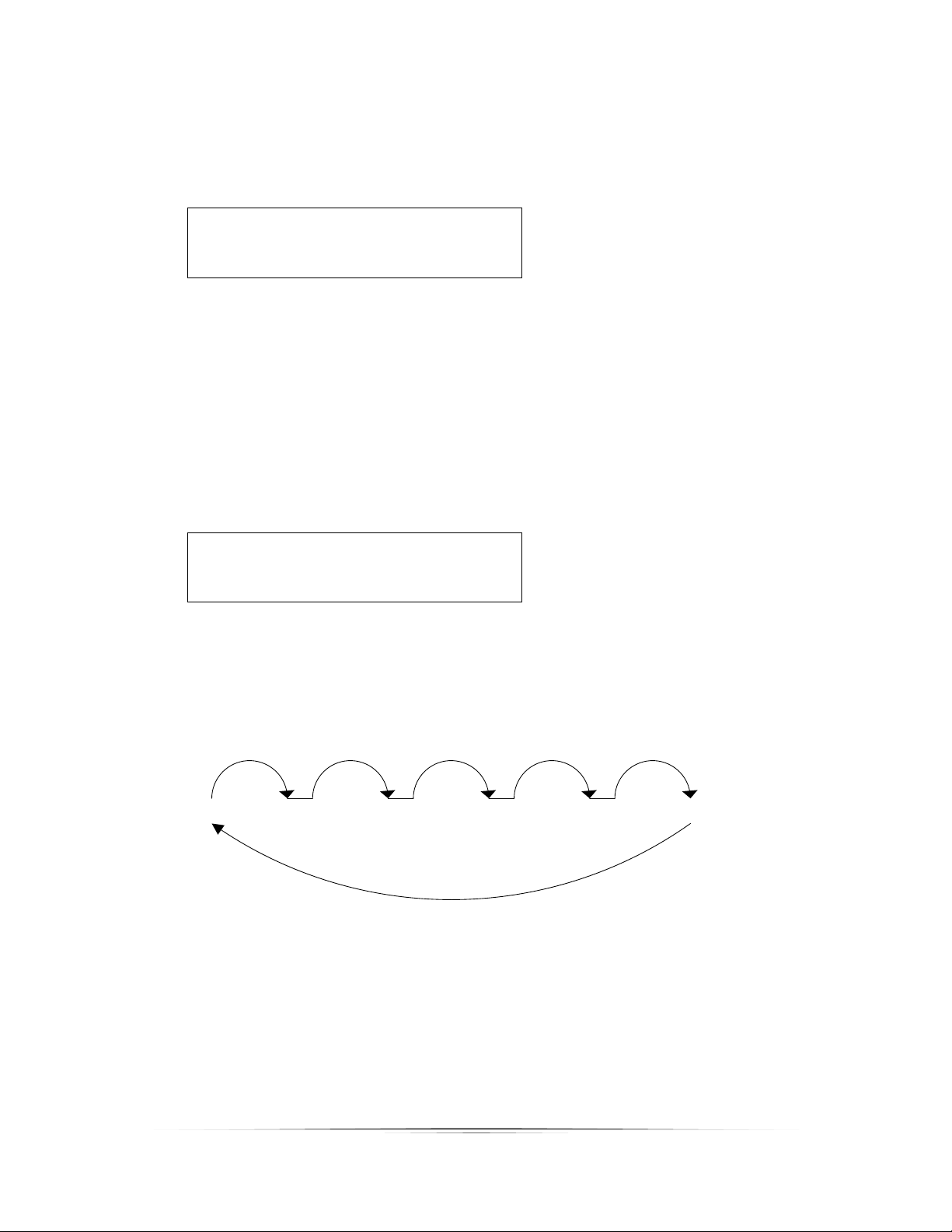
BelowinFigure5isanexampleofwhenStackShotisconfiguredforfivesteps.Atthe
completionofthefivesteps(andwith“AutoReturn”setto“Yes”),therailwillmovebackto
itsinitialposition.If“AutoReturn”hadbeensetto“No”,therailwouldhaveremainedat
thefinalposition.
Figure5‐AutoReturn
3.3.6 MotorSpeed
Themotorspeed(“Speed”)isanadjustableparameter.Whynotsetthespeedtothe
maximum?Therearetwodrawbacksfromgoingfaster: