StackShotManual_1_5.pdf - 第11页
11 until all the characters have been entered (A total of 12 may be us ed). Not all spaces need to be filled, just keep pressing select to finish the entry. …

10
3.3.4 Loading/SavingSettings
StackShotautomaticallysavesthelastsettingsused,butsometimesitismoreconvenientto
savedifferentconfigurationsfordifferentsetups(oneconfigurationforinsects,forflowers,
orevenspecificlenses).Toloadorsavethesettings,presstheSELECTbuttonuntilthe
cursorisnextto“Load/SaveConfig”and presstheUPorDOWNbuttontoenterthenext
screen.
== Global Config ==
> Load/Save Settings
Auto Return: No
Speed: 800 mils/sec ->
Fromthisscreenyouhavetwooptions–toeitherloadorsavetheconfiguration.Pressthe
SELECTbuttontochangebetweenthetwooptions.Underthe“Load”screen,youwillsee
thefollowing:
== Load Config ==
1. <empty>
Up/down to select.
UsingtheUPorDOWNbuttons,youcanscrollthroughthetenavailableconfigurationsto
retrieve.Iftheyhaveneverbeenloadedwithaconfigurationbeforeitwillsho wupas
“empty”otherwiseitwillshowthenameyouhadpreviouslysaved.Onceyouhave
highlightedthedesiredconfigurationtoload,presstheSELECTb utton.Thiswilltakeyouto
themainscreenforthisconfiguration.Youcanaborttheloadingscreenbysimplypressing
theCONFIGbutton.
Theprocessissimilarforsavingaconfiguration.Once“Save”isselected,youwillseethe
followingscreen:
== Save Config ==
1. <empty>
Up/down to select.
UsetheUPorDOWNbuttonstoselectwhichconfigurationyouwouldliketosave.Youcan
overwritepreviouslystoredconfigurations.Oncethedesiredconfigurationisselected,
presstheSELECTbutton.Atthispointyoucanente raname.Thecursorunderlinesyour
currentposition.TheUPandDOWNbuttonsmaybeusedtochangethecharacters.Each
timeSELECTispresseditwilltakeyoutothenextcharacterposition.Keeppressingselect
11
untilallthecharactershavebeenentered(Atotalof12maybeused).Notallspacesneed
tobefilled,justkeeppressingselecttofinishtheentry.Uponsavingtheconfigurationthe
screenwillshow:
== Save Config ==
1. 5X Spiders
Saved. Cfg exits.
Up/down to select.
Inthiscasethesettingnamewassetto“5XSpiders”.PresstheCONFIGbuttontoexittothe
mainscreen.
3.3.5 AutomaticReturn
WhenStackShotfinishesaseriesofstepsyouhavetheoptionofreturningtothebeginning
positionautomatically(“AutoReturn”setto“Yes”).Thisisusefulifyouwanttochangea
camerasettingandbeginanothersetofpictures.Tochangethissetting,usetheUPor
DOWNbuttons.Whensetto“No”,StackShotwillleavethecameraatthefinalposition.
== Global Config ==
Load/Save Settings
Auto Return: No
Speed: 800 mils/sec ->
>
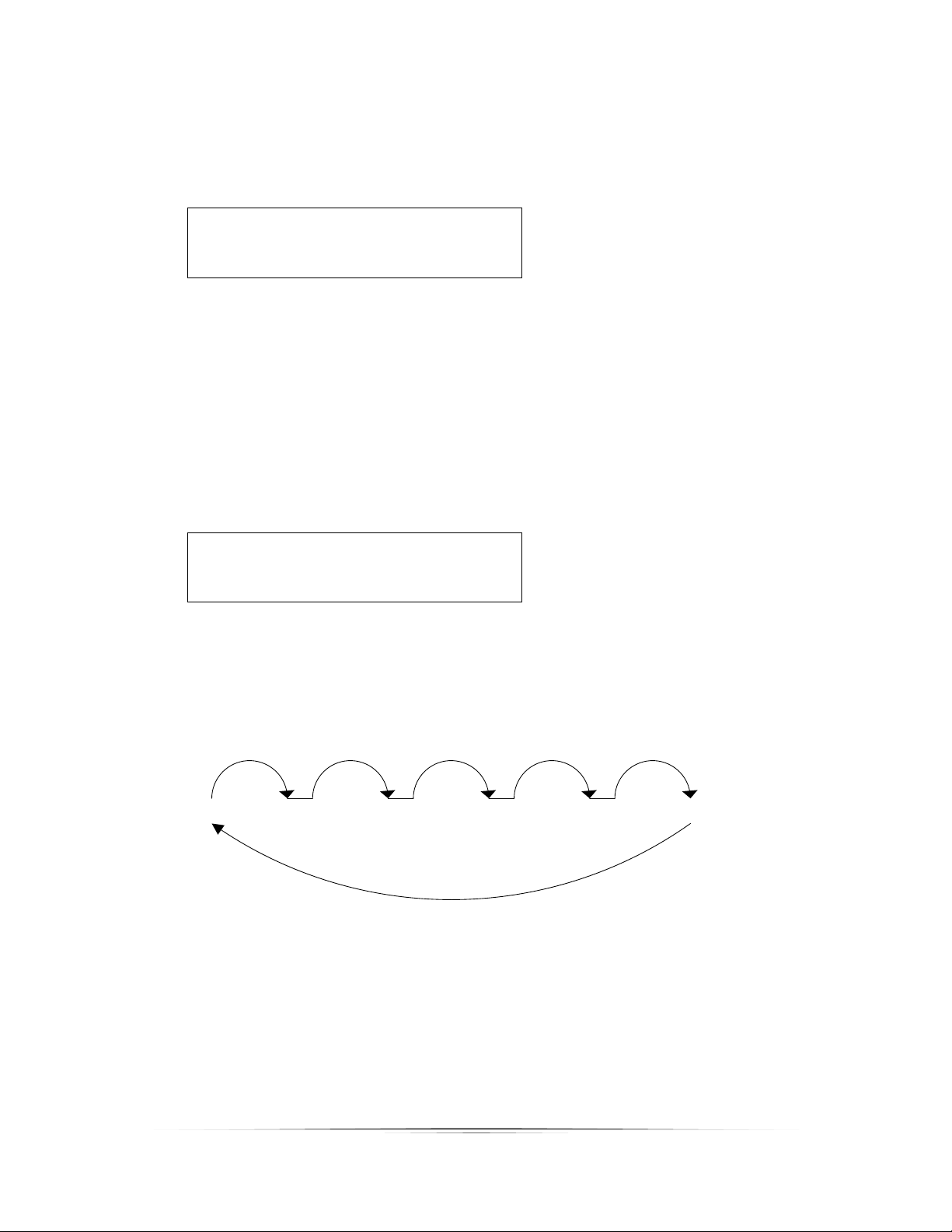
BelowinFigure5isanexampleofwhenStackShotisconfiguredforfivesteps.Atthe
completionofthefivesteps(andwith“AutoReturn”setto“Yes”),therailwillmovebackto
itsinitialposition.If“AutoReturn”hadbeensetto“No”,therailwouldhaveremainedat
thefinalposition.
Figure5‐AutoReturn
3.3.6 MotorSpeed
Themotorspeed(“Speed”)isanadjustableparameter.Whynotsetthespeedtothe
maximum?Therearetwodrawbacksfromgoingfaster:

12
1. Itwilllikelyincreasethesettletimerequired.
2. Asspeedincreases,motortorquedecreases.ThiscancauseStackShotto“slip”and
notmovetherailproperly.
Thedefaultwillworkformostapplications,butifyouseetherailnotmovingproperly
(becauseyou’reusinga12000mmprimelenstofocus‐stackyourneighbor’sforehead),and
thetorqueissetatmaximum,tryslowingdownthemotorspeed.
== Global Config ==
Load/Save Settings
Auto Return: No
Speed: 800 mils/sec ->
>
3.3.7 TimeLapseInterval
Thetimelapseinterval(“Tlapse”)determinesthetimetakenbetweenstacks.Whensetto
“off”therailperformsonestackatatime(normaloperation).Whensettovalueotherthan
“off”,time‐lapsemodeisenabled.Thisfeatureallowstheperiodic captureofasequenceof
images.Anexamplewherethismaybehelpfulwouldbestackingaflowerbloomingover
time.Ifthe“Tlapse”timeisfasterthanthetimeittakestocompleteastackitwillskipthat
time‐lapseeventandwaitforthenextinterval.Theintervalmaybeadjustedfrom100ms
upto24hours.
== Global Config ==
> Tlapse: off
Tpulse: 500.0 ms
Tramp: 1.0 sec ->
Whenthetime‐lapseintervalissetStackShotwillshowthenormalmainscreentosetup
theshot.Oncetherailstarts,however,thefollowingwillbedisplayed:
Time Lapse Mode
Running: 0/10
# of Stacks: 0
Thevalueafter“Running:”indicatesthenumberofstepscompletedforthisstack.The“#of
Stacks”showsthenumberofcompletedstack“intervals”.
Afterthestackcompletes,atimerisdisplayedshowingthetimeremainingbeforethenext
stackisinitiated.
Time Lapse Mode
Remaining: 4.7 sec
# of Stacks: 0