StackShotManual_1_5.pdf - 第16页
16 3.4 Moving the Rail The macro ‐ rail may be moved in and out manually using the FWD / BACK buttons. These two buttons will always give you control over the ra…

15
DOWNbutton.Thebacklightingmaybeadjustedfromarangeof1–10.
== Global Config ==
> LCD Backlight: 10 ->

16
3.4 MovingtheRail
Themacro‐railmaybemovedinand outmanuallyusingtheFWD/BACKbuttons.Thesetwo
buttonswillalwaysgiveyoucontrolovertherailunlessacaptureiscurrentlytakingplace.If
StackShotiscurrentlyrunningacapturesequenceanybuttonpresswillabortthesequence.If
thecameracarriageisrunintooneofthestopsateitherendaclickingnoisewillbeheard.This
willnotcausedamagetotherail.
CAUTION:Alwayskeepyourbody,cables,andequipmentclearoftherailwhileitisinmotion.
Therailcanpinchandcrush.Beawareoftheenvironmentyouareoperatingin.Thecenterof
gravitywillchangeasStackShotmovesthecamera.Movingtherailcanpotentiallycausea
tippinghazard.Besurethatyourtri podissecuredandbalancedproperlytopreventdamageto
equipment.Monitoryourcamera,lens,andotherequipmentatalltimeswhiletherailis
movingtopreventdamagetoyourequipment.Themotorcablemayposeasatrippinghazard.
Usecaution.
3.5 ShutterDisable
BypressingdowntheCONFIGbutton,andthensimultaneouslypressingtheSHUTTERbutton,
youcanactivatethe“ShutterDisable”feature.StackShotwillfunctionnormallyexceptthatit
willnotallowtheshuttertofire(norwilltheshutterLEDilluminate).Toindicatethatthis
featureisactive,“SD”willflashintheupperright‐handcorneroftheLCDDisplay.Usethe
abovebuttoncombinationtorevertbacktonormaloperations.PressingtheSHUTTERbutton
willalsode‐activatethe“ShutterDisable”feature.
3.6 OperatingModes
Fromthemainscreen,thefirstlineoftheLCDdisplayshowswhichoperatingmodeStackShotis
currentlyusing.PresstheSELECTbuttontomovetheindicatornextto“Mode”.Tochangethe
operatingmodepressandreleasetheUPorDOWNbutton.Thedifferentmodesarediscussed
below.
17
3.7 Mode:AutomaticStep
3.7.1 Overview
AutomaticStepmode(“Auto‐Step”)simplifiesthepicturetakingprocess.Itallowstheuserto
determinethebeginningandendpositionbyusingtheFWDandBACKbuttons,andalsothe
numberofstepsdesired.Afterthatthecapturingprocessis started.Thereisnoneedtoenter
anydistance–justchoosetheappropriatestartand endpositionthatyoudesire.
3.7.2 NumberofSteps
“#Steps”isthenumberofstepsbetweenthebeginningandendposition.UsetheUP/DOWN
buttonstochoosethenumberofstepsdesired.StackShotalwaystakesapicturepriorto
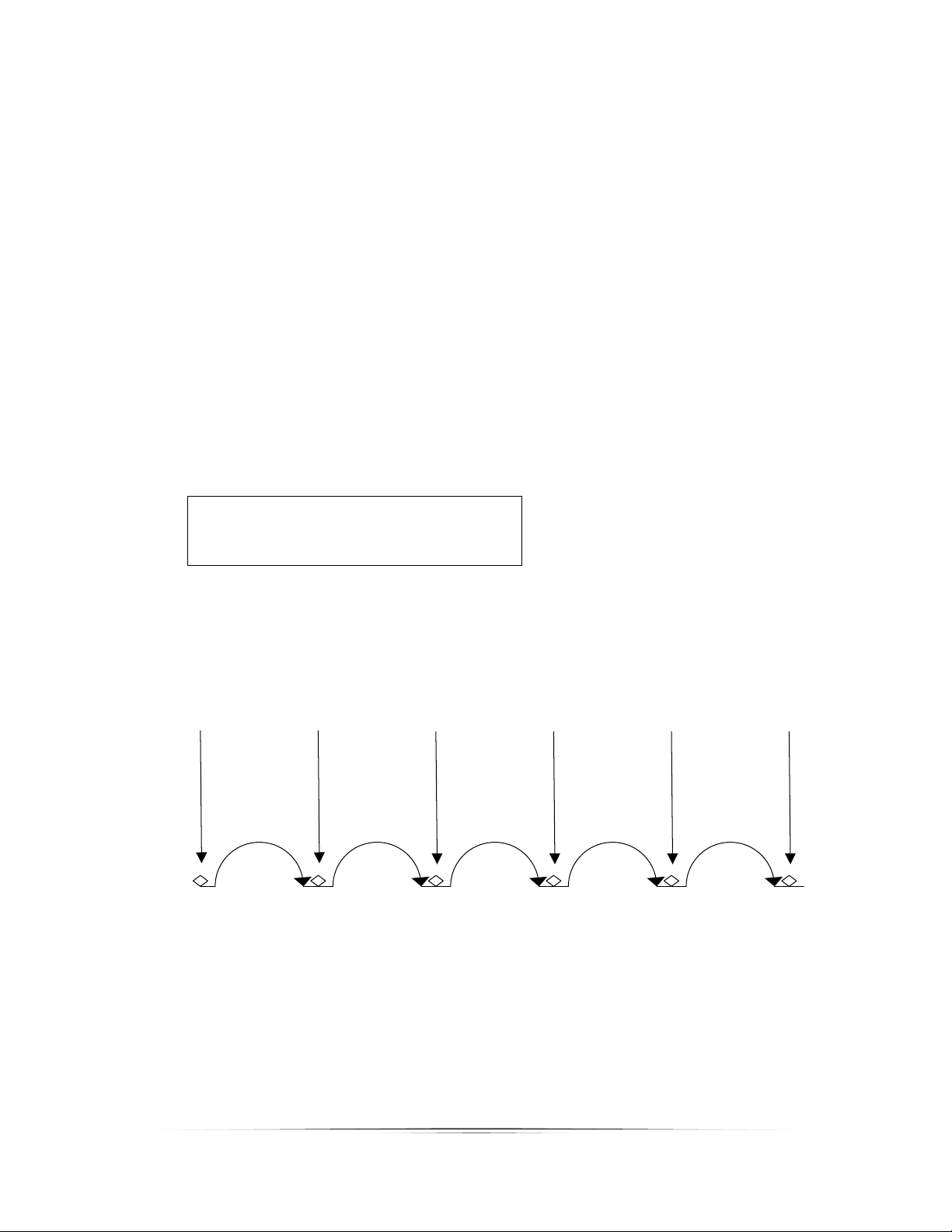
movingthemotorsothetotalnumberofpicturestakenwillalwaysbe:“#Steps”+1.See
below:
Mode: Auto-Step
> # Steps: 5
Select Start Pos
AsyoucanseeinFigure6below,therearefivesteps(movements)oftherail .Thefirstpicture
startspriortomovingit,andthefinalpictureoccursafterthelaststep.Fivesteps‐‐sixpictures.
Pictures Taken
Step 1 Step 2 Step 3 Step 4 Step 5
Pic 1 Pic 2 Pic 3 Pic 4 Pic 5 Pic 6
Figure6‐StepsVs.Pictures
3.7.3 SelectingtheStart/EndPositions
PresstheSELECTbuttonuntilthecursorison“SelectStartPos”.UsetheFWD/BACKbuttonsto
findtheappropriatebeginningofthepicturesequence.Oncehappywiththatposition,press