StackShotManual_1_5.pdf - 第20页
20 3.8 Mode: Automatic Distance 3.8.1 Overview Automatic Distance mode (“ Auto ‐ Dist ”) is very similar to “ Automatic Step ” mode. It allows the user to determine …
19
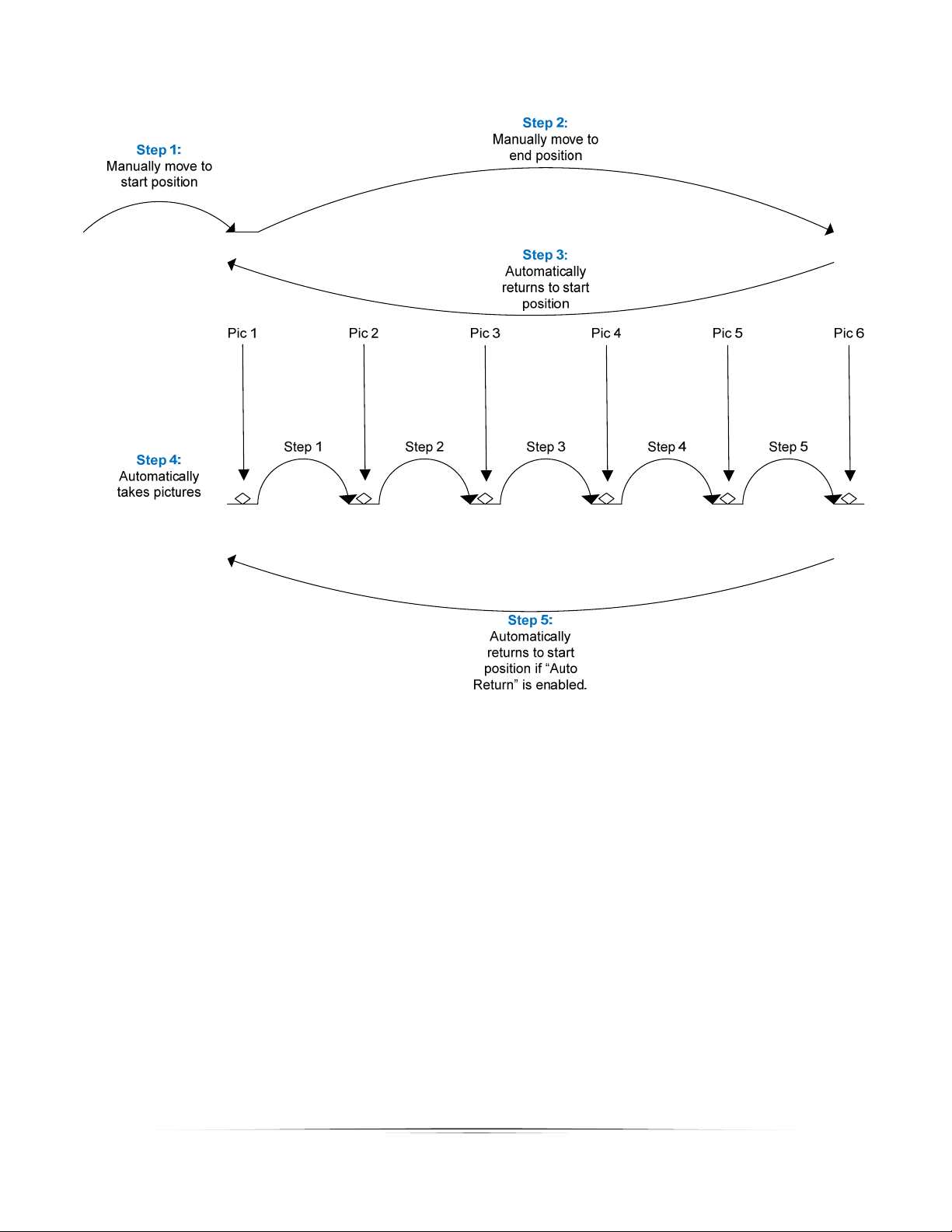
Figure7‐AutomaticStepMode
Note:IfyoupresstheFWDorBACKbuttonsafterthestackhascompleted,therailwillmovein
thedirectiondesired.Ifyouthenchoose“RunAgain?”fromthemenu, itwillusethecurrent
positionoftherailasthestartratherthantheoriginalposition.Thisallowsadjustmentstothe
startingpointwithouthavingtogothroughandchooseanewstartandendpointforthestack.

20
3.8 Mode:AutomaticDistance
3.8.1 Overview
AutomaticDistancemode(“Auto‐Dist”)isverysimilarto“AutomaticStep”mode.Itallowsthe
usertodeterminethebeginningandendpositionexactlylike“AutomaticStep”mode.Theonly
differenceisthattheuserspecifiesthedistancetotravelforeachstep.StackShotwilltakea
picturebeforefirstmoving,andthenateverydistanceincrementspecified.Ifthetotaldistance
desiredisnotevenlydivisiblebythedesireddistanceperstep,StackShotwill“rounddown”,
thatis,itwillnotmovethelastpartialdistance.SeeFigure8belowasanexample.
3.8.2 DistanceperStep
“Dist/Step”isthedistancetherailshouldmoveforeverystep.UsetheUP/DOWNbuttonsto
choosethedesireddistance.
Mode: Auto-Dist
> Dist/Step: 200 um
Select Start Pos
3.8.3 SelectingtheStart/EndPositions
PresstheSELECTbuttonuntilthecursorison“SelectStartPos”.UsetheFWD/BACKbuttonsto
findtheappropriatebeginningofthepicturesequence.Oncehappywiththatposition,press
eithertheUPorDOWNbutton.Thetextonthedisplaywillchangeto“SelectEndPos”.Again,
usetheFWD/BACKbuttonstochoosethefinalpositionofthesequence.Onceagainpressthe
UPorDOWNbuttontoselectthisfinalposition.
3.8.4 StartingtheSequence
Oncethefinalpositionhasbeenselected,thestatus willchangeto“Up/Downtostart”andthe
lastlineonthedisplaywillshow“ChangeSettings”.
Mode: Auto-Dist
> Dist/Step: 200 um
Up/Down to start
Change Settings
21
PresstheUPorDOWNbuttontoinitiatethesequence.Themotorwillmovebacktothestart
positionandbegincapturingpictures.Thestatus li newillindicatewhichstepisinprogress:
Mode: Auto-Dist
Dist/Step: 200 um
Running: 3/10
Ifyoupressanybuttonduringthistimeitwillstopthemotor,abortthesequence,andthe
displaywillshow“Aborted”andgiveyoutheoptiontorunthesequenceagain.Torestartthe
sequence,presseithertheUPorDOWNbutton.
Mode: Auto-Dist
Dist/Step: 200 um
> Aborted. Run Again?
Change Settings
Whenthesequencecompletes,youalso havetheoptiontorestartbypressingtheUPorDOWN
button.Ifyouwanttochoosenewstartandendpositions,presstheSELECTbuttonsothatthe
cursorisnextto“ChangeSettings”.PresstheUPorDOWNbutton.Youcanthenchooseanew
startandendposition.SeeFigure8belowtode monstrate“Auto‐Distance”mode.