StackShotManual_1_5.pdf - 第5页
5 1. Safety Instructions WARNING indicates a potentially hazardous situatio n which, if not avoided, could result in death or serious injury. Follow all CAUTION notic…

4
TableofFigures
Figure1‐TypicalConnectionDiagram.........................................................................................................6
Figure2‐PicturesperStep...........................................................................................................................8
Figure3‐SettleTime....................................................................................................................................9
Figure4‐TotalTimingDiagram....................................................................................................................9
Figure5‐AutoReturn.................................................................................................................................11
Figure6‐StepsVs.Pictures........................................................................................................................17
Figure7‐AutomaticStepMode.................................................................................................................19
Figure8‐AutomaticDistanceMode..........................................................................................................22
Figure9‐TotalDistanceMode...................................................................................................................25
Figure10‐ManualMode............................................................................................................................29
Figure11‐ContinuousMode.....................................................................................................................31
Figure12‐UniversalIRRemote..................................................................................................................35
Figure13‐RCAconnector..........................................................................................................................36
Figure14‐StackShotOrchidSetup............................................................................................................38
Figure15‐OrchidSeq uen ce.......................................................................................................................40
Figure16‐OrchidStack..............................................................................................................................41
Figure17‐AntSetup..................................................................................................................................42
Figure18‐AntStack...................................................................................................................................43

5
1. SafetyInstructions
WARNINGindicatesapotentiallyhazardoussituationwhich,ifnotavoided,couldresultindeath
orseriousinjury.
FollowallCAUTIONnoticestoreducetheriskofpersonalinjury,preventdamagetothe
StackShotmodule,accessories,anddevices(cameras,flashes,etc).Failuretofollowall
CAUTIONnoticesmayvoidyourwarranty.CAUTIONmayalsoindicateapotentiallyhazardous
situationwhich,ifnotavoided,mayresultinpersonalinjury.
ThesafetyalertsymbolprecedesageneralCAUTIONorWARNINGstatement.
TheelectricalhazardsymbolprecedesanelectricshockhazardCAUTIONorWARNING
statement.
2. GettingStarted
Thelatestversionofthismanualisavailableathttp://www.cognisys‐inc.com
.
TheStackShotpackagecontainsthefollowing:
1. StackShotControlModule(1)
2. AC/DCPowerAdapter(1)
3. OperationManualCD(1)–includingafreetrialofHeliconandZerenefocusstacking
software
4. Motorcable(1)
5. StackShotRailAssembly(1)
TheStackShotmotorcableconnectstothefour‐pinconnectoronthecontrolmodule.
Theconnectorlabeled“Trigger”shouldconnecttoyourcamerausi ngtheappropriateshuttercableor
universalIRremote.
CAUTION:Onlyconnectthemotorcabletothecontrolmodulewhenthecontrolmoduleis not
powered.
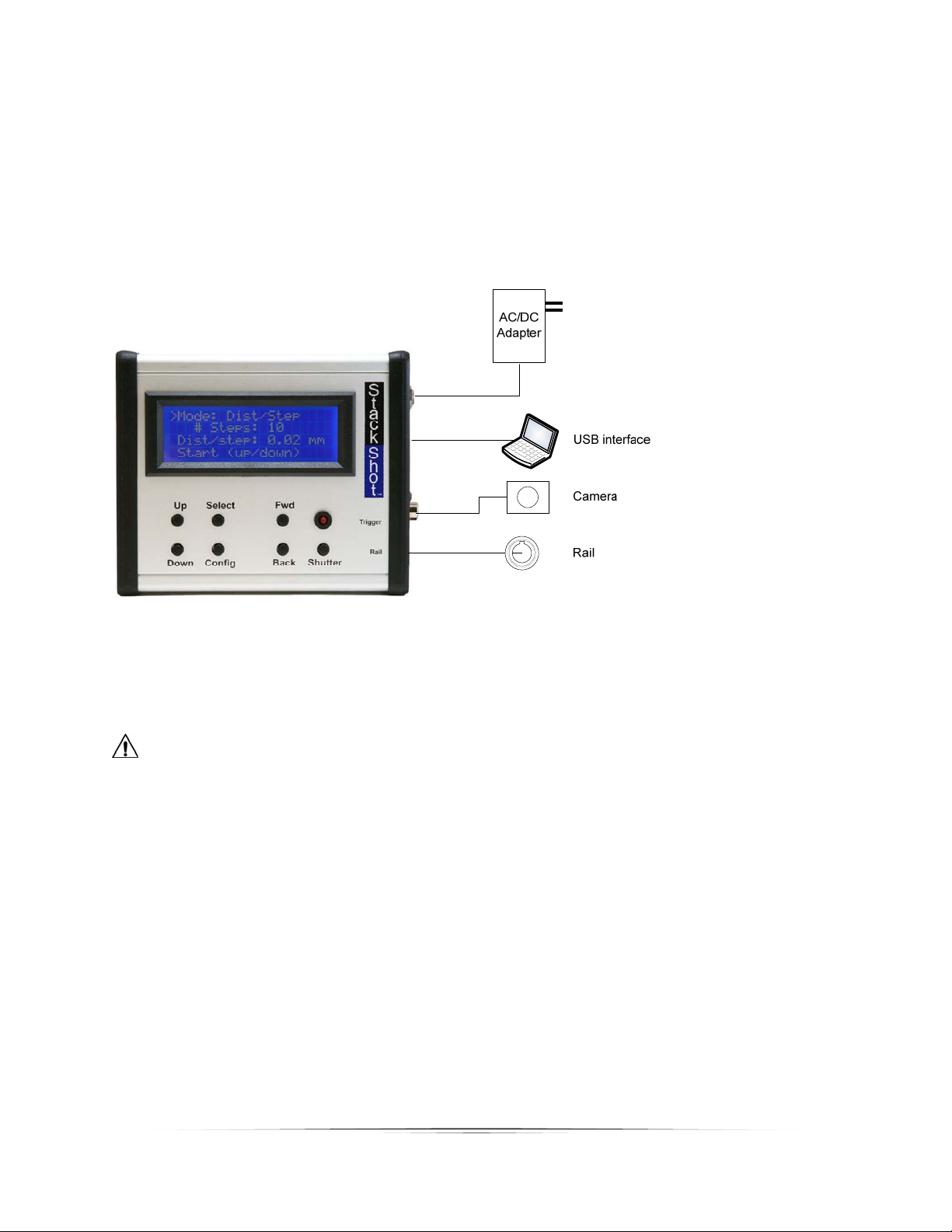
6
PowertotheStackShotmodule isprovidedthroughanACtoDCpoweradapterora12Vbattery
(purchasedseparately).Astandardsealedlead‐acidbatterywitha1‐5amp/hourcapacityisaccep table.
PlugthepoweradapterintotheStackShotmodulepowerjackandplugtheadapterintothewall.The
unitwillpowerup,displayasplashscreen,andthencontinuetothemainscreen.ACadaptersare
availableforotherplugtypesaswell(UK,EU,andAUS).
Figure1‐TypicalConnectionDiagram
CAUTION:Onlyusethepoweradapter(cube)thatcamewiththeStackShotmodule.Useofother
poweradaptersmaydamagethemoduleand/ormotor.