StackShotManual_1_5.pdf - 第6页
6 Power to the StackShot module is provided through an AC to DC power adapter or a 12V battery (purchased separat ely). A standard sealed lead ‐ acid battery with …

5
1. SafetyInstructions
WARNINGindicatesapotentiallyhazardoussituationwhich,ifnotavoided,couldresultindeath
orseriousinjury.
FollowallCAUTIONnoticestoreducetheriskofpersonalinjury,preventdamagetothe
StackShotmodule,accessories,anddevices(cameras,flashes,etc).Failuretofollowall
CAUTIONnoticesmayvoidyourwarranty.CAUTIONmayalsoindicateapotentiallyhazardous
situationwhich,ifnotavoided,mayresultinpersonalinjury.
ThesafetyalertsymbolprecedesageneralCAUTIONorWARNINGstatement.
TheelectricalhazardsymbolprecedesanelectricshockhazardCAUTIONorWARNING
statement.
2. GettingStarted
Thelatestversionofthismanualisavailableathttp://www.cognisys‐inc.com
.
TheStackShotpackagecontainsthefollowing:
1. StackShotControlModule(1)
2. AC/DCPowerAdapter(1)
3. OperationManualCD(1)–includingafreetrialofHeliconandZerenefocusstacking
software
4. Motorcable(1)
5. StackShotRailAssembly(1)
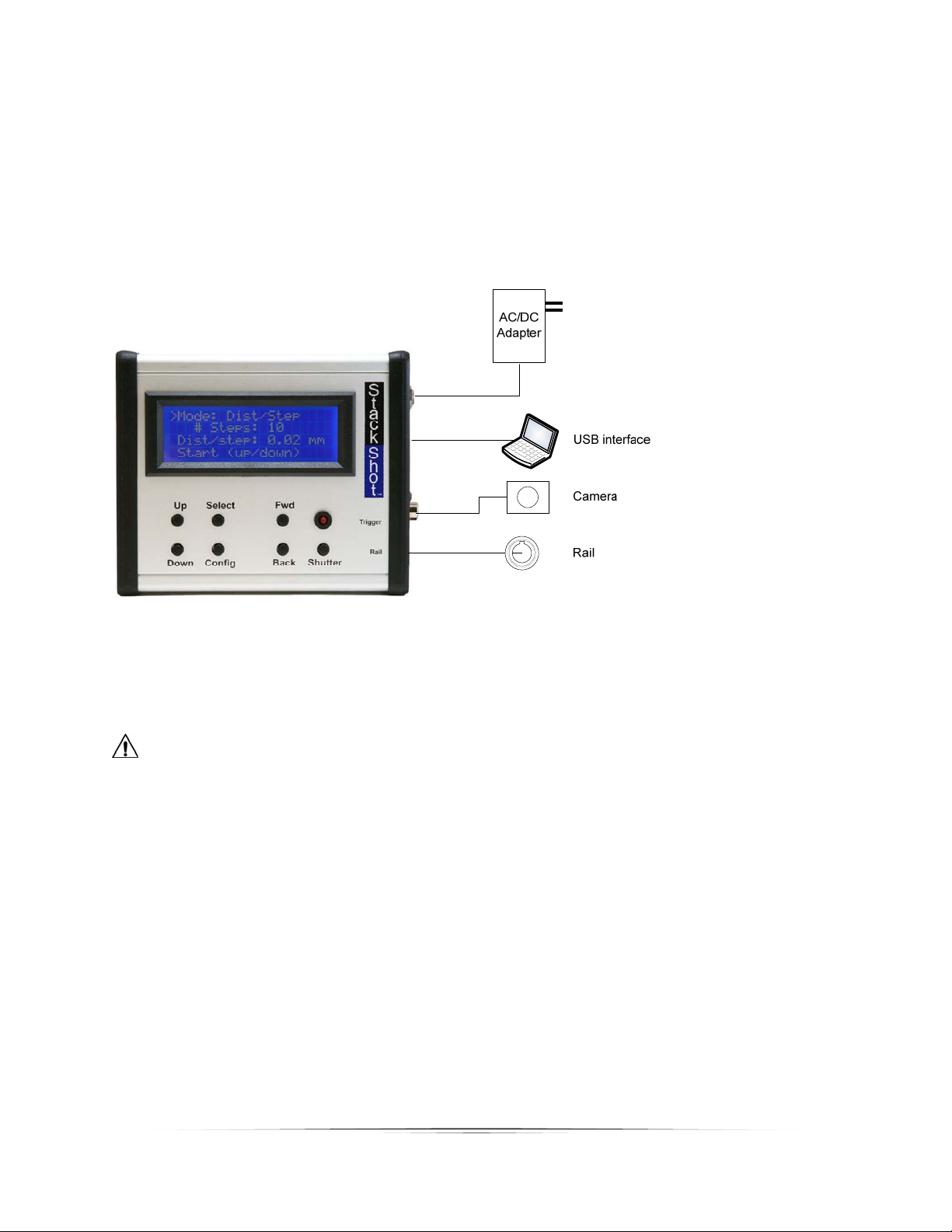
TheStackShotmotorcableconnectstothefour‐pinconnectoronthecontrolmodule.
Theconnectorlabeled“Trigger”shouldconnecttoyourcamerausi ngtheappropriateshuttercableor
universalIRremote.
CAUTION:Onlyconnectthemotorcabletothecontrolmodulewhenthecontrolmoduleis not
powered.
6
PowertotheStackShotmodule isprovidedthroughanACtoDCpoweradapterora12Vbattery
(purchasedseparately).Astandardsealedlead‐acidbatterywitha1‐5amp/hourcapacityisaccep table.
PlugthepoweradapterintotheStackShotmodulepowerjackandplugtheadapterintothewall.The
unitwillpowerup,displayasplashscreen,andthencontinuetothemainscreen.ACadaptersare
availableforotherplugtypesaswell(UK,EU,andAUS).
Figure1‐TypicalConnectionDiagram
CAUTION:Onlyusethepoweradapter(cube)thatcamewiththeStackShotmodule.Useofother
poweradaptersmaydamagethemoduleand/ormotor.

7
3. Operation
3.1 Overview
Withmacrophotographyalltoooftenpictureshaveashallowdepthoffield(DOF).Thisis
whereStackShot(andwidelyavailablefocus‐stackingsoftware)shine.StackShotallowsprecise
controloveracamera’spositionintendedforusewithmacrophotography.Itautomatesthe
processoftakingseveralpicturesinincrementalsteps.Thesubsequentimagesarethen
processedbyfocus‐stackingsoftwaretomergetheshallowDOFimagesintoasinglecrispand
highlydetailedpicture.Whilethissameprocesscanbeaccomplis hedmanually,gettingprecise
stepsisdifficult,timeconsuming,andfrustrating.Decreasingthetimespenttakingtheimages
alsoallowsyoutofocus‐stackthingsthatjustwouldn’tcooperateorstaystilllongenough.By
combiningasimpleuser‐interfacewithbehind‐the‐scenesextremeflexibility,StackShotisa
necessityforanyseriousmacrophotographer.
CAUTION:Alwayskeepyourbody,cables,andequipmentclearoftherailwhileitisinmotion.
Beawareoftheenvironmentyouareoperatingin.Thecenterofgravitywillchangeas
StackShotmovesthecamera.Movingtherailcanpotentiallycauseatippinghazard.Besure
thatyourtripodissecuredandbalancedproperlytopreventdamagetoequipment.Monitor
yourcamera,lens,andotherequipmentatalltimeswhile therailismovingtopreventdamage
toyourequipment.Themotorcablemayposeasatrippinghazard.Usecaution.
3.2 TheUserInterface
TherearesevenbuttonstocontrolStackShot.
TheSELECTbuttonmovesthecursor(“>”indicator)fromlinetolineonthedis play.TheUPand
DOWNbuttonadjustthevaluesforeachline.CONFIGwilldisplaya(lengthy)listofuser‐
specifiedconfigurations.FWDmanuallymovesthemotorassemblyforwardwhileBACKmoves
itbackward.SHUTTERwillmanuallyfiretheshutteronthecamera.
Note:Ifthemotorismovingorasequenceisactive,anybuttonpresswillstopthemotor
immediatelyandaborttheactivesequence.
Usersettingswillbesavedacrosspowercycles.
Thedifferentmodesofoperationarelistedinthefollowingsections.