StackShotManual_1_5.pdf - 第7页
7 3. Operation 3.1 Overview With macro photography all too often pictures have a shallow depth of field (D OF). This is where StackShot (and widely available focus ‐…
6
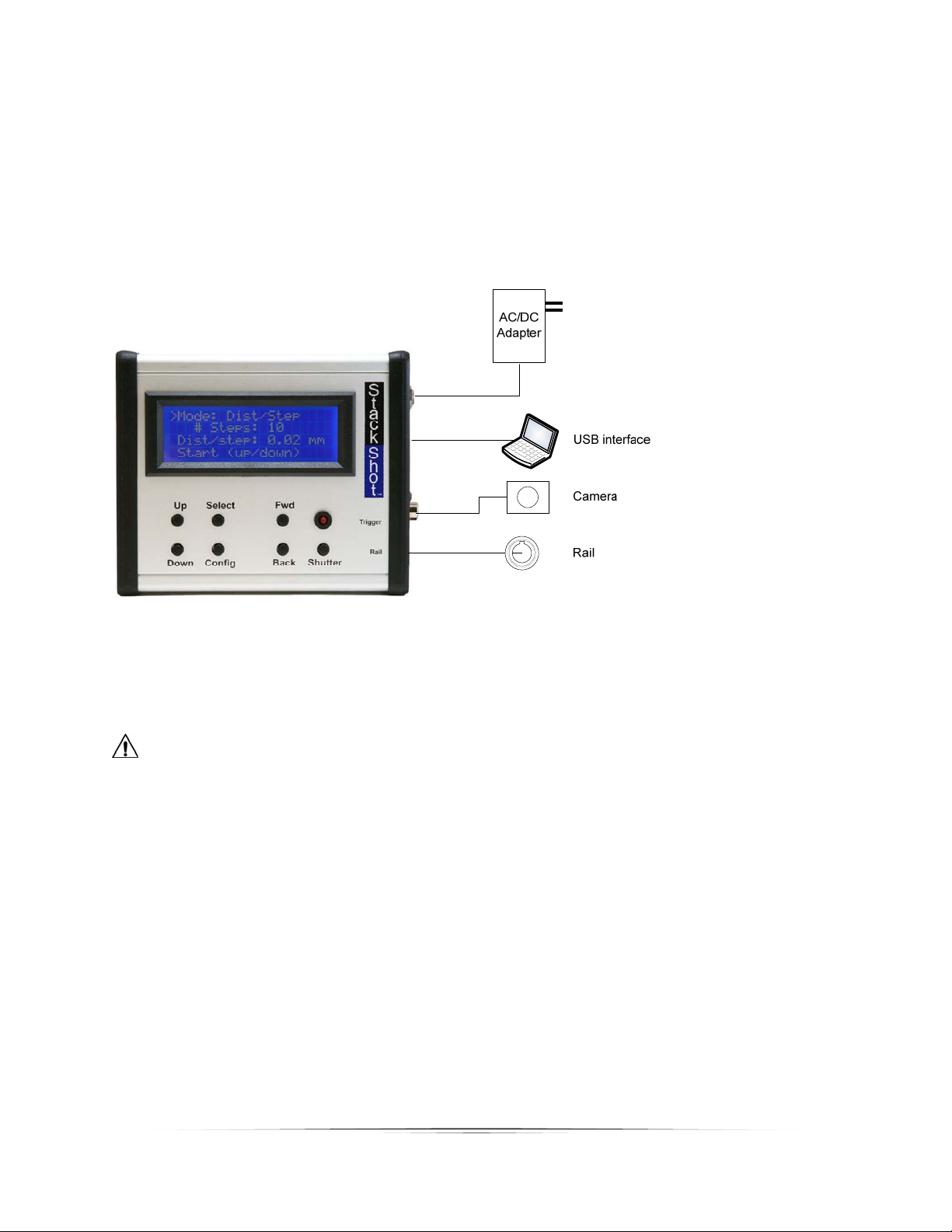
PowertotheStackShotmodule isprovidedthroughanACtoDCpoweradapterora12Vbattery
(purchasedseparately).Astandardsealedlead‐acidbatterywitha1‐5amp/hourcapacityisaccep table.
PlugthepoweradapterintotheStackShotmodulepowerjackandplugtheadapterintothewall.The
unitwillpowerup,displayasplashscreen,andthencontinuetothemainscreen.ACadaptersare
availableforotherplugtypesaswell(UK,EU,andAUS).
Figure1‐TypicalConnectionDiagram
CAUTION:Onlyusethepoweradapter(cube)thatcamewiththeStackShotmodule.Useofother
poweradaptersmaydamagethemoduleand/ormotor.

7
3. Operation
3.1 Overview
Withmacrophotographyalltoooftenpictureshaveashallowdepthoffield(DOF).Thisis
whereStackShot(andwidelyavailablefocus‐stackingsoftware)shine.StackShotallowsprecise
controloveracamera’spositionintendedforusewithmacrophotography.Itautomatesthe
processoftakingseveralpicturesinincrementalsteps.Thesubsequentimagesarethen
processedbyfocus‐stackingsoftwaretomergetheshallowDOFimagesintoasinglecrispand
highlydetailedpicture.Whilethissameprocesscanbeaccomplis hedmanually,gettingprecise
stepsisdifficult,timeconsuming,andfrustrating.Decreasingthetimespenttakingtheimages
alsoallowsyoutofocus‐stackthingsthatjustwouldn’tcooperateorstaystilllongenough.By
combiningasimpleuser‐interfacewithbehind‐the‐scenesextremeflexibility,StackShotisa
necessityforanyseriousmacrophotographer.
CAUTION:Alwayskeepyourbody,cables,andequipmentclearoftherailwhileitisinmotion.
Beawareoftheenvironmentyouareoperatingin.Thecenterofgravitywillchangeas
StackShotmovesthecamera.Movingtherailcanpotentiallycauseatippinghazard.Besure
thatyourtripodissecuredandbalancedproperlytopreventdamagetoequipment.Monitor
yourcamera,lens,andotherequipmentatalltimeswhile therailismovingtopreventdamage
toyourequipment.Themotorcablemayposeasatrippinghazard.Usecaution.
3.2 TheUserInterface
TherearesevenbuttonstocontrolStackShot.
TheSELECTbuttonmovesthecursor(“>”indicator)fromlinetolineonthedis play.TheUPand
DOWNbuttonadjustthevaluesforeachline.CONFIGwilldisplaya(lengthy)listofuser‐
specifiedconfigurations.FWDmanuallymovesthemotorassemblyforwardwhileBACKmoves
itbackward.SHUTTERwillmanuallyfiretheshutteronthecamera.
Note:Ifthemotorismovingorasequenceisactive,anybuttonpresswillstopthemotor
immediatelyandaborttheactivesequence.
Usersettingswillbesavedacrosspowercycles.
Thedifferentmodesofoperationarelistedinthefollowingsections.
8
3.3 GlobalConfiguration
ToenterStackShot’sGlobalConfiguration,quicklypressandreleasetheCONFIGbutton.The
displaywillchangeandlisttheavailableuserconfigurations.Toreturntothemainscreenpress
theCONFIGbuttonagain.Thedifferentconfigurationoptionsarediscussedbelow.Allof
thesesettingsaremaintainedwhenusingthe“Load/SaveSettings”option.Thisprovides
maximumflexibilityand easeofuse.Thelastsettingsusedarealsoretainedoverapowercycle
foryourconvenience.
3.3.1 PicturesperStep
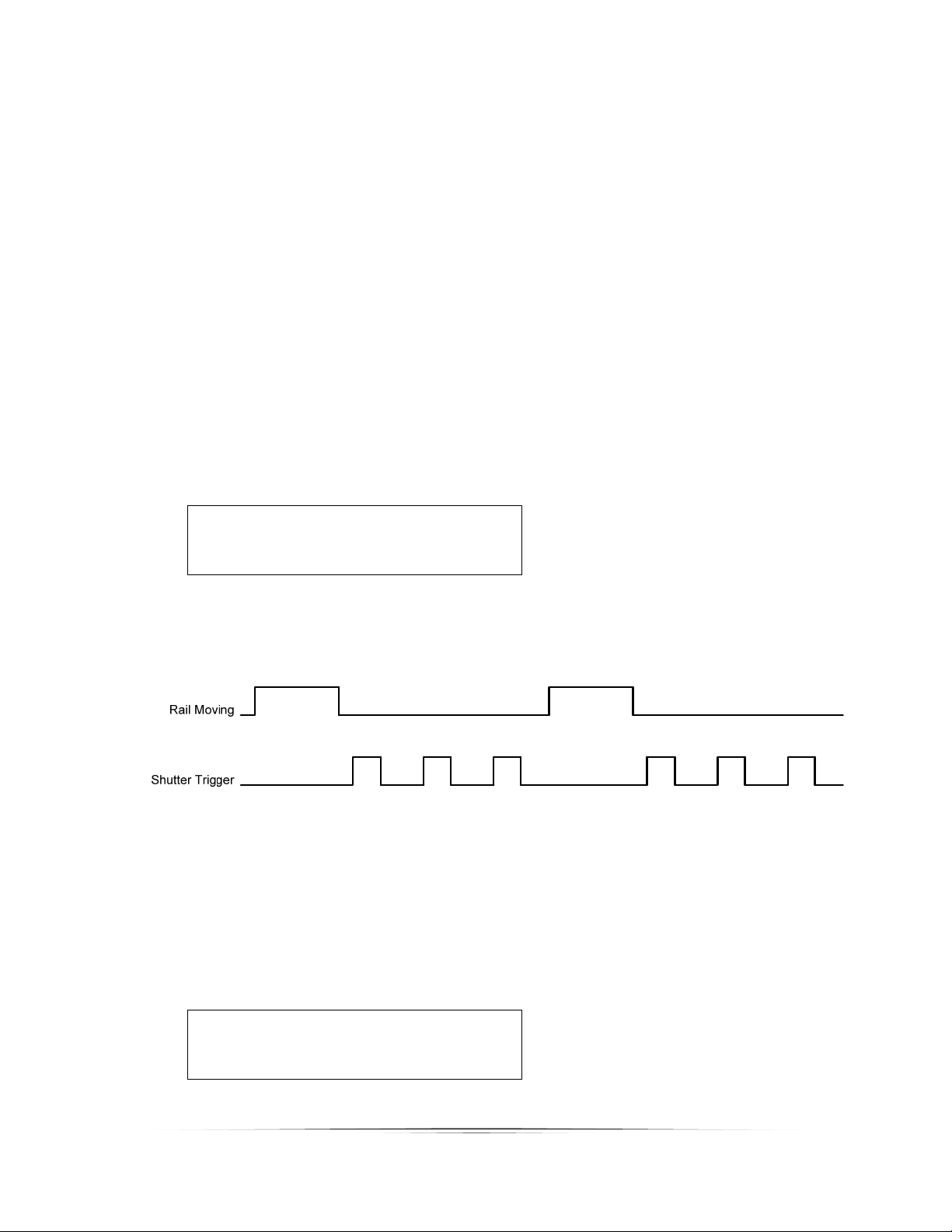
StackShotdefaultstoone pictureperstep.Youmay,however,increasethenumberof
pictures(“#pics”)takenateachstep.Thisgivesyoutheoptionofdoingexposure
bracketing,mirrorlockup,orothercameraeffects.Validvaluesarefrom1–1000.Thisis
notthetotalnumberofpicturestaken–justhowmanyateachstep.
== Global Config ==
> # pics: 1
Tsettle: 500.0 ms
Toff: 500.0 ms ->
SeeFigure2belowforatimingdiagramwith“#pics”setatthree.
Figure2‐PicturesperStep
3.3.2 SettleTime
AfterStackShotfinishesmoving,itmaybedesirabletohaveitwaitforthemotor
assembly/camera/tripodtostopmovingpriortotakingapicture.Youmayadjustthis
settlingtime(“Tsettle”)toforcethedesireddelay.
== Global Config ==
# pics: 1
Tsettle: 500.0 ms
Toff: 500.0 ms ->
>