StackShotManual_1_5.pdf - 第9页
9 Figure 3 below shows where the settling time takes place. Figure 3 ‐ Settle Time 3.3.3 Time Off Between Pictures Time off (“ Toff ”) is the time between…
8
3.3 GlobalConfiguration
ToenterStackShot’sGlobalConfiguration,quicklypressandreleasetheCONFIGbutton.The
displaywillchangeandlisttheavailableuserconfigurations.Toreturntothemainscreenpress
theCONFIGbuttonagain.Thedifferentconfigurationoptionsarediscussedbelow.Allof
thesesettingsaremaintainedwhenusingthe“Load/SaveSettings”option.Thisprovides
maximumflexibilityand easeofuse.Thelastsettingsusedarealsoretainedoverapowercycle
foryourconvenience.
3.3.1 PicturesperStep
StackShotdefaultstoone pictureperstep.Youmay,however,increasethenumberof
pictures(“#pics”)takenateachstep.Thisgivesyoutheoptionofdoingexposure
bracketing,mirrorlockup,orothercameraeffects.Validvaluesarefrom1–1000.Thisis
notthetotalnumberofpicturestaken–justhowmanyateachstep.
== Global Config ==
> # pics: 1
Tsettle: 500.0 ms
Toff: 500.0 ms ->
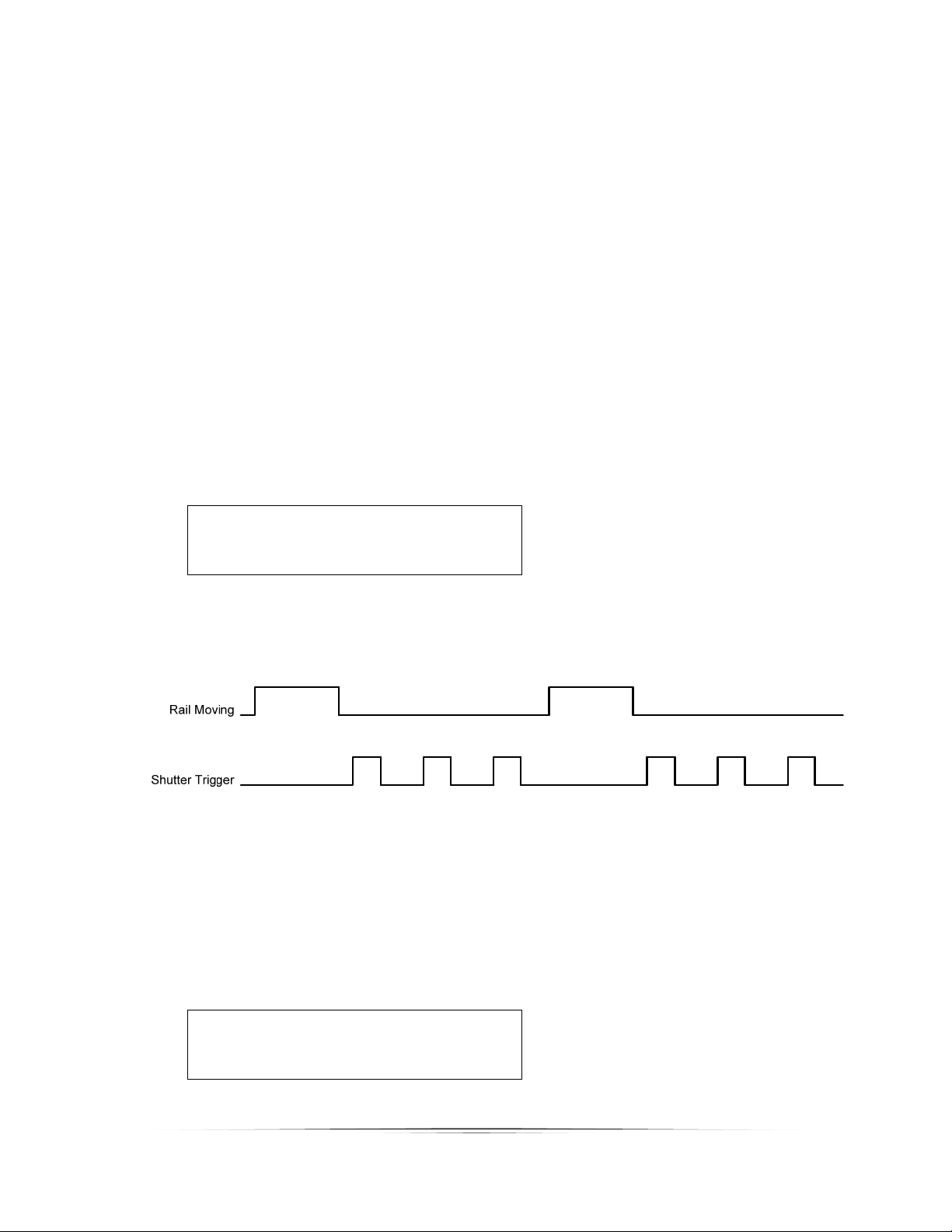
SeeFigure2belowforatimingdiagramwith“#pics”setatthree.
Figure2‐PicturesperStep
3.3.2 SettleTime
AfterStackShotfinishesmoving,itmaybedesirabletohaveitwaitforthemotor
assembly/camera/tripodtostopmovingpriortotakingapicture.Youmayadjustthis
settlingtime(“Tsettle”)toforcethedesireddelay.
== Global Config ==
# pics: 1
Tsettle: 500.0 ms
Toff: 500.0 ms ->
>
9
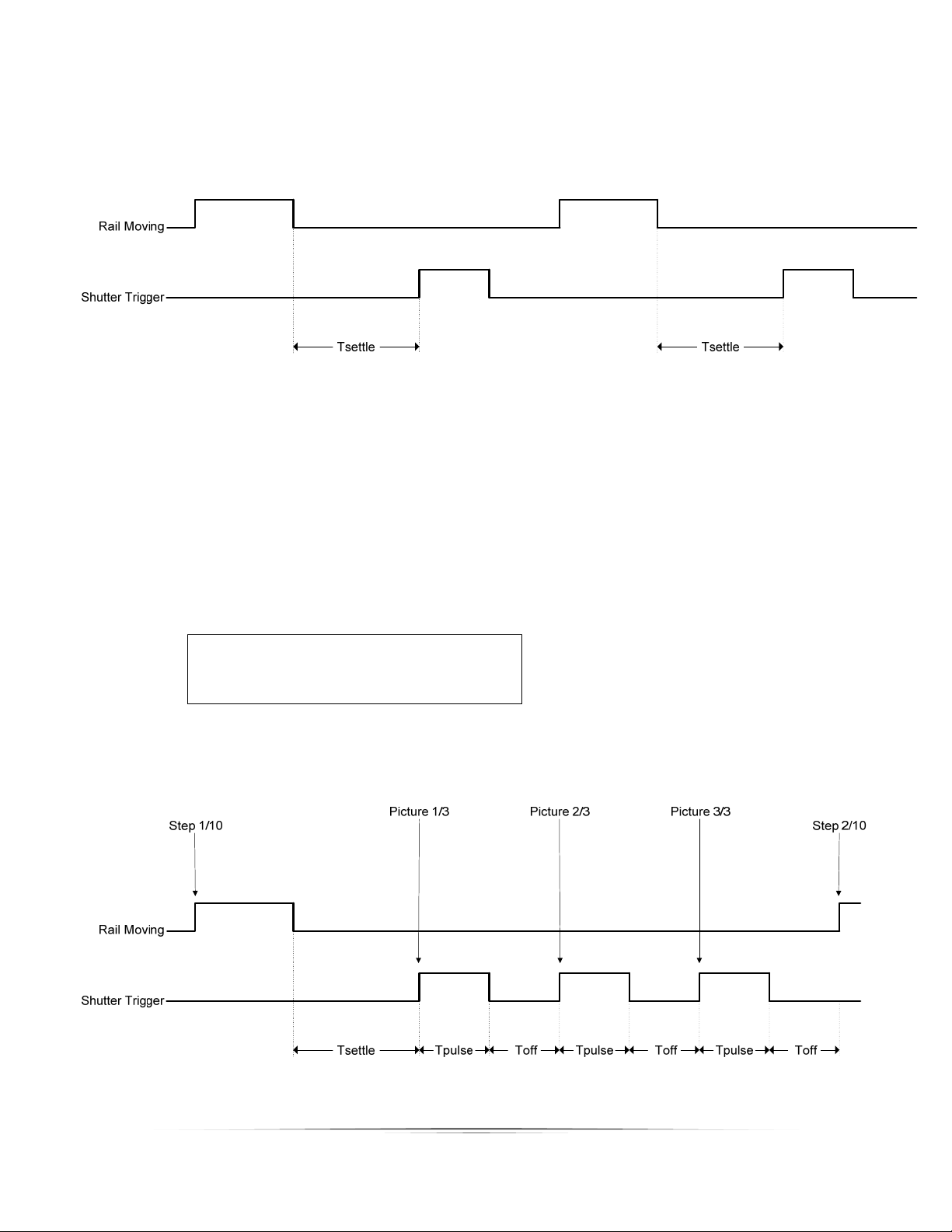
Figure3belowshowswherethesettlingtimetakesplace.
Figure3‐SettleTime
3.3.3 TimeOffBetweenPictures
Timeoff(“Toff”)isthetimebetweenmultiplepictures.Thisonlyapplieswhenthenumber
ofpictures(“#pics”)isgreaterthanoneunlesstheoperatingmodeissetto“Continuous”.
In“Continuous”mode,“Toff”isthetimebetweenpictures.
== Global Config ==
# pics: 3
Tsettle: 500.0 ms
Toff: 500.0 ms ->
>
Seebelowtodemonstratewhere“Tsettle”,“ Toff”,and“Tpulse”allcomeintoplaywhen
takingmultiplepictures.
Figure4‐TotalTimingDiagram

10
3.3.4 Loading/SavingSettings
StackShotautomaticallysavesthelastsettingsused,butsometimesitismoreconvenientto
savedifferentconfigurationsfordifferentsetups(oneconfigurationforinsects,forflowers,
orevenspecificlenses).Toloadorsavethesettings,presstheSELECTbuttonuntilthe
cursorisnextto“Load/SaveConfig”and presstheUPorDOWNbuttontoenterthenext
screen.
== Global Config ==
> Load/Save Settings
Auto Return: No
Speed: 800 mils/sec ->
Fromthisscreenyouhavetwooptions–toeitherloadorsavetheconfiguration.Pressthe
SELECTbuttontochangebetweenthetwooptions.Underthe“Load”screen,youwillsee
thefollowing:
== Load Config ==
1. <empty>
Up/down to select.
UsingtheUPorDOWNbuttons,youcanscrollthroughthetenavailableconfigurationsto
retrieve.Iftheyhaveneverbeenloadedwithaconfigurationbeforeitwillsho wupas
“empty”otherwiseitwillshowthenameyouhadpreviouslysaved.Onceyouhave
highlightedthedesiredconfigurationtoload,presstheSELECTb utton.Thiswilltakeyouto
themainscreenforthisconfiguration.Youcanaborttheloadingscreenbysimplypressing
theCONFIGbutton.
Theprocessissimilarforsavingaconfiguration.Once“Save”isselected,youwillseethe
followingscreen:
== Save Config ==
1. <empty>
Up/down to select.
UsetheUPorDOWNbuttonstoselectwhichconfigurationyouwouldliketosave.Youcan
overwritepreviouslystoredconfigurations.Oncethedesiredconfigurationisselected,
presstheSELECTbutton.Atthispointyoucanente raname.Thecursorunderlinesyour
currentposition.TheUPandDOWNbuttonsmaybeusedtochangethecharacters.Each
timeSELECTispresseditwilltakeyoutothenextcharacterposition.Keeppressingselect