M2series_ServiceManual_e.pdf - 第48页
3 Mechanical Section 3-16 Nozzle Recognition Stickers Labeling a Nozzle ID Sticker to a Nozzle ACTION: ① From the surface to which the sticker is to be affixed, remove oil, dust and water content complete ly using indust…
3 Mechanical Section
3-15
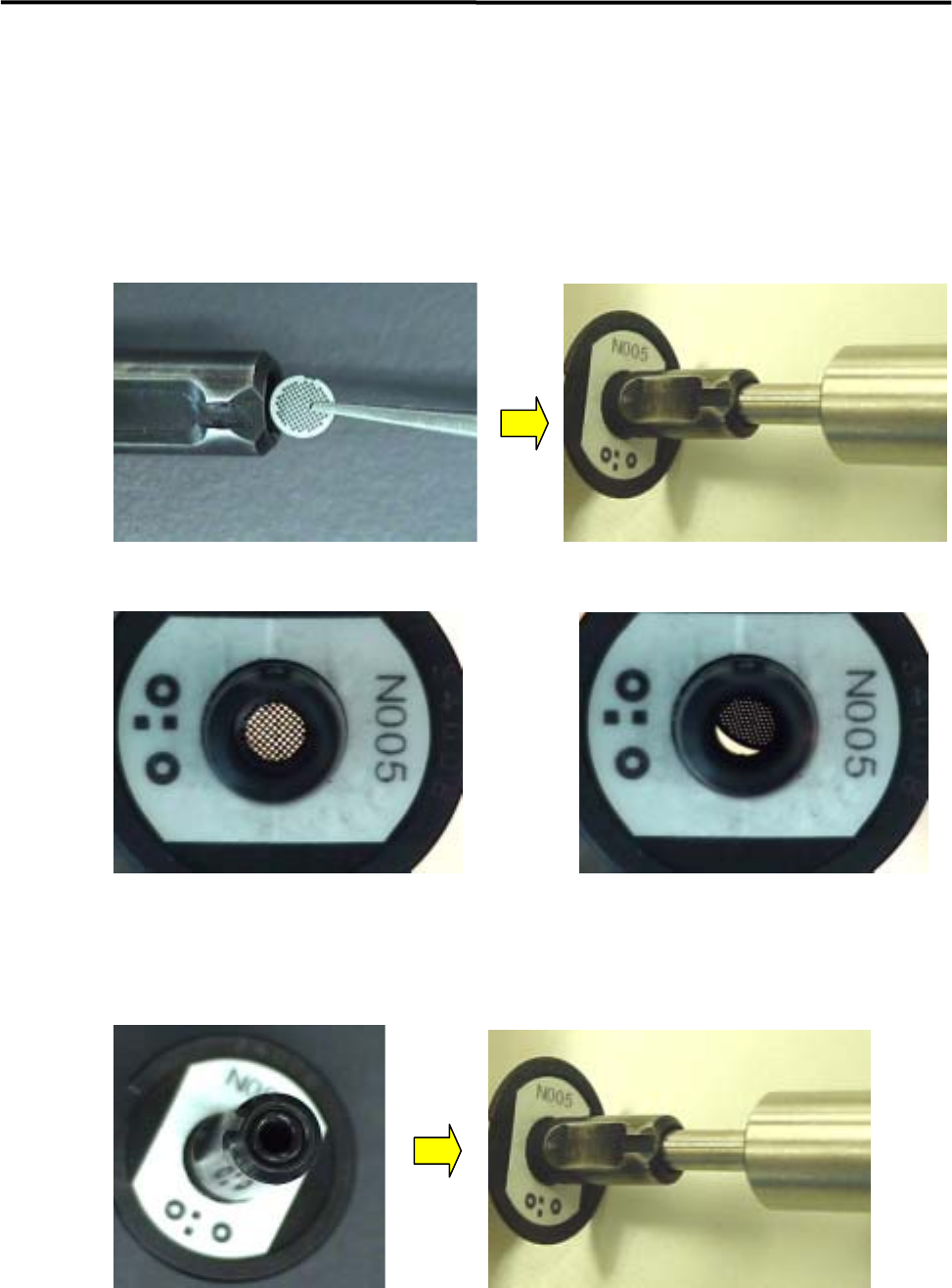
■ Attaching O-ring and Nozzle Filter
ACTION:
① Insert the filter with tweezers and adjust the position of the filter using the O-ring insertion jig.
Correct Incorrect
② Set the O-ring at the tip of the nozzle
③ Push the O-ring slowly using the O-ring insertion jig to the bottom of the nozzle
④ Remove the jig slowly.
⑤ Check that the filter and the O-ring have been set in place correctly.
)
Checking the nozzle for clogging
3 Mechanical Section
3-16
Nozzle Recognition Stickers
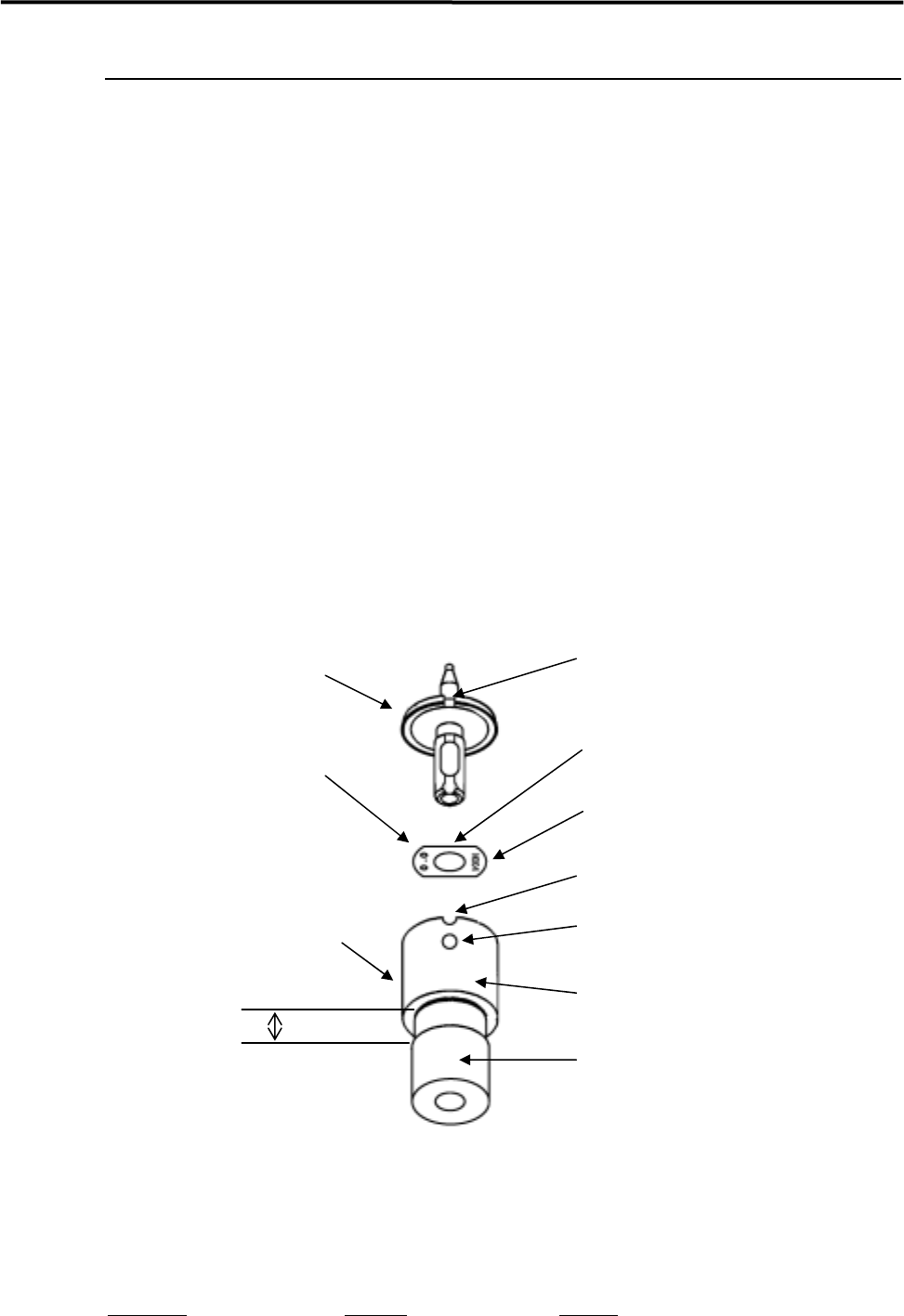
Labeling a Nozzle ID Sticker to a Nozzle
ACTION:
① From the surface to which the sticker is to be affixed, remove oil, dust and water content
completely using industrial alcohol.
② Pull out the shaft of the nozzle sticker tool approx. 3mm from the ring.
③ Peel the sticker from the paper using tweezers.
④ Place the sticker with its adhesive side up, and then put it in the jig (make sure that the D-cut on
the sticker is aligned with that on the ring). (The sticker must be angled so that the nozzle ID no.
is oriented as illustrated below.) Take care not to touch the adhesive surface with fingers.
⑤ Push the nozzle into the shaft. Make sure that the nozzle’s notch is aligned with the positioning
slot on the ring.
⑥ While pressing the nozzle’s rim, push the shaft into the ring so that the sticker is affixed onto the
nozzle.
⑦ Check that the sticker touches the bottom of the ring.
Notch
Nozzle
D-cut
Nozzle ID sticker
ID No. (N***)
Positioning slot
Positioning pin
Nozzle ID sticker tool
Ring
Shaft
3mm
NOTE: If the shaft is pulled out of the ring too much, it may come off. If it comes off, align the shaft’s slot with the
ring’s positioning pin and then insert the shaft into the ring slowly.
Part Name
Part No. Remark
ID SEAL TOOL, ASSY. LC1-M8903-00X ID sticker tool

3 Mechanical Section
3-17
Cleaning Nozzle Recognition Stickers
Dirt on nozzle ID/presence stickers can be a cause of vision recognition failure. Regularly clean the nozzle
ID/presence stickers.
ACTION:
① Clean the sticker with cotton swab soaked with alcohol.
② Wipe off the remaining alcohol on the sticker with dry cotton swab.
NOTE: Particularly the nozzle ID stickers are liable to get dirty. If a nozzle ID sticker becomes too dirty to be
cleaned, replace it with new one.
For the part No. for the nozzle ID sticker, refer to “5. Materials”.
NOTE: The nozzle ID/presence stickers are easily peeled off when they get wet. Be sure to dry them with cotton
swab whenever they get wet.