00197975-06_UM_TX-Serie_EN.pdf - 第226页
5 Tasks at the placement machi ne User manual SIPLACE TX-Series 5.1 Staff profiles From software version 713.0 Edition 01/2020 226 5.1.3 Operator level " Service (customer)" 5.1.3.1 T asks The servic e personne…
User manual SIPLACE TX-Series 5 Tasks at the placement machine
From software version 713.0 Edition 01/2020 5.1 Staff profiles
225
– Splicing materials:
– Splicing plates (4000), item no. 00318671-xx
– SMD tape connector 4.3 mm (4000), item no. 00356343-xx)
– SMD tape connector 16 mm (1000), item no. 00356344-xx)
– Erasers or fiberglass pens to remove fiducials
– Indelible pens for marking the tracks
– Vacuum cleaner with suitable nozzle
5.1.2 Operator level "Advanced production"
5.1.2.1 Tasks
The line engineers should be assigned the following tasks:
– Acting as a contact for the operators
– Managing the logbook
– Monitoring and carrying out preventive maintenance at the specified intervals
– Monitoring the workplace to ensure that it is clean and safe
– Monitoring conformity with ESD regulations
– Carrying out quality control
– Following up and reporting fault messages
– Making sure that errors have been eliminated
– Providing all materials required to produce the job in a timely manner, such as
–PCBs
– splicing materials
– Soldering paste
– Components
– Feeder modules, etc.
– Setting up the station for a new production batch
– Checking the feeder module settings:
– Increment
– Pickup position
– Checking the management data from OIS or SIPLACE Explorer
– Asking the responsible programmers to modify placement programs
– Ensuring a smooth flow of information between the individual groups
5 Tasks at the placement machine User manual SIPLACE TX-Series
5.1 Staff profiles From software version 713.0 Edition 01/2020
226
5.1.3 Operator level "Service (customer)"
5.1.3.1 Tasks
The service personnel's duties include:
– Major preventive maintenance jobs
– Mounting replacement parts
– Editing the placement machine data
– Calibrating the placement machine
User manual SIPLACE TX-Series 5 Tasks at the placement machine
From software version 713.0 Edition 01/2020 5.2 Controls and displays
227
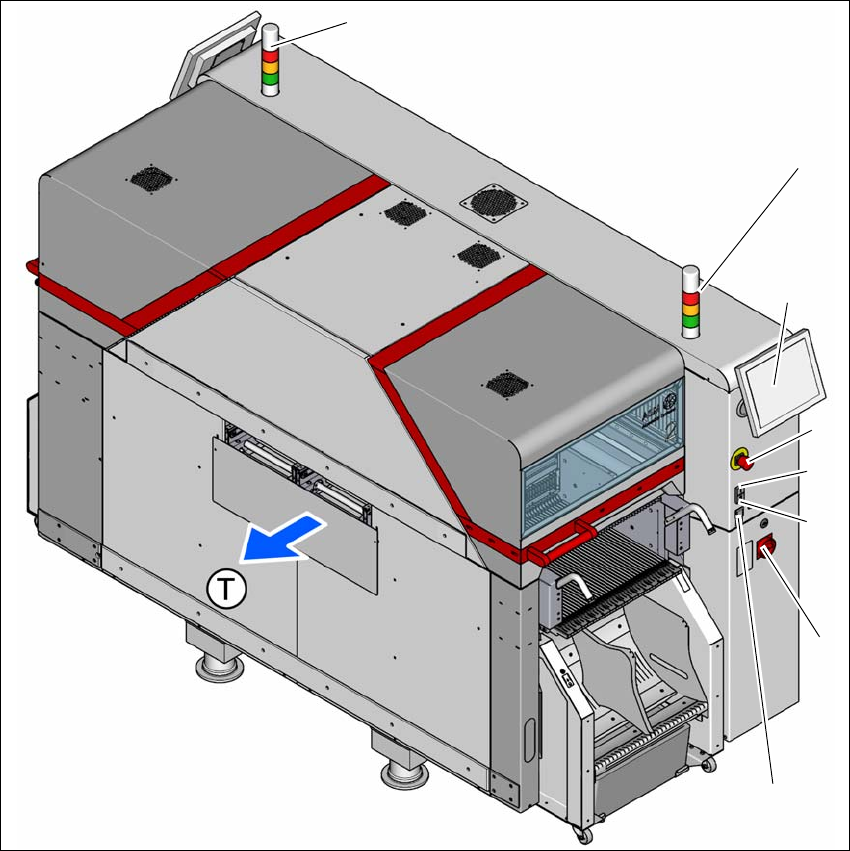
5.2 Controls and displays
5.2.1 Overview
5
Fig. 5.2 - 1 Controls and displays (location 2)
5
(1) Multitouch monitor (5) Main switch
(2) EMERGENCY STOP button (6) Button for docking and undocking the
component trolley
(3) Start button (white) (7) Indicator lamps with horn
(4) Stop button (black) (T) Direction of PCB transport
(6)
(2)
(4)
(3)
(1)
(7)
(7)
(5)