00197975-06_UM_TX-Serie_EN.pdf - 第235页
User manual SIPLACE TX-Series 5 Tasks at the placement machine From software version 713.0 Edition 01/2020 5.5 The user interfac e 235 5.5.1 St atus field The status field sh ows the curre nt placement machine status, th…
5 Tasks at the placement machine User manual SIPLACE TX-Series
5.5 The user interface From software version 713.0 Edition 01/2020
234
5.5 The user interface
The user interface is divided into the following areas.
5
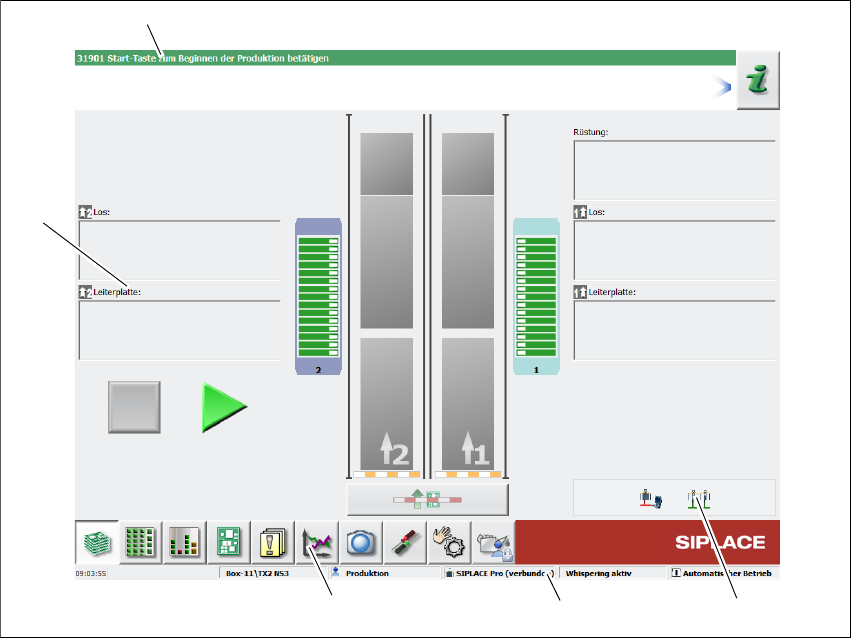
Fig. 5.5 - 1 Components on the user interface (example)
Legend
(1) Status field (status and error display)
(2) Processing area / display area
(3) Toolbar
(4) Information line
(5) View of changed configurations and additional options
(1)
(2)
(3)
(4)
(5)
User manual SIPLACE TX-Series 5 Tasks at the placement machine
From software version 713.0 Edition 01/2020 5.5 The user interface
235
5.5.1 Status field
The status field shows the current placement machine status, the error which occurred most re-
cently and the action to be performed.
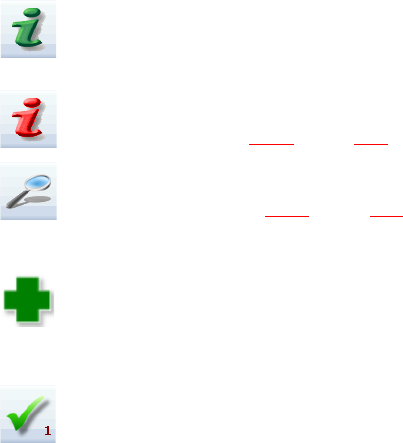
The right-hand side of the status field shows the status with the following icons:
(Green) Starts the context-sensitive Online Help function for the current view. All operating con-
trols for the current view are explained
(Red) Starts the help system, showing the possible causes of the current errors and suitable solu-
tions (see section 5.6.1
, page 243).
Opens a dialog box in which the error source, error message text and the error date with time are
shown (see section 5.6.1
, page 243). The help function for the current error can also be opened
from here.
Opens a detailed view for the current error. Troubleshooting measures can be directly opened
from this view (only shown for certain error messages).
Deletes the error currently shown from the status field.
5.5.2 Display and processing area
This area shows the buttons for setting/deleting functions, general information about the board,
setup, recipes and other information.
Animated and color-coded items helps explain processes or states (e.g. editing, empty location
etc.).
For an overview of all buttons and information, refer to the Online Help.
5 Tasks at the placement machine User manual SIPLACE TX-Series
5.5 The user interface From software version 713.0 Edition 01/2020
236
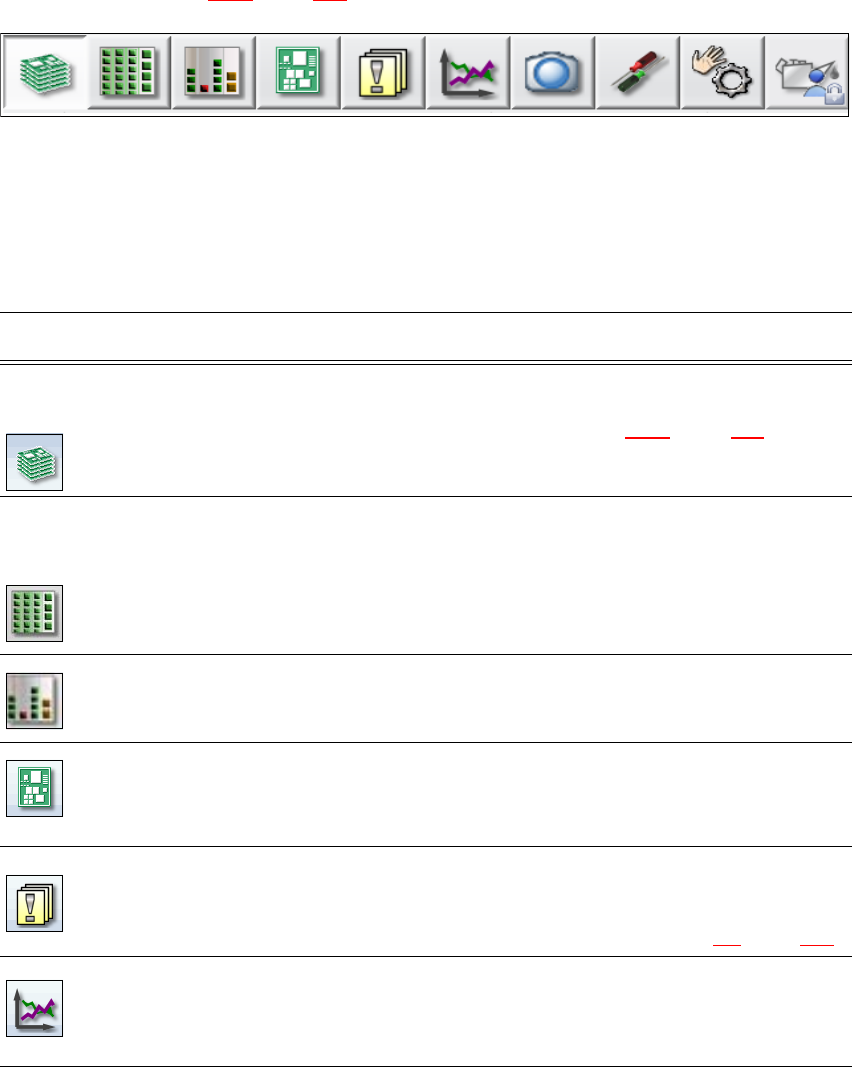
5.5.3 Toolbar
The toolbar contains buttons for the main station software functions.
These enable you to switch the user interface over to other views and to use the functions avail-
able there (see section 5.5.5
, page 240).
5
Fig. 5.5 - 2 Toolbar
The buttons vary according to your individual configuration and the operator level set. Some views
are only available in higher operator levels.
The following table briefly describes the buttons and main functions.
5
Icon View Description
Production
(main view)
Shows the placement machine status for the most frequently
performed tasks during production.
Shows the operating states, see section 5.5.2
, page 235.
Shows locations, name of setup, name of recipe, configuration
changes and additional options.
Feeder modules,
components and
nozzles
The setup can be individually opened for each of the 4 locations.
Allows you to check and configure feeder modules, components
and nozzles.
Allows you to teach component shapes and component pocket
shapes.
Shows the component level indicator.
Filling level view During placement, the operator is shown at all times when the
individual feeders will run empty and need to be filled up again.
PCBs Shows the boards and placement positions list.
Allows you to check and configure boards and components.
Allows you to teach fiducials.
Notifications Shows notifications about current and previous events. The notifi-
cations vary according to their type. Individual tables can be viewed
for track errors, conveyor errors, placement machine errors, gen-
eral errors and linked error messages (see section 5.6
, page 242).
Statistics Shows the statistics for performance, quality and rejected material.
Shows the placement machine and board performance.
Starts the OIS (Operator Information System), for more information
refer to the OIS documentation.