00197975-06_UM_TX-Serie_EN.pdf - 第296页
6 Station extensions User manual SIPLACE TX-Series 6.1 Nozzle changer From software version 713.0 Edition 01/2020 296 6.1.4.3 Configuration example with SIPLACE T winSt ar Location 1 can accomm odate a nozzle changer wit…

User manual SIPLACE TX-Series 6 Station extensions
From software version 713.0 Edition 01/2020 6.1 Nozzle changer
295
6.1.4.2 Technical data
6
Nozzle changer for the SIPLACE TwinStar
Number of magazines
Location 1 6 Max. 8 magazines for max. 16 nozzle garages
Number of nozzle holders may be freely configured
Standard configuration 3 magazines with two nozzle garages each
1 magazine with one nozzle garage
Nozzle types 4 xx with adapter
5xx (standard)
9 xx with adapter
Special nozzle, gripper
6 Station extensions User manual SIPLACE TX-Series
6.1 Nozzle changer From software version 713.0 Edition 01/2020
296
6.1.4.3 Configuration example with SIPLACE TwinStar
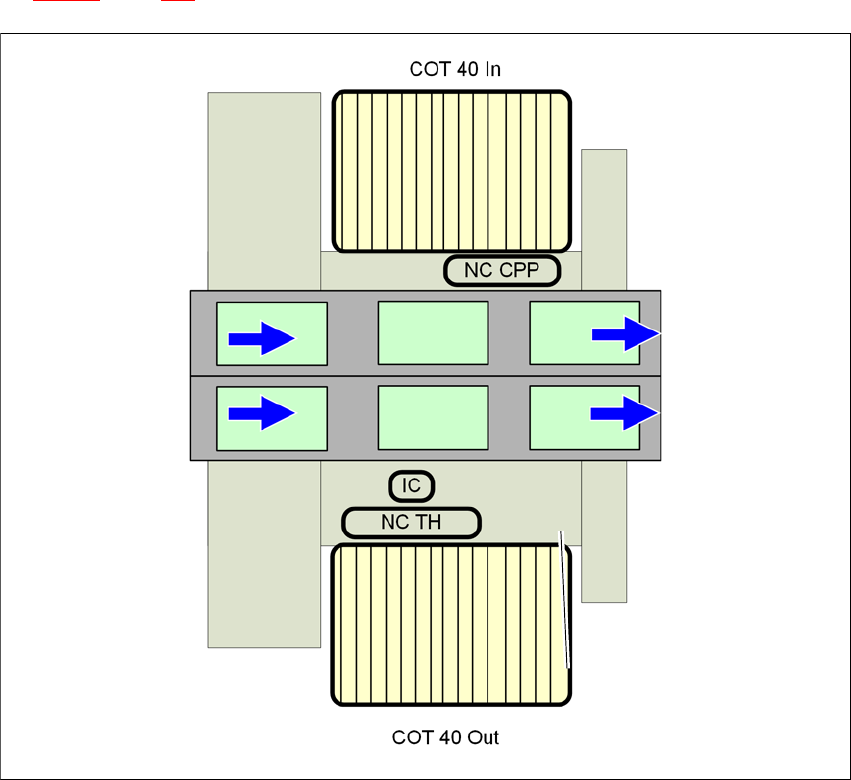
Location 1 can accommodate a nozzle changer with eight magazines for the TwinStar (item 1 in
fig. 6.1 - 13
, page 296).
6
Fig. 6.1 - 13 Position of nozzle changer for the TwinStar - configuration example of SIPLACE TX2
6
NC CPP
Nozzle changer for the CPP with 4 magazines
COT 40 In
Component trolley in the innermost position
COT 40 Out
Component trolley in the outermost position
IC
Stationary camera
NC TH
Nozzle changer for the TwinStar
User manual SIPLACE TX-Series 6 Station extensions
From software version 713.0 Edition 01/2020 6.1 Nozzle changer
297
6.1.4.4 Assembly
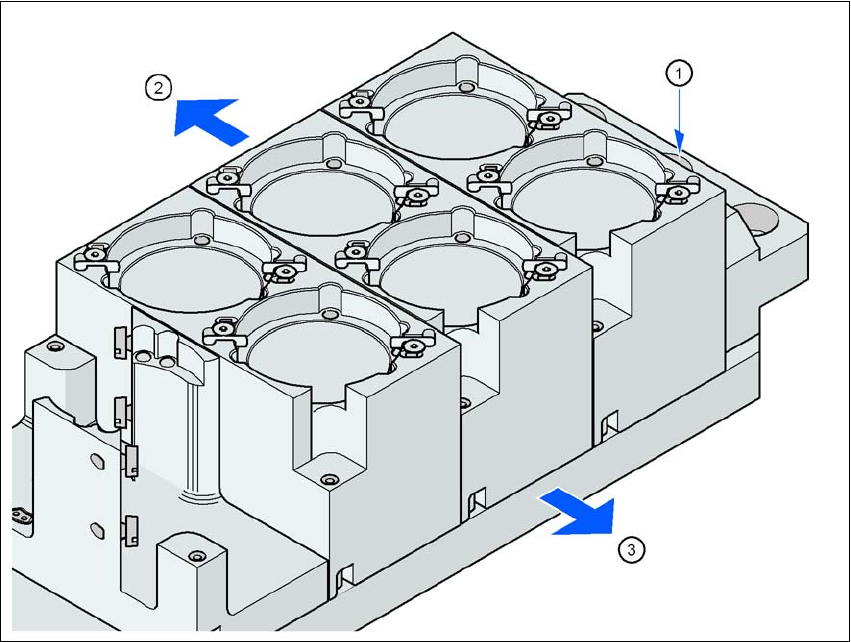
The nozzle changer is fixed to the COT insert.
6
Fig. 6.1 - 14 Assembly position
(1) Marking hole
(2) Operator side
(3) Arrow pointing toward the PCB conveyor
6
Align the nozzle changer so that the marking hole (item 1) is on the left, as viewed by the op-
erator.