00192809-01 - 第38页
3 Assembling and installing User Manual V 1.15 - Productivity Lift 3.4 Installation / Reinstallation of emergency conv eyor Software version V 40.1 1 Edition 01/2001 30

User Manual V 1.15 - Productivity Lift 3 Assembling and installing
Software version V 40.11 Edition 01/2001 3.4 Installation / Reinstallation of emergency conveyor
29
6WRSRIHPHUJHQF\FRQYH\RU
7RVWRSWKHHPHUJHQF\FRQYH\RUWKHSURFHGXUHGHVFULEHGDERYHKDVWREHPDGHWKHRWKHU
ZD\URXQG
1. By pushing the "stop" cursor the corresponding conveyor is put into stand-by mode.
2. Through "ALT" cursor the adjustment mode comes up.
3. Through the "Enter" cursor the menu comes up on the display which shows "PCB takeover"
comes up and you can chose the adjustment as used before the emergency conveyor (see
chapter "6.3").
4. Use the "enter" cursor. The menu "PCB transfer" comes up. Here it is the same procedure as
described in point 3 (see chapter "6.6").
5. Another use of the "enter" cursor brings up the menu "PCB pass-through". In this menu the
emergency conveyor can be switched off by choosing the adjustment "switched off" (see chap-
ter "6.7"). This change can be taken over with the "enter" cursor.
6. The adjustment mode can be quit with the "stop" cursor.
The device can be started with the "start" cursor. After an initialising time the device is ready for
operation.
127(
Pay attention that the changes made in chapter 6.3 and 6.6 are set back to the adjustments as
before activated.
3 Assembling and installing User Manual V 1.15 - Productivity Lift
3.4 Installation / Reinstallation of emergency conveyor Software version V 40.11 Edition 01/2001
30
User Manual V 1.15 - Productivity Lift 4 The function keys
Software version V 40.11 Edition 01/2001
31
7KHIXQFWLRQNH\V
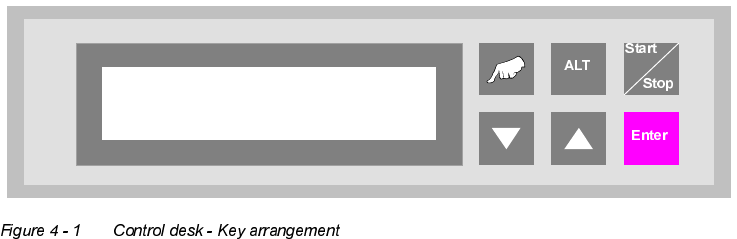
7KHNH\VRIWKH&$13FRQWUROGHVNDUHDUUDQJHGDVIROORZV
"Hand" : Calls up the test operation functions.
"▲" and "ALT" : Call up the configuration menu.
"ALT" : Calls up the parameter menu.
"Start / Stop" : Starts the automatic operating mode and switches to the stand-by mode.
"▼" : Cursor key to scroll downwards in the selection menus.
"▲" : Cursor key to scroll upwards in the selection menus.
"Enter" : This is used to confirm modified settings and proceed to the next input menu
within the menus. Acknowledgement of alarm signals.
Prod. Lift
V 40.1x