00192809-01 - 第39页
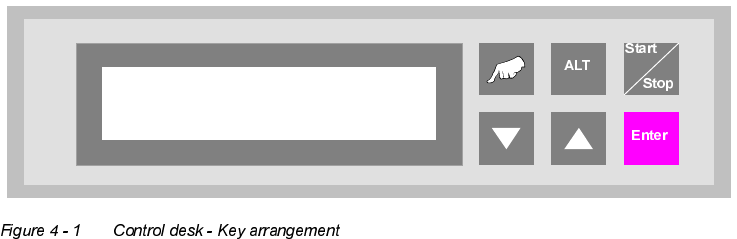
User Manual V 1.15 - Productivity Lift 4 The funct ion keys Software version V 40. 1 1 Edition 01/2001 31 7KHIXQFWLRQNH\V 7KHNH\VRIWKH&$ 13FRQWUROGHVN DUHDUUDQJHGDVIROORZV "Hand" : Calls u…
3 Assembling and installing User Manual V 1.15 - Productivity Lift
3.4 Installation / Reinstallation of emergency conveyor Software version V 40.11 Edition 01/2001
30
User Manual V 1.15 - Productivity Lift 4 The function keys
Software version V 40.11 Edition 01/2001
31
7KHIXQFWLRQNH\V
7KHNH\VRIWKH&$13FRQWUROGHVNDUHDUUDQJHGDVIROORZV
"Hand" : Calls up the test operation functions.
"▲" and "ALT" : Call up the configuration menu.
"ALT" : Calls up the parameter menu.
"Start / Stop" : Starts the automatic operating mode and switches to the stand-by mode.
"▼" : Cursor key to scroll downwards in the selection menus.
"▲" : Cursor key to scroll upwards in the selection menus.
"Enter" : This is used to confirm modified settings and proceed to the next input menu
within the menus. Acknowledgement of alarm signals.
Prod. Lift
V 40.1x
4 The function keys User Manual V 1.15 - Productivity Lift
Software version V 40.11 Edition 01/2001
32