ThermoFlex-Manual.pdf - 第111页
Section 8 ThermoFlex 8-9 Thermo Scientific If you ha ve any questions please contact Ther mo Fisher Scientic's Sales, Ser vice and Customer Suppor t. Figure 8-5 Flow T ransducer (FLo) Calibration indicates the contr…
Section 8
8-8 ThermoFlex
Thermo Scientific
Optional Process Fluid
Flow Transducer (FLo)
Calibration
The ThermoFlex has been designed to minimize the need for calibration.
However, if calibration is desired or recommended by our Sales, Service
and Customer Support, please use the following procedure.
This procedure requires a running chiller, a calibrated reference owmeter
and an external ow control valve.
Connect a calibrated reference owmeter to the outlet line. Using an
external ow control valve, increase the ow to a suitable high-end
calibration point. Ensure the ow is stabilized.
To enter the Calibration Loop ensure the controller display is displaying the
process uid temperature, see the diagram on the next page. Press and hold
the and then press the key. The display will indicate CAL.
Press the key and the controller will display rtd1. Press
until the controller displays FLo. Press and the controller will ash
between HiFLo and the ow rate.
Use to adjust the rate to match the reference owmeter.
Press the key to accept the value.
Decrease the ow to a suitable low-end calibration point (avoid a zero ow
rate). Ensure the ow is stable.
The controller will ash between LoFLo and the ow rate. Use to
adjust the rate to match the reference owmeter.
Press the key and StorE is displayed, press to save both
values, press to not save them.
Note After pressing the button at the StorE prompt wait
several seconds before proceeding to ensure that a bad calibration message
(Er 16) does not appear. Premature use of the keypad after pressing
may cancel the bad calibration error message.
Section 8
ThermoFlex 8-9
Thermo Scientific
If you have any questions please contact Thermo Fisher Scientic's Sales,
Service and Customer Support.
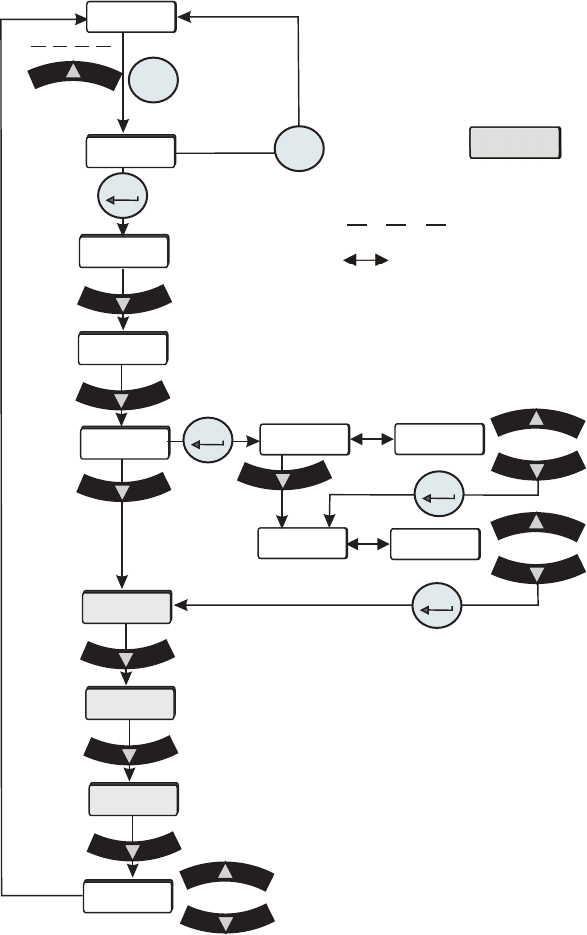
Figure 8-5 Flow Transducer (FLo) Calibration
indicates the controller display is alternating
between the two displays.
indicates press and hold.
xx.x C
mode
rtd1
PrES1
Flo
r rtd
A in
Aout1
CAL
enter
StorE
xx.x
xx.x
xx
xx
HiFLo
LoFLo
enter
enter
enter
mode
Shaded displays only appear on
chillers equipped with that option.
Save calibration
Do not save calibration
Section 8
8-10 ThermoFlex
Thermo Scientific
enter
enter
SEtuP
mode modemode
diA9
mode
mode
SP
mode
Press within 10 seconds
FLtrS
StEPS
0
enter
voLtS
xx.x
Beep
SEr1
Clearing SEr1
Message
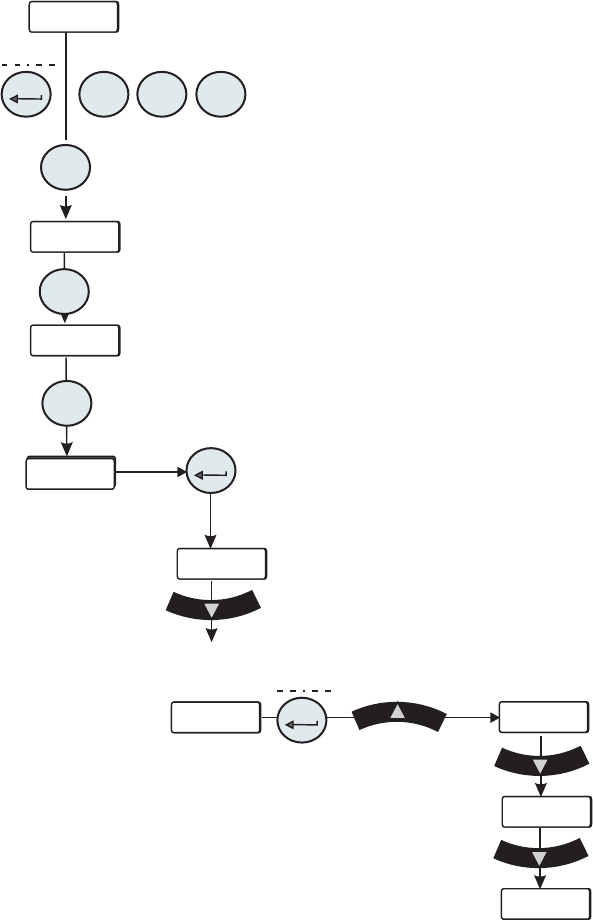
Press the down arrow (approximately 11 times)
until StEPS is displayed.
Press and hold enter and then press the up arrow,
the display will show 0.
Press the down arrow to return to the temperature
display.
With SEr1 ashing press and hold enter and then
press mode three times, the controller should beep.
Press the mode key until diA9 is displayed. Press
enter.