ThermoFlex-Manual.pdf - 第120页
Thermo Scientific C-4 ThermoFlex Appendix C Thermo Scientific Thermo Scientific T able 1 Configurable Relay #1 (CodE1) Error Error Code Factory Default Low Level (option) LLF Enable 1 (Default) T ank Overflow o FLo Disable 2 …
Thermo Scientific
Appendix C
ThermoFlex C-3
Thermo Scientific
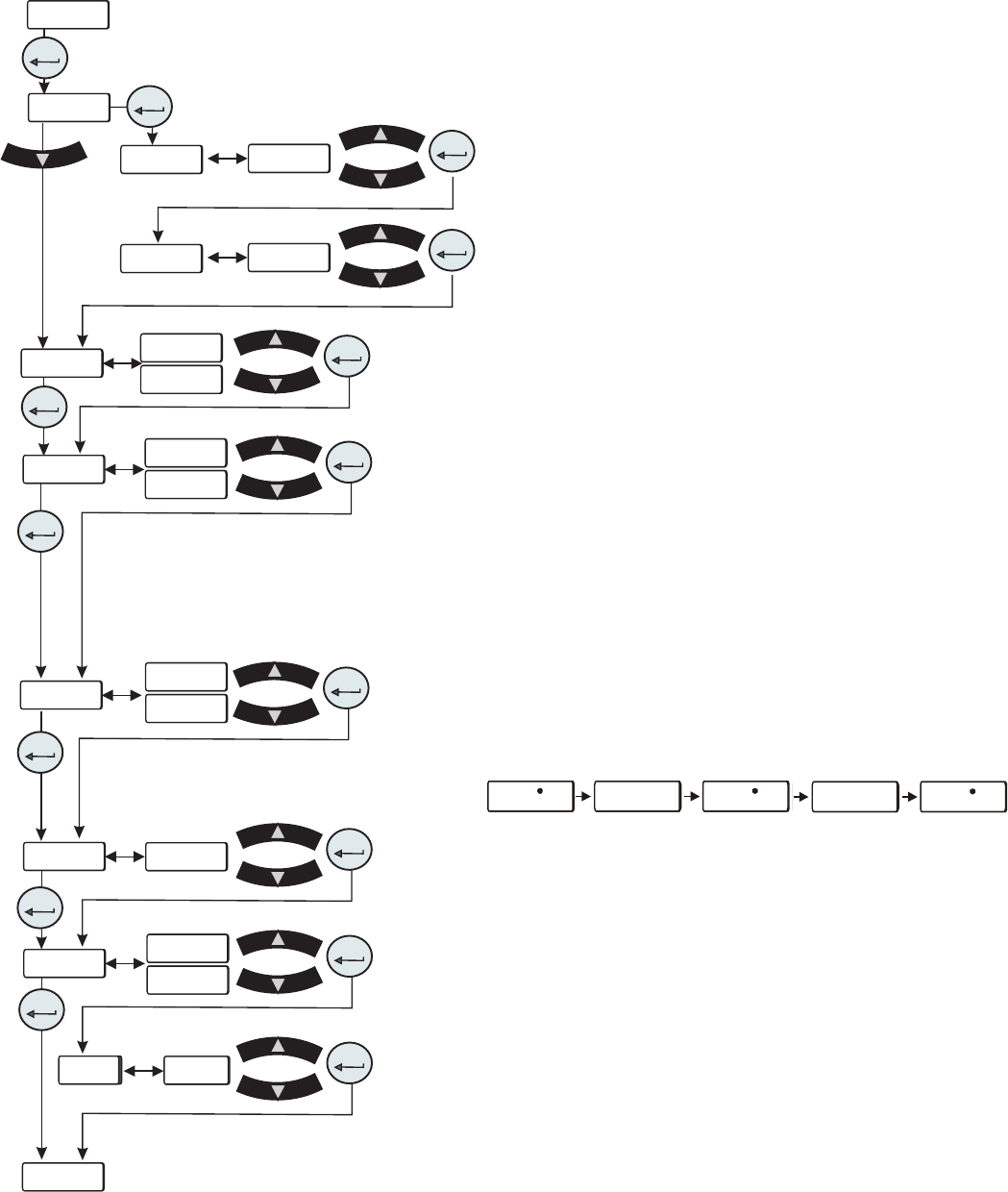
• rELAY is used to congure relay 1 (CodE 1) and
relay 2 (
CodE 2), see Tables 1 and 2 on the next page.
For example: To have just the drip pan, 4, and low
temp, 8, error faults enabled for relay 1 you would
enter their sum, 12, at the
CodE 1 display. To have the
tank overow, 2, the low temp, 16, and high pressure,
1024, error faults enabled for relay 2 you would enter
their sum, 1040, at the
CodE 2 display.
This display depends on your chiller
configuration, see Section 4.
Figure C-2 Analog I/0 Loop
xx. x Cxx. x C xx. x C
xx. x Cxx. x C xx. x C
• r rtd is used to enable/disable the remote temperature
sensor. See Table 3 for pin out information.
Note There is no other indication on the chiller that the
remote sensor is enabled.
• r.Start is used to enable/disable the remote start/stop.
Note Enabling analog I/O remote start/stop disables
the chiller’s local controller start/stop capability. Enabling
analog I/O remote also overrides serial communications
start/stop commands.
• r SEt is used to enable/disable the remote setpoint.
Note When remote setpoint is enabled a ashing dot will
appear on the controller's display as shown below.
• AnAin is used to congure the analog voltage input type.
Type 1: 0 - 10 VDC (Default)
Type 2: 10 mV/°C
Type 3: 4 - 20 mA
• dAC is used to enable/disable the digital to analog
converter. Once enabled, the desired output type can be
selected.
Note The Type display only appears if dAC is set to on.
Type 1: 0 - 10 VDC (Default)
Type 2: 10 mV/°C
Type 3: 4 - 20 mA
rELAY
CodE 1
CodE 2
enter
enter
xx
xx
xxxxx
xxxxx
enter
enter
r rtd
r.Start
r SEt
AnAin
dAC
dAC
----
xx
xx
xx
xx
xx
xx
xx
xx
xx
xx
OFF
OFF
OFF
OFF
on
on
on
on
tYPE1
tYPE1
enter
enter
enter
enter
enter
enter
enter
enter
enter
enter
enter
OPt

Thermo Scientific
C-4 ThermoFlex
Appendix C
Thermo Scientific
Thermo Scientific
Table 1 Configurable Relay #1 (CodE1)
Error Error Code Factory Default
Low Level (option) LLF Enable 1 (Default)
Tank Overflow o FLo Disable 2
Drip Pan Full (option) driP Disable 4
Low Temp Lo t* Disable 8
High Temp Hi t* Disable 16
Low Flow (option) LoFLo* Enable 32 (Default)
High Flow (option) HiFLo* Disable 64
Low Resistivity (option) Er 28* Disable 128
High Resistivity (option) Er 30* Disable 256
High Pressure Hi P1* Disable 512
Low Pressure Lo P1* Disable 1024
Chiller Fault Any Fault Enable 2048 (Default)
Pump/Chiller Shut Off Status bit(s) Disable 4096
Refrigeration Shut Off Status Bit Disable 8192
Limit Fault (option) PHEr, oL, LPC, HPC, Er 47, Er 48 Enable 16384 (Default)
Sensor Fault Er 23, Er 24, Er 25, Er 26 Disable 32768
external sensor opened or shorted Default Relay Code 1 Display = 18465
(1 + 32 + 2048 + 16384 = 18465)
*Regardless of alarm setting - fault or indicator
Table 2 Configurable Relay #2 (CodE2)
Error Error Code Factory Default
Low Level (option) Add Disable 1
Tank Overflow o FLo Disable 2
Drip Pan Full (option) driP Disable 4
Auto Refill Error (option) rEFiL Disable 8
Low Temp Lo t* Enable 16 (Default)
High Temp Hi t* Enable 32 (Default)
Low Flow (option) Lo FL* Disable 64
High Flow (option) Hi FL* Disable 128
Low Resistivity (option) Er 28* Disable 256
High Resistivity (option) Er 30* Enable 512 (Default)
High Pressure Hi P1* Disable 1024
Low Pressure Lo P1* Disable 2048
Indicator (warning) Any Indicator Disable 4096
PM Timer (option) di, SEr 1 to 6 Disable 8192
Communication Error Er 15, Er 41, Er 42 Disable 16384
Sensor Fault Er 23, Er 24, Er 25, Er 26 Enable 32768 (Default)
external sensor opened or shorted Default Relay Code 2 Display = 33328
(16 + 32 + 512 + 32768 = 33328)
*Regardless of alarm setting - fault or indicator
Thermo Scientific
Appendix C
ThermoFlex C-5
Thermo Scientific
Analog Input Calibration
Figure C-3 Analog Input
Calibration Loop
xx.x
xx.x
9.50
0.50
Ai Hi
Ai Hi
Ai Lo
Ai Lo
xx.x C
mode
rtd1
Flo
CAL
enter
enter
enter
enter
enter
enter
mode
r rtd
A in
Aout1
StorE
PrES1
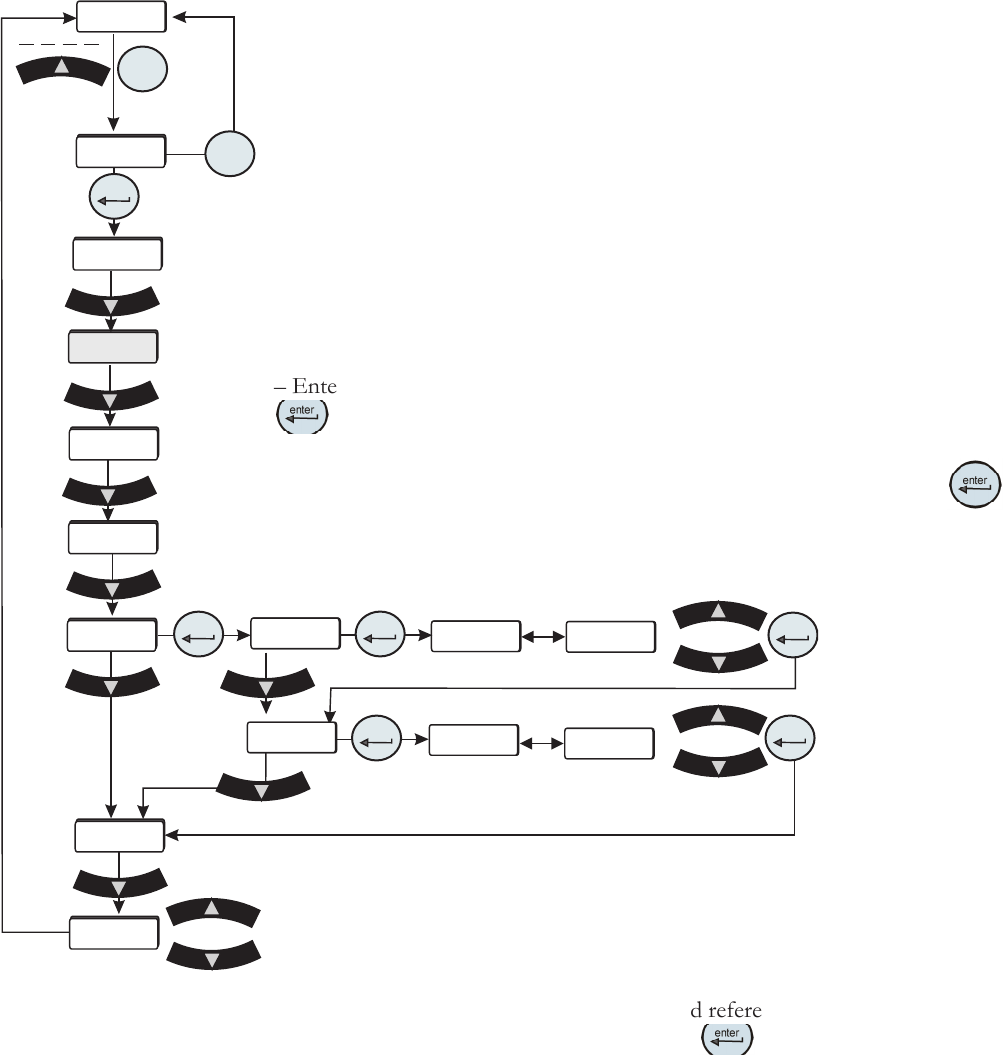
The analog input uses a 2-point calibration. Depending on how the analog input is
congured Type1, Type2 or Type 3, the HMI will display either volts, millivolts or
milliamps. The calibration procedure is:
– Start with default high and low endpoints each consisting of a voltage/current
value and a theoretical analog input value. This will permit calibration of either
point rst. Both ends must be calibrated for the entire calibration to be valid.
– Connect a 9.50v/0.400mv/20.00ma reference voltage/current source to the
analog input, pins 6 and 15.
– The HMI will display 9.50/0.400/20.00. Use the arrow keys to adjust the display
to match the applied input voltage/current.
– Allow the analog input to stabilize, approximately 10 seconds.
– Enter the measured reference voltage/current using the HMI by pressing the
key. The rmware will use this value and the theoretical analog value and
those from the low end to calculate a linear gain and offset.
– The display will automatically go to the low calibration message. Press
to
calibrate the analog input at the low end.
– Connect a 0.50v/0.050mv/4.00ma reference voltage/current source to the analog
input.
Save calibration
Do not save calibration
– The HMI will display 0.50/0.050/4.00. Use the arrow
keys to adjust the display to match the applied input
voltage/current. Allow the analog input to stabilize,
approximately 10 seconds.
– Enter the measured reference voltage/current using the
HMI by pressing the
key. The rmware will use this
value and the theoretical analog input value and those from
the high end to calculate a linear gain and offset.
– If the gain and offset are acceptable, the calibration is
accepted and the calibration is now valid at the low end.
Otherwise, the calibration is rejected and a bad calibration
error message (Er 16) is displayed.