ThermoFlex-Manual.pdf - 第60页
Section 4 4-2 ThermoFlex Thermo Scientific Start Up Setup Note F or rst time use, please refer to the quic k star t instr uctions included with your c hiller or the copy in this manual. The manual's version follo ws…
ThermoFlex 4-1
Thermo Scientific
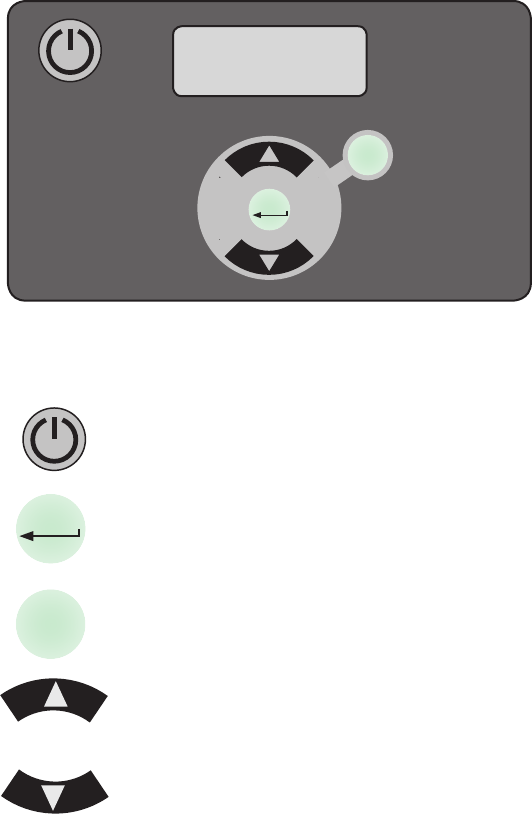
Basic Controller
Section 4 Operation
The controller controls temperature using a Proportional-Integral-Derivative
(PID) algorithm. It is designed with an easy to use operator interface.
This key is used to start and stop the chiller.
This key is used to navigate through the controller displays, to
make changes and to save changes once they are made. It is
also used to clear error codes.
This key is also used to navigate through controller displays.
The up arrow key is used to navigate through the controller
displays and to increase adjustable values.
The down arrow key is used to navigate through the
controller displays and to decrease adjustable values.
Figure 4-1 Basic Controller
mode
enter
+
-
enter
mode
+
-
Section 4
4-2 ThermoFlex
Thermo Scientific
Start Up
Setup
Note For rst time use, please refer to the quick start instructions included
with your chiller or the copy in this manual. The manual's version follows
the Table of Contents.
Before starting the chiller, double check all electrical and plumbing
connections. Have extra recirculating uid on hand. If the chiller will not
start refer to Section 7 Troubleshooting.
If the chiller is equipped with a deionization lter cartridge refer to Section
5 for installation.
• Place the optional GFCI breaker located on the rear to the up position.
• For ThermoFlex900 through 10000s, place the circuit protector located
on the rear to the on ( I ) position. The display will indicate a series of
upward scrolling bars (
).
• For ThermoFlex15000 and 24000s, the display will indicate a series of
upward scrolling bars (
) as soon as power is supplied.
• The bars will scroll upward indicating the controller is initializing. The
initialization takes approximately 15 seconds.
• When the bars disappear the controller display will go blank.
• Press the
key on the controller. The controller will show the process
uid temperature. The pump and refrigeration system will also start.
Note You can press the
key anytime after placing the circuit
protector to the on position.
If the auto restart is enabled and the chiller shuts down as a result of
a power failure, when power is restored the chiller will automatically
restart. Auto restart is enabled using the Setup Loop, see Setup Loop
in this Section.
Note After initial start up, check your plumbing for leaks.
CAUTION
Section 4
ThermoFlex 4-3
Thermo Scientific
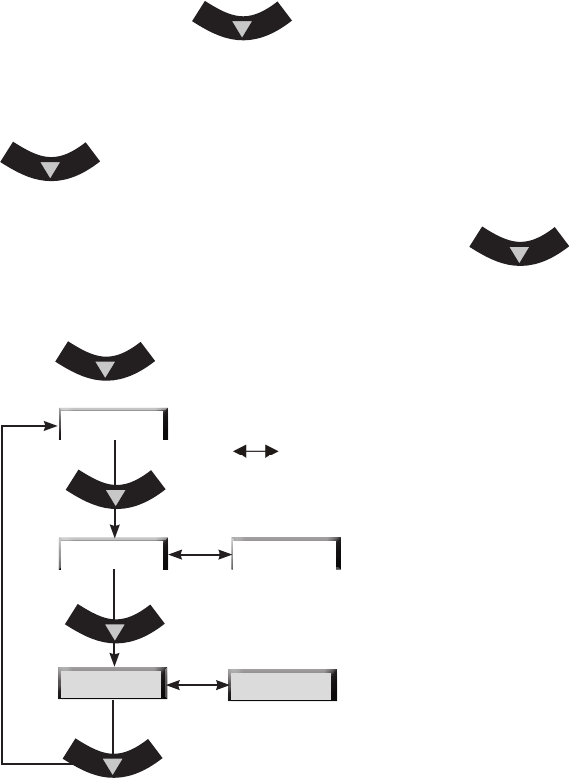
If desired, press the key to display the pump's discharge
pressure - P 1 . The display will alternate between P 1 and the pump's
discharge pressure value.
If the chiller is equipped with an optional ow transducer, pressing
again will display the ow rate - FLo. The display will alternate
between FLo and the ow rate value.
After displaying P1 or FLo for 60 seconds, if the
key is
not depressed the display will automatically revert to the process uid
temperature.
Press
again to display the process uid temperature.
P 1 - Pump discharge pressure
in PSI, bar or kPa*.
FLo - Flow rate in liters or gallons per
minute* (optional feature).
* See Setup Loop in this Section to
change displayed scales.
indicates the controller display is alternating
between the two displays.
Figure 4-2 Main Loop
FLo
xx.x C
xx
xx
P1