PSV7000_ Owners Manual_096-0460-001B - 第118页
Maintenance ■ Workspace, Head and Gantry 4—12 Data I/O • 096-0640-001B back Cleaning the PSV7000 Machine General Machine Cleaning General cleaning should be perfor med on a w eekly basis. General cleaning includes, but i…
■ Workspace, Head and Gantry ◘ Socket Adapters and Actuation
PSV7000 Owner’s Manual 4—11
back
WARNING: Electric shock hazard! Opening any access doors
while the power is ON can be dangerous even when steps
instruct you to do so. Use extreme caution and do not touch
any electronic equipment except as directed.
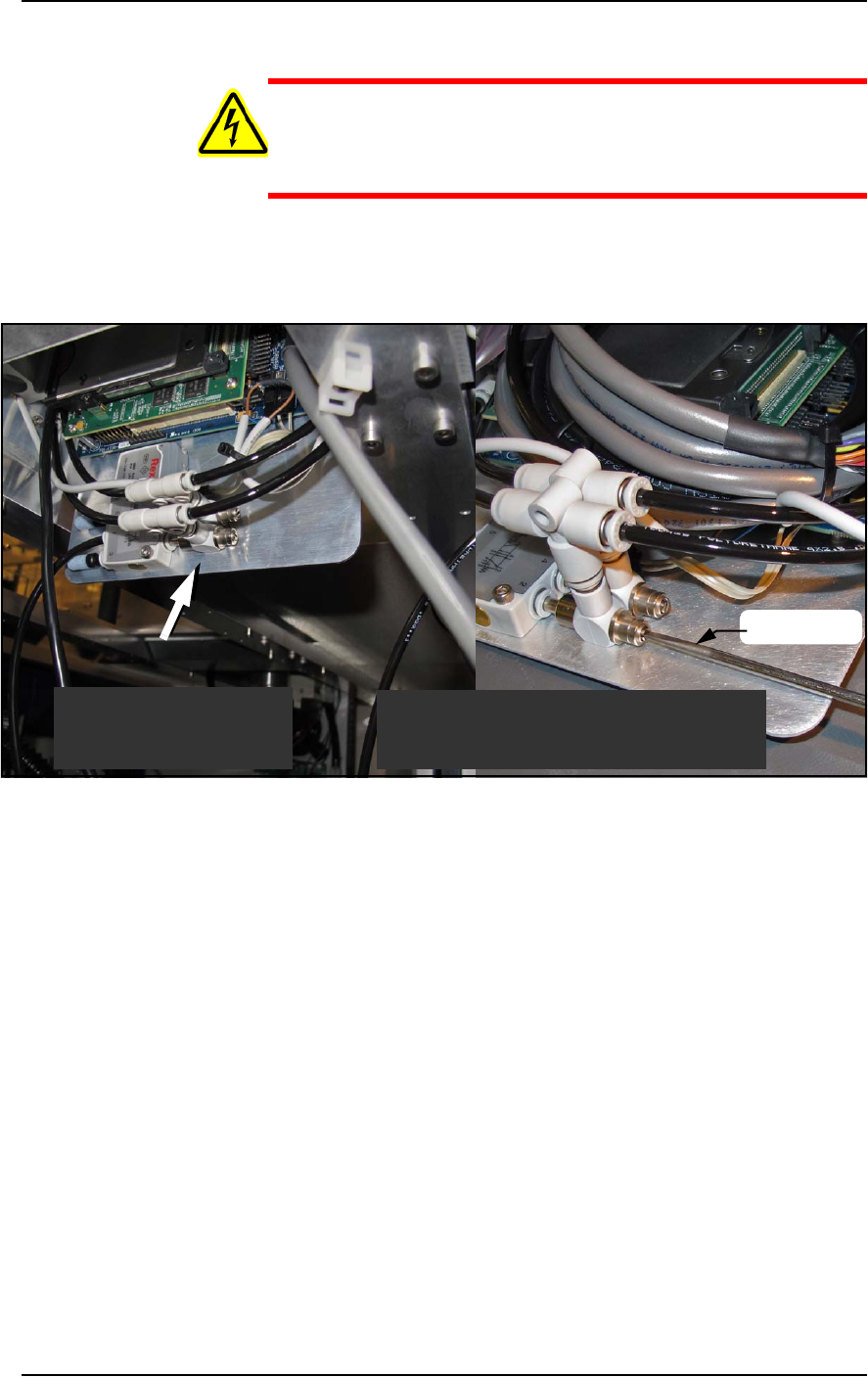
3. Open the access door nearest the target programmer and locate
the in-line air flow control for the up (sockets closed) position.
Refer to Figure 4-3.
Figure 4-3: Actuator flow controls (arrow). The lower one (that the
screwdriver is at) sets the UP speed.
4. Adjust the appropriate flow control 1/2 to 1 revolution clockwise
for slower action, or counter-clockwise for faster action.
5. Close the access door, and clear the door open warning on the
monitor.
6. At the Actuate tab of the Gantry window, click the Actuate Socket
switch to ON while listening and watching the opener.
If it is too fast it will produce a louder noise than optimum when
it operates. If it is too slow it will look slow.
7. Click Actuate Socket OFF.
8. Adjust the flow controls as necessary and repeat the test.
9. Perform the same procedure for the other flow control if neces-
sary.
Looking upward inside
the access door.
Looking upward inside
the access door.
Shown here with programmer removed
for illustration purposes only.
screwdriver
Maintenance ■ Workspace, Head and Gantry
4—12 Data I/O • 096-0640-001B
back
Cleaning the PSV7000 Machine
General Machine Cleaning
General cleaning should be performed on a weekly basis. General
cleaning includes, but is not limited to, the following listed item.
WARNING: Vision hazard! Pressurized air or debris blown
into the eyes or skin could cause bodily damage. Always use
care and wear protective eye goggles when cleaning with
pressurized air.
1. Remove all dropped devices, debris, and other materials from all
working areas.
2. With air and power OFF, remove all devices and materials that
may have fallen inside the machine.
3. Use dry, compressed air to remove all dust and debris from the
work surface and from under the machine.
4. Dust the safety doors, inside and outside, with an antistatic
cleaner.
5. Wipe the top and side panels to remove grease, fingerprints, and
dust.
6. Dust the top surfaces of the input/output modules.
Cleaning the Device Position Sensor
Fingerprints and excessive amounts of dust or other residue on the
optical windows of the Device Position Sensor will degrade the per-
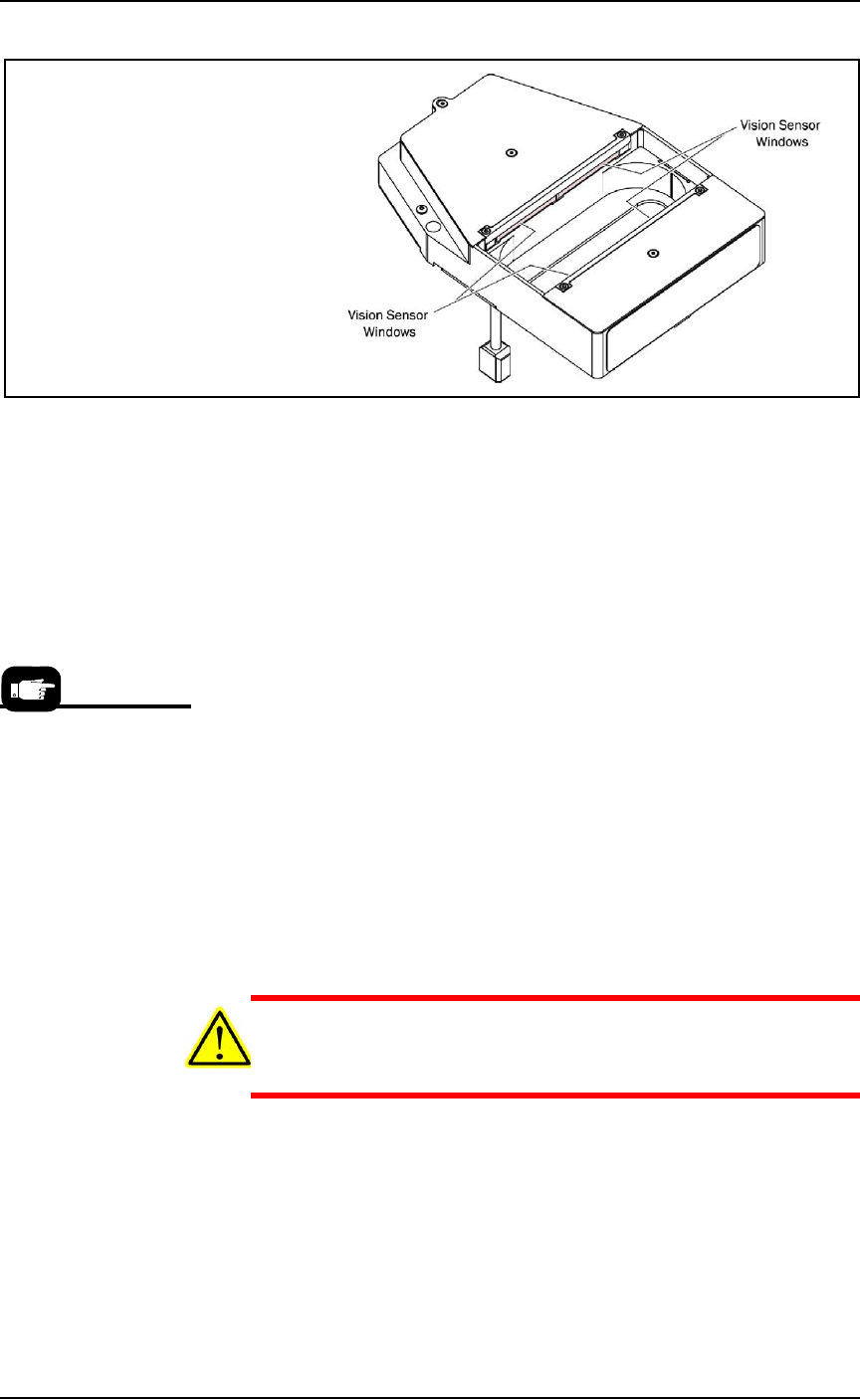
formance of the sensor. The sensor is mounted on the bottom of the
PNP head.
If the sensors are not providing a good image, it may be an indicator
that the windows need cleaning.
For instructions to turn
OFF the air, see page
4-9.
■ Workspace, Head and Gantry ◘ Cleaning the PSV7000 Machine
PSV7000 Owner’s Manual 4—13
back
Figure 4-4: The Device Position Sensor.
Check the Sensor Windows
To check to see if the sensor windows are currently providing a good
image:
• Open the Gantry window in the AH700 and click Check Image.
The wavy line should be smooth. If it is jagged, clean the win-
dows. For more information and an image, refer to the on-screen
Help.
Clean the Sensor Windows
Requirements
• pre-moistened wipes (PN 5700410), or
• lens tissue (PN 570041)
To clean the sensor windows:
1. Brush dust off the sensor windows using a camel-hair brush
such as an artist brush.
2. Remove fingerprints or other oily deposits; either use pre-moist-
ened wipes or moistened lens tissue or cotton swab with a small
amount of isopropyl alcohol.
CAUTION: Product damage hazard! Wiping back and forth may
re-deposit the debris and may damage the window glass. Wipe in
a single direction, lift and repeat.
3. Wipe each window once IN A SINGLE DIRECTION.
4. Using a dry tissue or swab, lightly wipe each window IN A SIN-
GLE DIRECTION to remove any remaining alcohol or acetone
residue.
The cleaning wipes are
part of the Self-Service
Spare Parts Kits.