PSV7000_ Owners Manual_096-0460-001B - 第124页
Maintenance ■ Workspace, Head and Gantry 4—18 Data I/O • 096-0640-001B back 5. Open the safety door . 6. W ith a device or clean finger , plug probe tip 1 and ensure the green generator lamp comes on. See Figure 4-8 . Fi…
■ Workspace, Head and Gantry ◘ Adjusting the Vacuum Generator Sensors
PSV7000 Owner’s Manual 4—17
back
Adjusting the Vacuum Generator
Sensors
Note: If you notice consecutive programming pick errors, before
adjusting vacuum sensors complete the Z-Axis adjustment. For
instructions on Z-Axis adjustment, see Teaching the Workspace
Locations on page 3-9. If completing the Z-Axis adjustment does
not reduce or eliminate subsequent pick errors, complete the vac-
uum sensor adjustments described here.
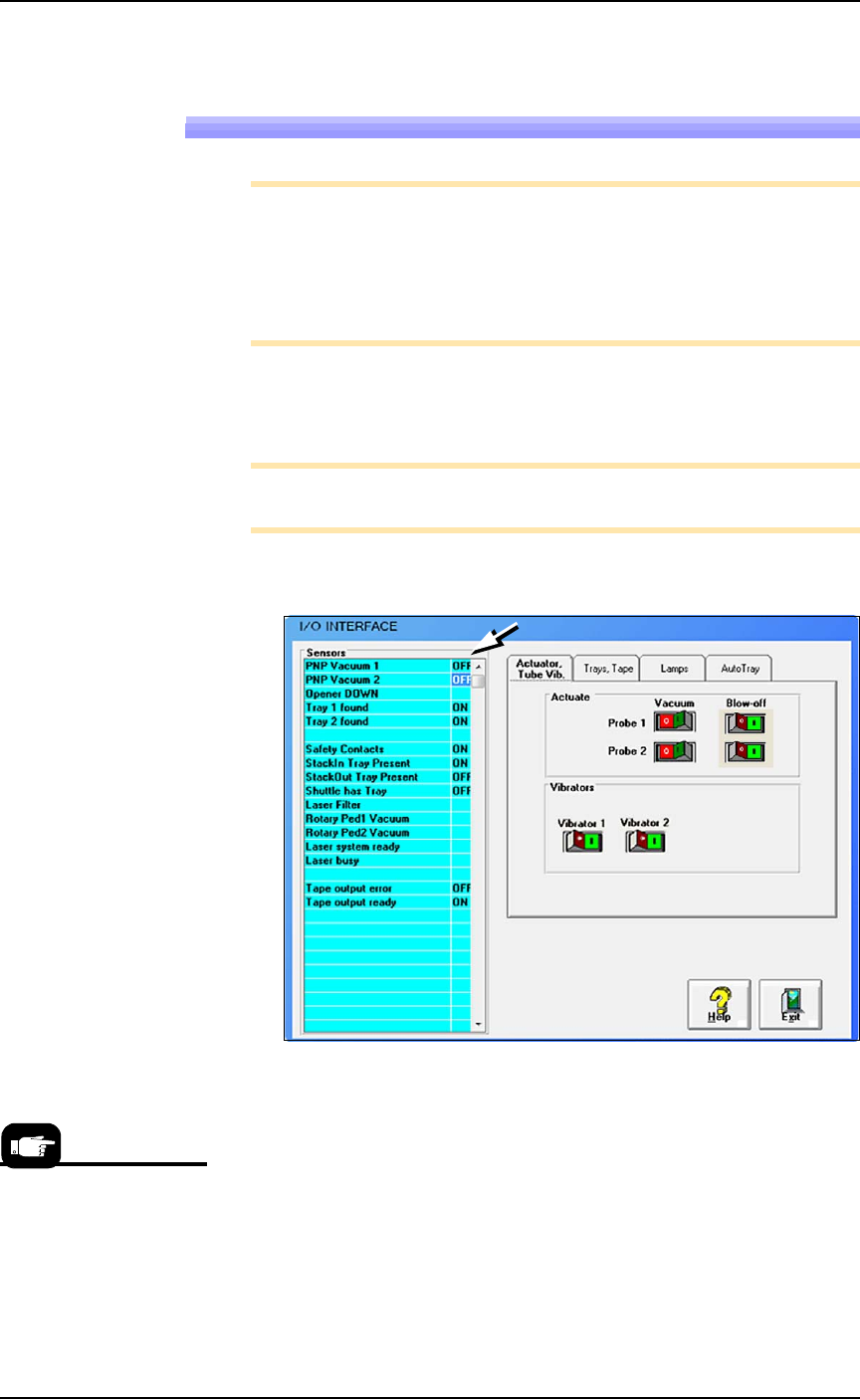
Vacuum sensors on the PSV7000 System are adjustable. The
I/O Interface window displays a list of the sensors in the
PSV7000 System and the status of each sensor.
Note: The number of sensors on the PSV7000 System depends on
the options installed.
To view the status of sensors at the main AH700 Setup window, click
System > Misc. I/O.
Figure 4-7: The I/O Interface window reports sensor status and allows
switching options on or off. (The number of tabs vary.)
To Adjust Probe Vacuum Generator Sensors:
1. Finish a job.
2. At the Gantry window, move the PNP head to the Tool position
3. Close the Gantry window and at the System window click
Misc. I/O.
4. At the I/O Interface tab, for both probes, click the Vacuum toggle
ON and the Blow-off toggle OFF. Refer to the figure above.
Click the Tool label on
the Gantry window to
move the head for easy
access; front and center.
Maintenance ■ Workspace, Head and Gantry
4—18 Data I/O • 096-0640-001B
back
5. Open the safety door.
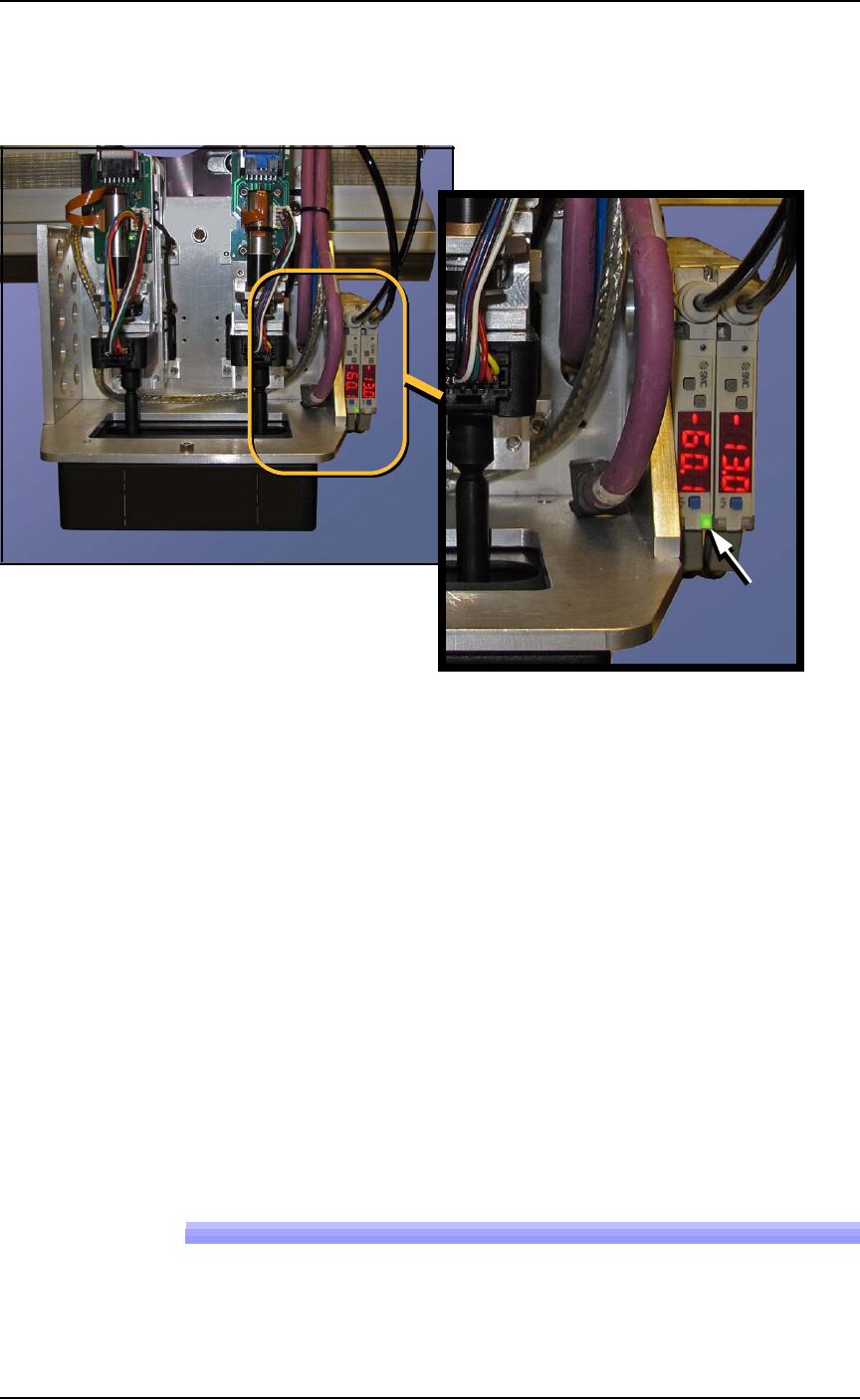
6. With a device or clean finger, plug probe tip 1 and ensure the
green generator lamp comes on. See Figure 4-8.
Figure 4-8: The PNP Probe vacuum generator adjustments. In this
image, the green lamp for probe #2 is ON.
7. Read the high and low values each time you plug the air with
your finger and release it. They are needed for the next step.
8. Set the trigger value on the sensor by pressing the S (blue SET)
button on the vacuum generator block and then using the UP or
DOWN buttons, set the value to midway between the high value
and the low value. It should be approximately -40 kPa.
9. Press the SET button again.
10. Check adjustment by blocking and unblocking the probe tip sev-
eral times and ensuring the green lamp goes on and off each
time.
11. Repeat these steps for probe 2.
12. Turn OFF the vacuum switches for both probes.
Wipe the probe tips with a clean dry cloth.
Replacing the Input Air Filter
1. If a job is running, Pause or Finish the job.
■ Workspace, Head and Gantry ◘ Vacuum Generator Filters and Silencers
PSV7000 Owner’s Manual 4—19
back
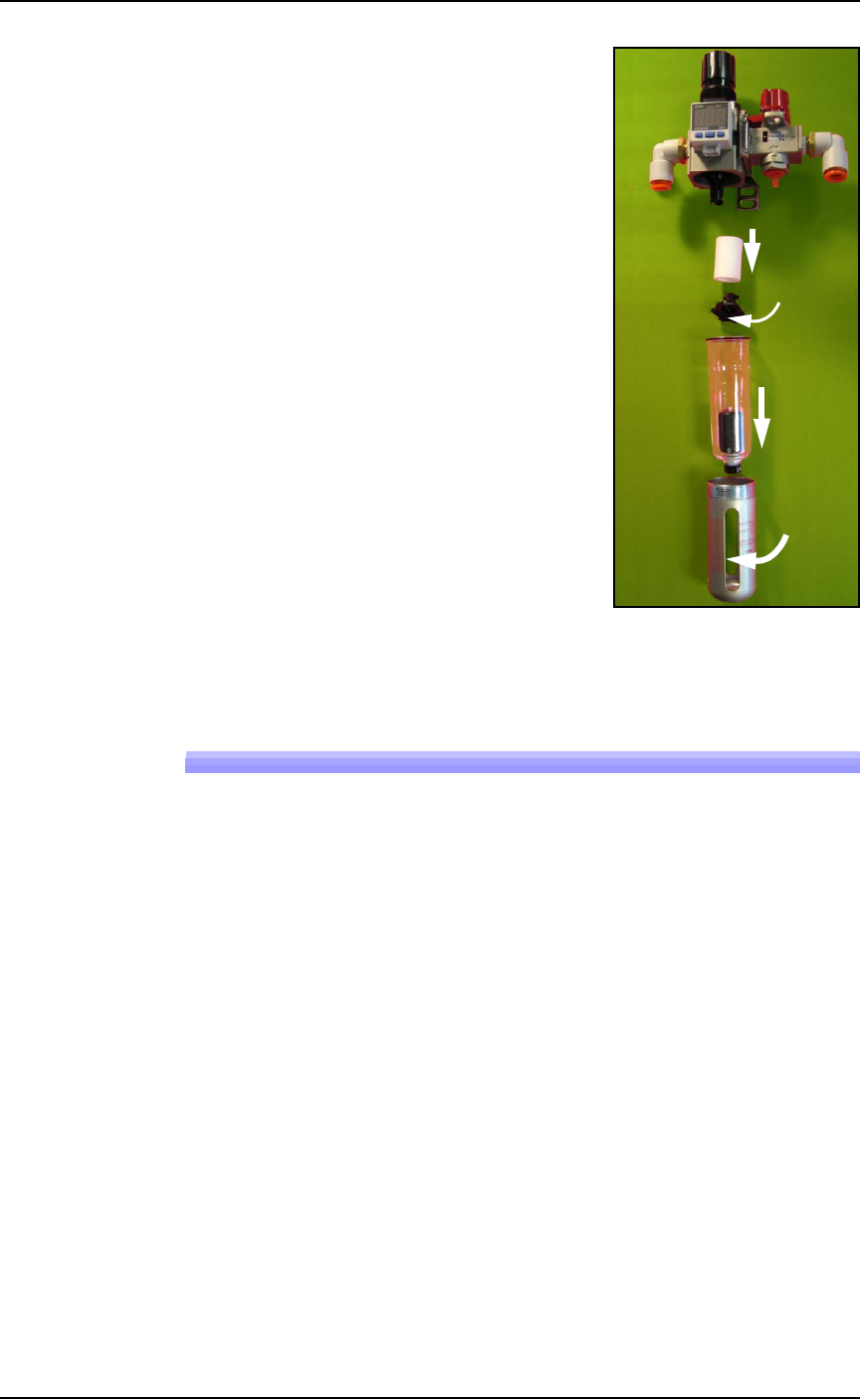
2. Turn off shop air and disconnect
the input air line from the Air Fil-
ter/Regulator at the quick connect
fitting.
3. Unscrew the air contamination
collection bowl housing.
4. Pull off the clear collection bowl.
Clean out any dirt, oil, or water.
5. Unscrew the black knob below the
filter.
6. Pull off the filter. Clean or replace
as necessary.
Reinstall in reverse order being careful
not to damage the O-ring on the bowl.
Reconnect the shop air supply line.
Figure 4-9: Replacing the Air Filter/Regulator.
Vacuum Generator Filters and Silencers
These procedures cover removing and cleaning or replacing vacuum
generator parts for vacuum generators on PSV7000 head.
A clogged or dirty vacuum filter or silencer can cause dropped
devices and placement problems at the PNP head.
Requirements
•metric hex key set
• flat screwdriver
• small Phillips screwdriver
Vacuum Generator Filters
1. Finish a job if one is running.
2. Use the Gantry window to move the PNP head to an accessible
location such as the Tool position.
3. Properly shut OFF the PSV7000 System. See Shutting Down the
PSV7000 System on page 2-7.
Filter
Knob
Bowl
Bowl
hous-
ing
In