PSV7000_ Owners Manual_096-0460-001B - 第126页
Maintenance ■ Workspace, Head and Gantry 4—20 Data I/O • 096-0640-001B back WARNING: Shock hazard! Open ing th e safety doors stops motion of the gantry only. It does not remove electri cal power from the machine or any …
■ Workspace, Head and Gantry ◘ Vacuum Generator Filters and Silencers
PSV7000 Owner’s Manual 4—19
back
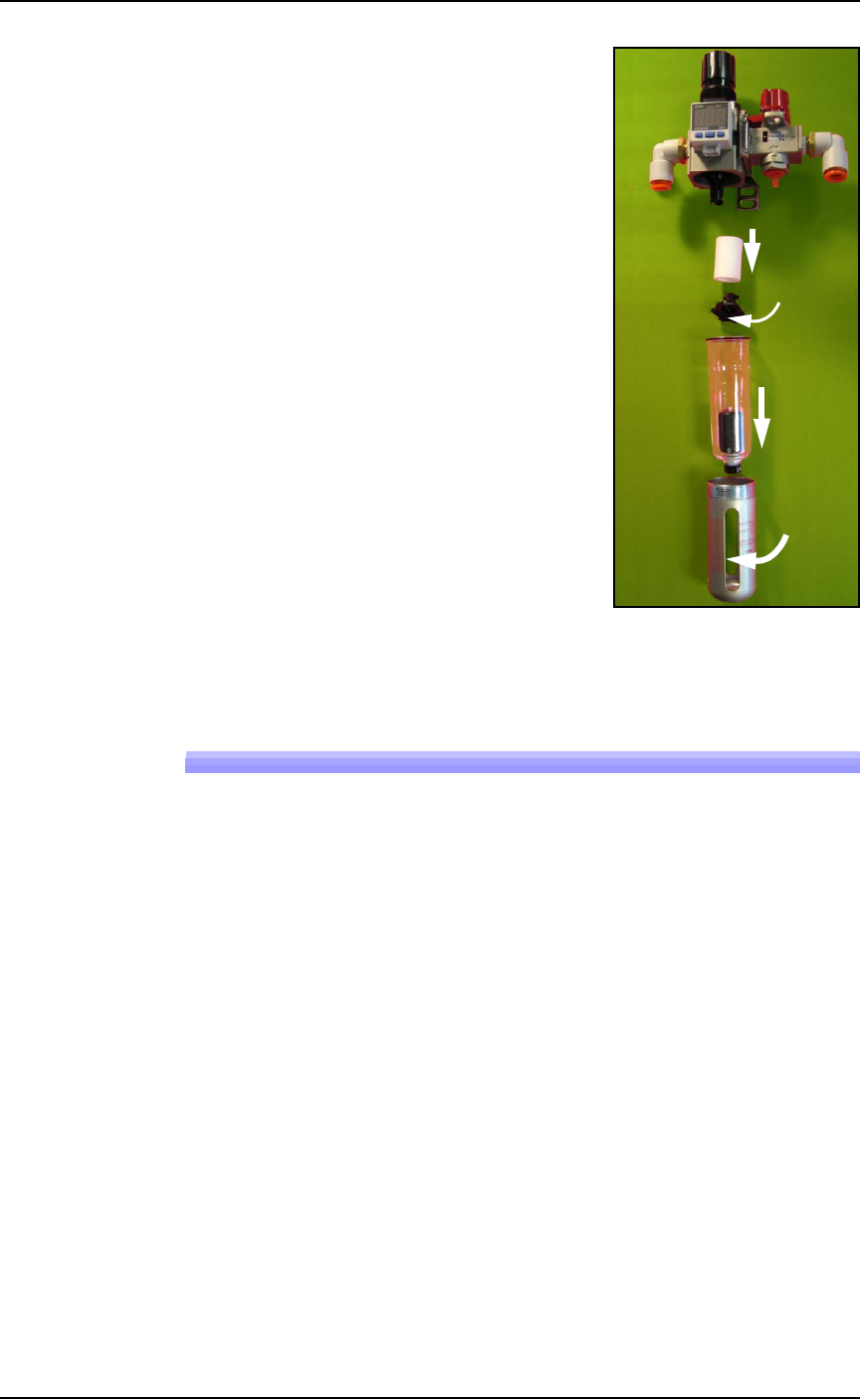
2. Turn off shop air and disconnect
the input air line from the Air Fil-
ter/Regulator at the quick connect
fitting.
3. Unscrew the air contamination
collection bowl housing.
4. Pull off the clear collection bowl.
Clean out any dirt, oil, or water.
5. Unscrew the black knob below the
filter.
6. Pull off the filter. Clean or replace
as necessary.
Reinstall in reverse order being careful
not to damage the O-ring on the bowl.
Reconnect the shop air supply line.
Figure 4-9: Replacing the Air Filter/Regulator.
Vacuum Generator Filters and Silencers
These procedures cover removing and cleaning or replacing vacuum
generator parts for vacuum generators on PSV7000 head.
A clogged or dirty vacuum filter or silencer can cause dropped
devices and placement problems at the PNP head.
Requirements
•metric hex key set
• flat screwdriver
• small Phillips screwdriver
Vacuum Generator Filters
1. Finish a job if one is running.
2. Use the Gantry window to move the PNP head to an accessible
location such as the Tool position.
3. Properly shut OFF the PSV7000 System. See Shutting Down the
PSV7000 System on page 2-7.
Filter
Knob
Bowl
Bowl
hous-
ing
In
Maintenance ■ Workspace, Head and Gantry
4—20 Data I/O • 096-0640-001B
back
WARNING: Shock hazard! Opening the safety doors stops
motion of the gantry only. It does not remove electrical
power from the machine or any optional equipment.
Turn the main power OFF for safety unless otherwise
directed.
4. Open the front safety door and mark the wire connectors at the
two vacuum pressure switches on the right side of the head for
returning them to the correct location.
5. For access, unplug the two wire connectors (just marked) by
pulling them out. See Figure 4-10 below.
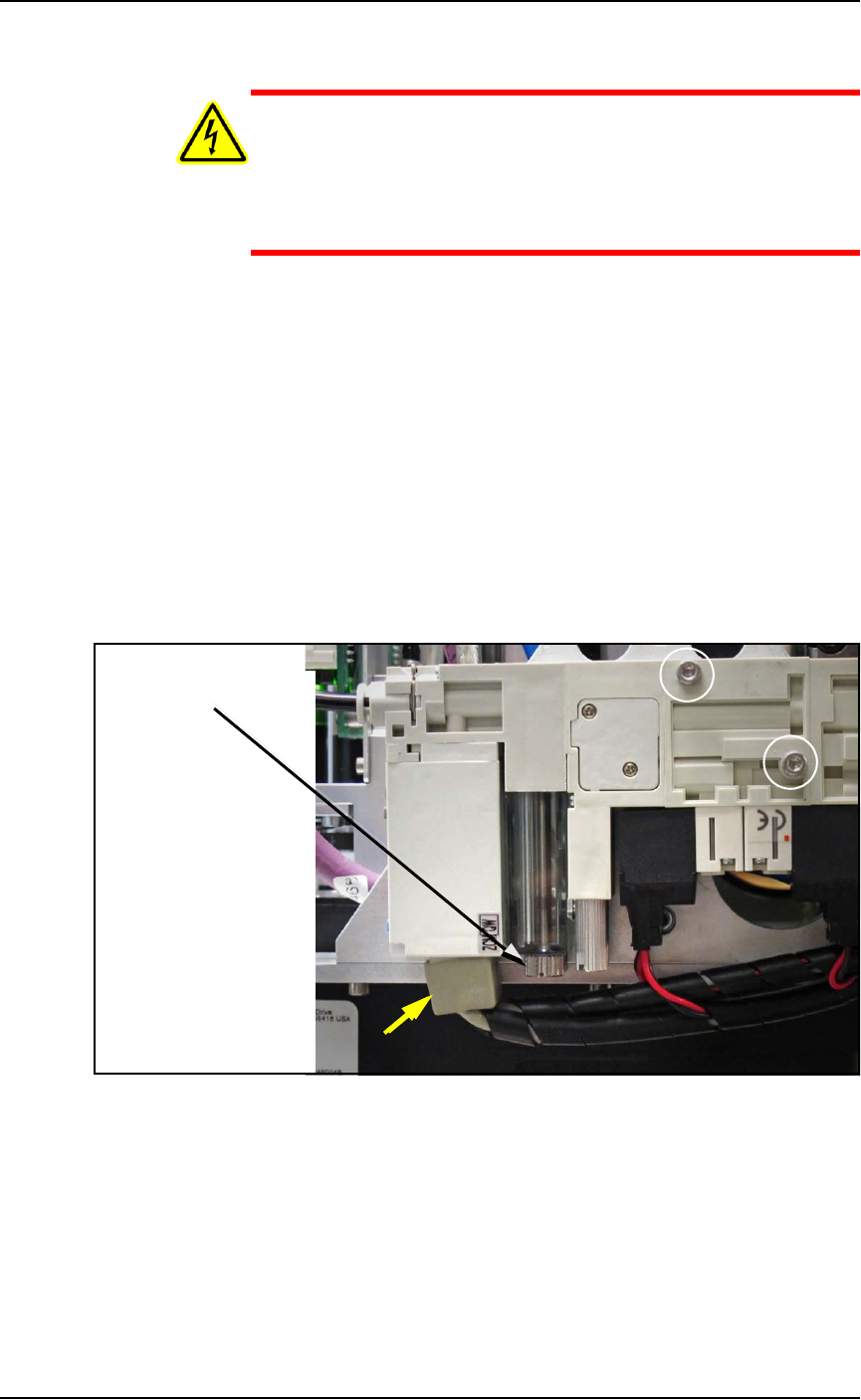
6. With a flat screwdriver, unscrew the knurled fastener on the
underside of the nearest filter housing. See the figure below.
7. Remove the filter housing and ensure that the o-ring doesn’t fall.
8. Remove the next housing.
9. Remove the filter from the each housing. They should be white
or nearly white. If dirty or clogged, replace with new filter
(Data I/O PN 294-0219-001+). See the figure below.
Figure 4-10: Removing the PNP head Vacuum Generator filter. The
filters are adjacent so only one is visible in this view. The yellow arrow
points to the wiring connectors.
Two fasteners attach the inner and outer pneumatic generator blocks
(circled).
Reinstall in reverse order and plug the two wire connectors back in at
the same locations.
Filter knob
■ Workspace, Head and Gantry ◘ Vacuum Generator Filters and Silencers
PSV7000 Owner’s Manual 4—21
back
Vacuum Generator Silencers
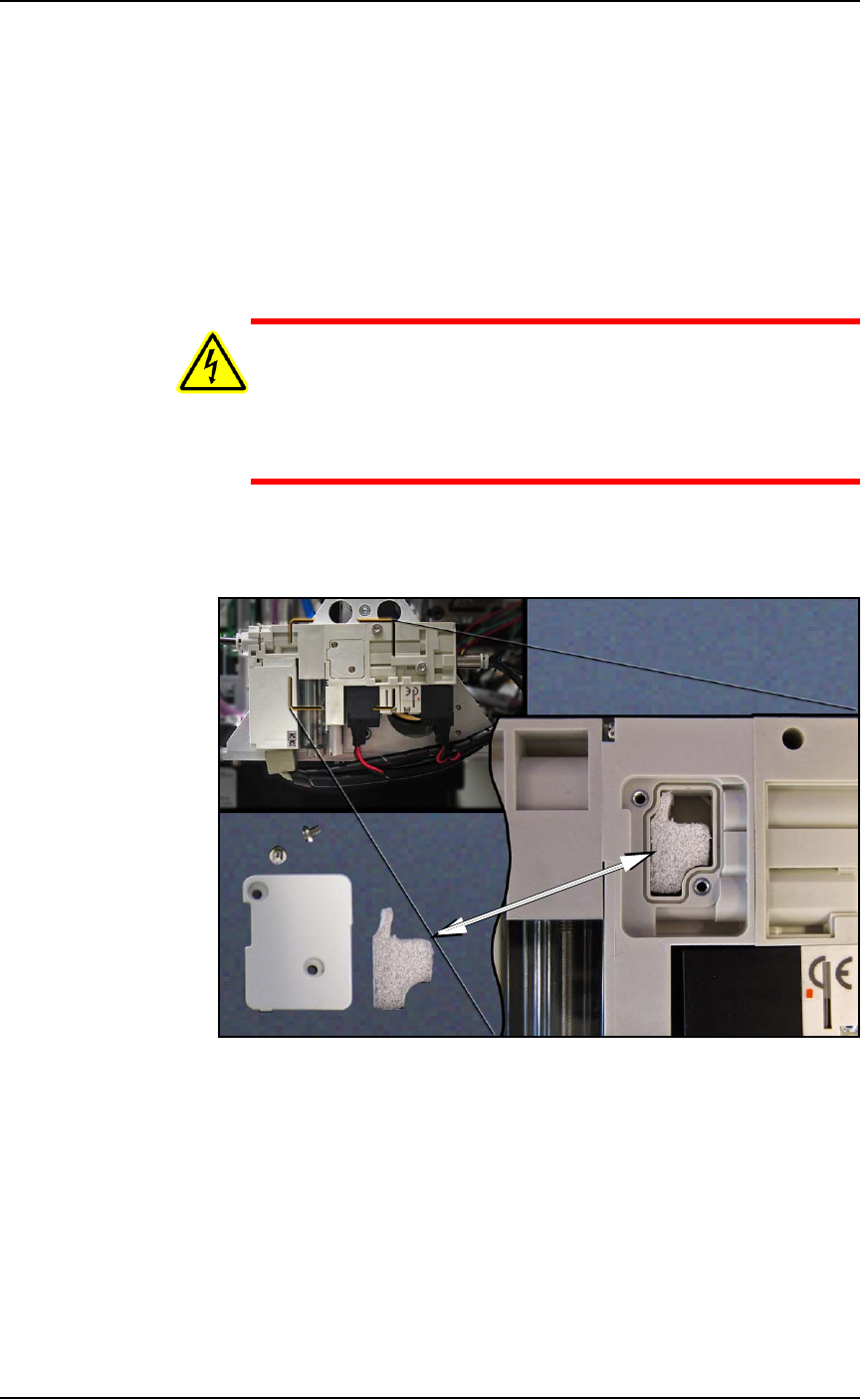
There is one silencer for each vacuum generator block at the PNP
head. To inspect or replace the silencer:
1. Finish a job if one is running.
2. Use the Gantry window to move the PNP head to an accessible
location such as the Tool position.
3. Properly shut OFF the PSV7000 System. See Shutting Down the
PSV7000 System on page 2-7.
WARNING: Shock hazard! Opening the safety doors stops
motion of the gantry only. It does not remove electrical
power from the machine or any optional equipment.
Turn the main power OFF for safety unless otherwise
directed.
4. Open the safety door and remove the small silencer cover plate
on the accessible vacuum generator (two 1.5 mm hex key).
Figure 4-11: The vacuum generator silencer. It is included in the
Self-Service Spares Kit.
5. Inspect the silencer. If it looks dirty—not white—replace it.
6. Replace the cover plate.
7. Repeat the process for the inner (hidden) pneumatic block by
removing the outer block; two screws (2.5 mm hex key). Refer to
Figure 4-10 on page 4–20.
8. Reinstall the outer block when done.