PSV7000_ Owners Manual_096-0460-001B - 第127页
■ Workspace, Head and Gantry ◘ Vacuum Generator Filters and Silencers PSV7000 Owner’s Manual 4—21 back V acuum Generator Silencers There is one silencer for each vacuum generator block at the PNP head. T o inspect or rep…
Maintenance ■ Workspace, Head and Gantry
4—20 Data I/O • 096-0640-001B
back
WARNING: Shock hazard! Opening the safety doors stops
motion of the gantry only. It does not remove electrical
power from the machine or any optional equipment.
Turn the main power OFF for safety unless otherwise
directed.
4. Open the front safety door and mark the wire connectors at the
two vacuum pressure switches on the right side of the head for
returning them to the correct location.
5. For access, unplug the two wire connectors (just marked) by
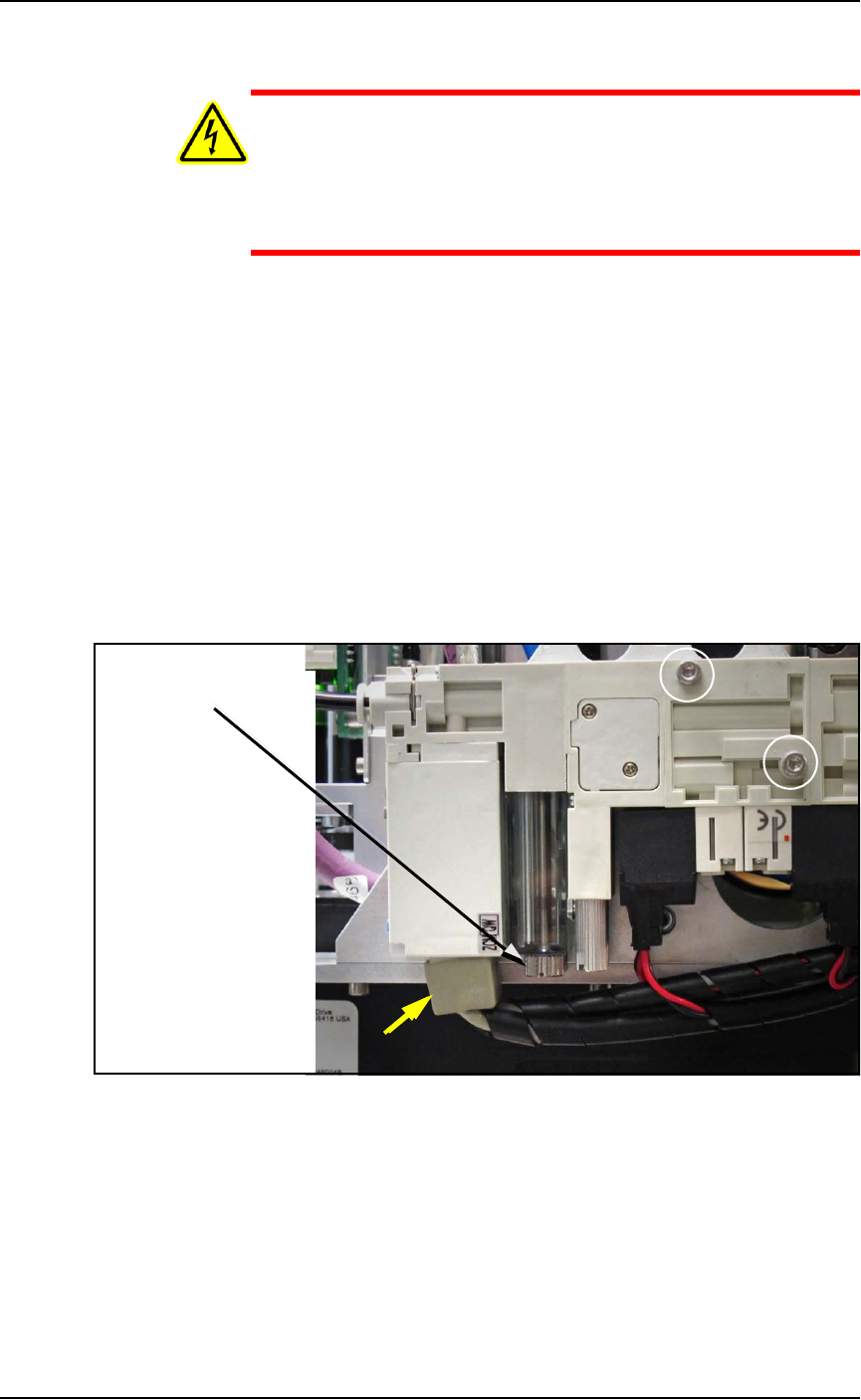
pulling them out. See Figure 4-10 below.
6. With a flat screwdriver, unscrew the knurled fastener on the
underside of the nearest filter housing. See the figure below.
7. Remove the filter housing and ensure that the o-ring doesn’t fall.
8. Remove the next housing.
9. Remove the filter from the each housing. They should be white
or nearly white. If dirty or clogged, replace with new filter
(Data I/O PN 294-0219-001+). See the figure below.
Figure 4-10: Removing the PNP head Vacuum Generator filter. The
filters are adjacent so only one is visible in this view. The yellow arrow
points to the wiring connectors.
Two fasteners attach the inner and outer pneumatic generator blocks
(circled).
Reinstall in reverse order and plug the two wire connectors back in at
the same locations.
Filter knob
■ Workspace, Head and Gantry ◘ Vacuum Generator Filters and Silencers
PSV7000 Owner’s Manual 4—21
back
Vacuum Generator Silencers
There is one silencer for each vacuum generator block at the PNP
head. To inspect or replace the silencer:
1. Finish a job if one is running.
2. Use the Gantry window to move the PNP head to an accessible
location such as the Tool position.
3. Properly shut OFF the PSV7000 System. See Shutting Down the
PSV7000 System on page 2-7.
WARNING: Shock hazard! Opening the safety doors stops
motion of the gantry only. It does not remove electrical
power from the machine or any optional equipment.
Turn the main power OFF for safety unless otherwise
directed.
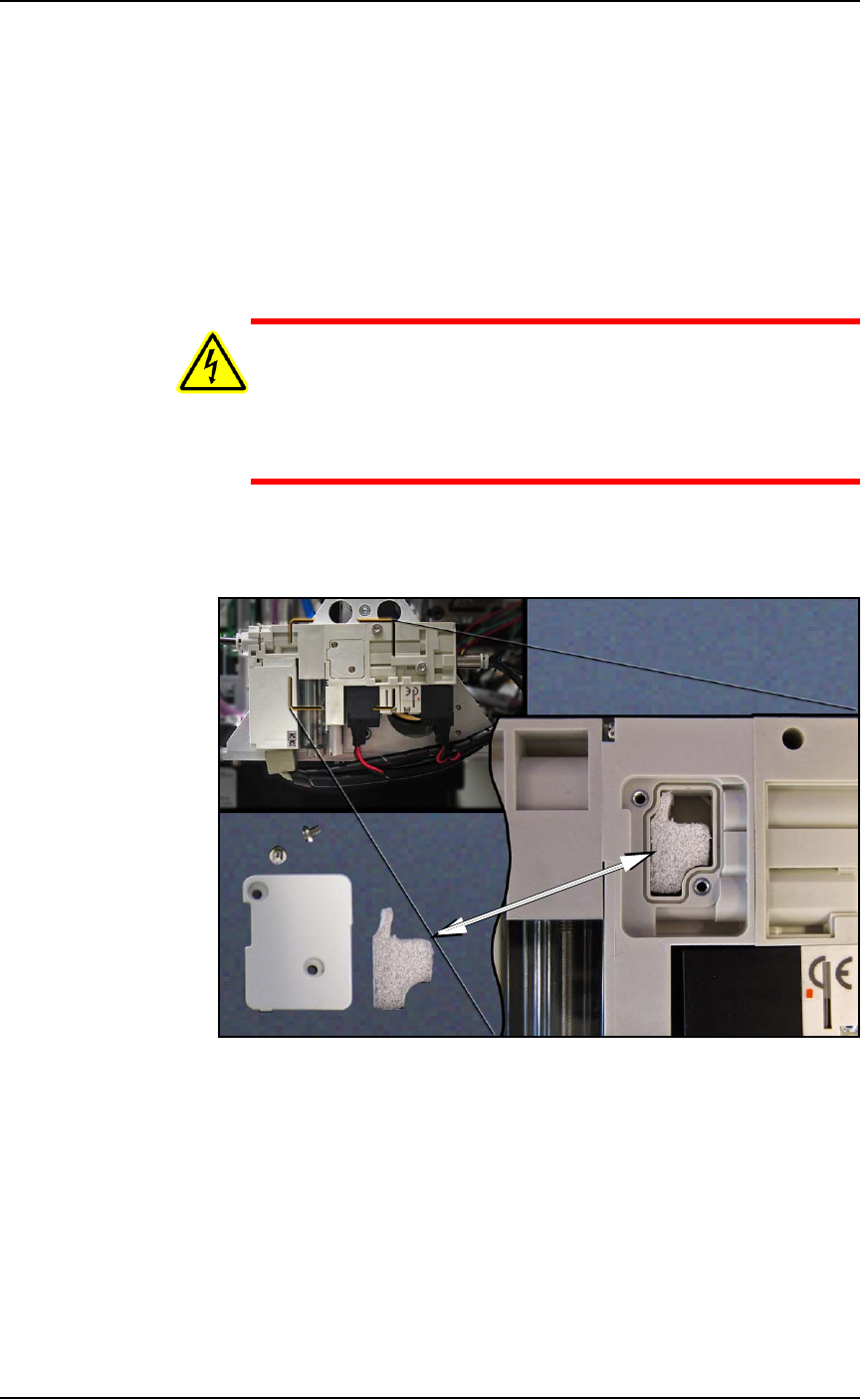
4. Open the safety door and remove the small silencer cover plate
on the accessible vacuum generator (two 1.5 mm hex key).
Figure 4-11: The vacuum generator silencer. It is included in the
Self-Service Spares Kit.
5. Inspect the silencer. If it looks dirty—not white—replace it.
6. Replace the cover plate.
7. Repeat the process for the inner (hidden) pneumatic block by
removing the outer block; two screws (2.5 mm hex key). Refer to
Figure 4-10 on page 4–20.
8. Reinstall the outer block when done.
Maintenance ■ Workspace, Head and Gantry
4—22 Data I/O • 096-0640-001B
back
Inspecting Gantry Parts
Checking the PNP Head
1. Properly shut OFF the PSV7000 sub-systems and machine
power. Refer to Shutting Down the PSV7000 System on page 2-7.
2. Check that all connectors are secure.
3. Turn on the system air and check that there are no vacuum leaks.
Lubricating the Gantry
Requirements
• NSK Grease (Data I/O PN 560-0034-001) and Grease Gun MG70
(Data I/O PN 560-0035-001)
WARNING: Possible collision hazard! The high speed and
force of the gantry can seriously harm anyone working inside
the workspace.
When working within the machine workspace, moving the
PNP head must be the responsibility of only one qualified
individual. All others must stay clear of the machine controls
to prevent injury to that person.
Ensure that a job is Paused or Finished, or the system power
is OFF prior to opening any safety doors.
1. Move the PNP head to a programmer near the center of the
workspace.
2. Properly shut OFF the PSV7000 sub-systems and machine
power. See Shutting Down the PSV7000 System on page 2-7.
3. Open the safety door and remove the old grease and dirt build
up from the guide rails using shop towels.
4. Apply grease to the grease fitting on each end of all three runner
blocks. Use grease that meets DIN 51825 requirements. using an
MG70 (or equivalent) grease gun. See Figure 4-12.
Note: Too much grease may cause grease to splatter inside the work
envelope. Do not over-apply the grease.
Examples of grease
conforming to
DIN 51825 are:
• Mobil SHC-100
• UNIREX N
• Mobilith SHC Series
• Castrol Longtime
PD 1 and PD 2