PSV7000_ Owners Manual_096-0460-001B - 第20页
Introduct ion ■ System Description 1—6 Data I/O • 096-0460-001B back Electrostatic Discharge (ESD) Precautions Devices (integrated circuits) are very sensitiv e to stati c, and could be damaged by unintended electrostati…
■ System Description ◘ Safety Systems
PSV7000 Owner’s Manual 1—5
back
cal power from PSV7000 or any optional equipment installed.
Turn the main power OFF before opening metal access doors.
Pinch hazard! The E-Stop does not shut off air. Socket actuators
can still move down and up.
Safety Door with Interlocks
During operation, when the high-speed PNP head is processing
devices, the clear plastic doors at the workspace are closed to protect
operators from injury. Both doors have a safety interlock which stops
gantry movement if the operator forgets to first park the PNP head.
Normally, if the power is ON, the PNP head should be stopped in the
park position or Tool position prior to opening a safety door.
WARNING: Possible collision hazard! The high speed and force of
the gantry can seriously harm anyone working inside the work-
space.
When working within the machine workspace, moving the PNP
head must be the responsibility of only one qualified individual.
All others must stay clear of the machine controls to prevent injury
to that person.
Ensure that a job is Paused or Finished, or the system power is
OFF prior to opening any safety doors.
WARNING: Shock hazard! Opening the safety doors stops motion
of the gantry only. It does not remove electrical power from the
machine or any optional equipment.
Turn the main power OFF for safety unless otherwise directed.
CAUTION: Possible product damage! Do not use solvents such as
acetone, lacquer thinner, mineral spirits, isopropyl alcohol, or any
type of abrasive compound on the safety doors. These products
will damage the safety door surfaces and ESD coating, and
reduce visibility of the work area.
Park Position:
The spot where the head
stops when a job is paused
or ended (near left side
center).
Tool Position:
Near the front center for
easy access to the PNP
head.
Home Position...
the far, right corner of
the workspace where
the head travels to
before each job is
started.
Introduction ■ System Description
1—6 Data I/O • 096-0460-001B
back
Electrostatic Discharge (ESD) Precautions
Devices (integrated circuits) are very sensitive to static, and could be
damaged by unintended electrostatic discharge while being handled.
The most effective way to prevent damage from ESD is to make sure
a common electric potential (ground) exists between a static-sensitive
device or component, its environment, and the operator.
Operators should wear an antistatic wrist strap (Data I/O part
number 440-0021-001+) connected to one of the grounding connec-
tions on the machine. The wrist strap should contain a 1–10 M-ohm
current limiting resistor.
Handling Devices Safely
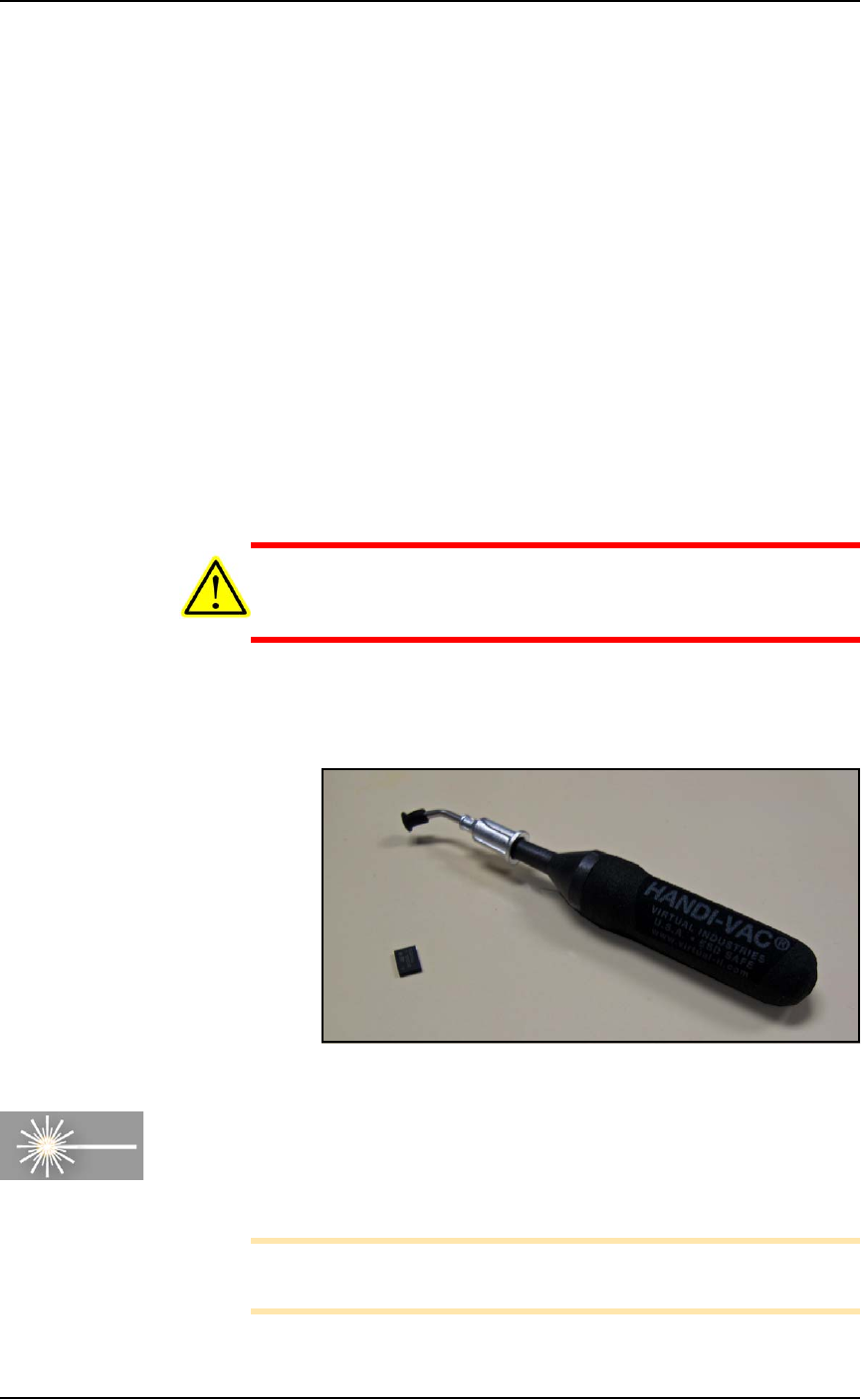
To prevent damage to device pins, use a vacuum tool, also called a
vacuum tweezer, to pick up devices. The vacuum tool is designed to
handle devices without damaging them.
CAUTION: Possible device pin damage! Do not touch devices
with your hands or any implement other than the vacuum tool.
Doing so could damage devices with fine-pitched leads.
To pick up a device using the vacuum tools use an squeezable air
bladder for suction. There are a variety of models, sizes and tips.
Some tips are replaceable.
Figure 1-1: A Vacuum Tweezer: Data I/O PN 565-8000-001.
[Laser Marking only] Fume Extractor
Used with the Laser Marking option, the laser fume extractor
removes harmful smoke and hazardous materials from the marking
area and safely stores them for proper disposal.
Note: Refer to Laser Safety on page 1-20 for more information.
For maintenance, see Laser Marking Fume Extractor on page 4-35.
■ System Description ◘ Machine Axes
PSV7000 Owner’s Manual 1—7
back
Machine Axes
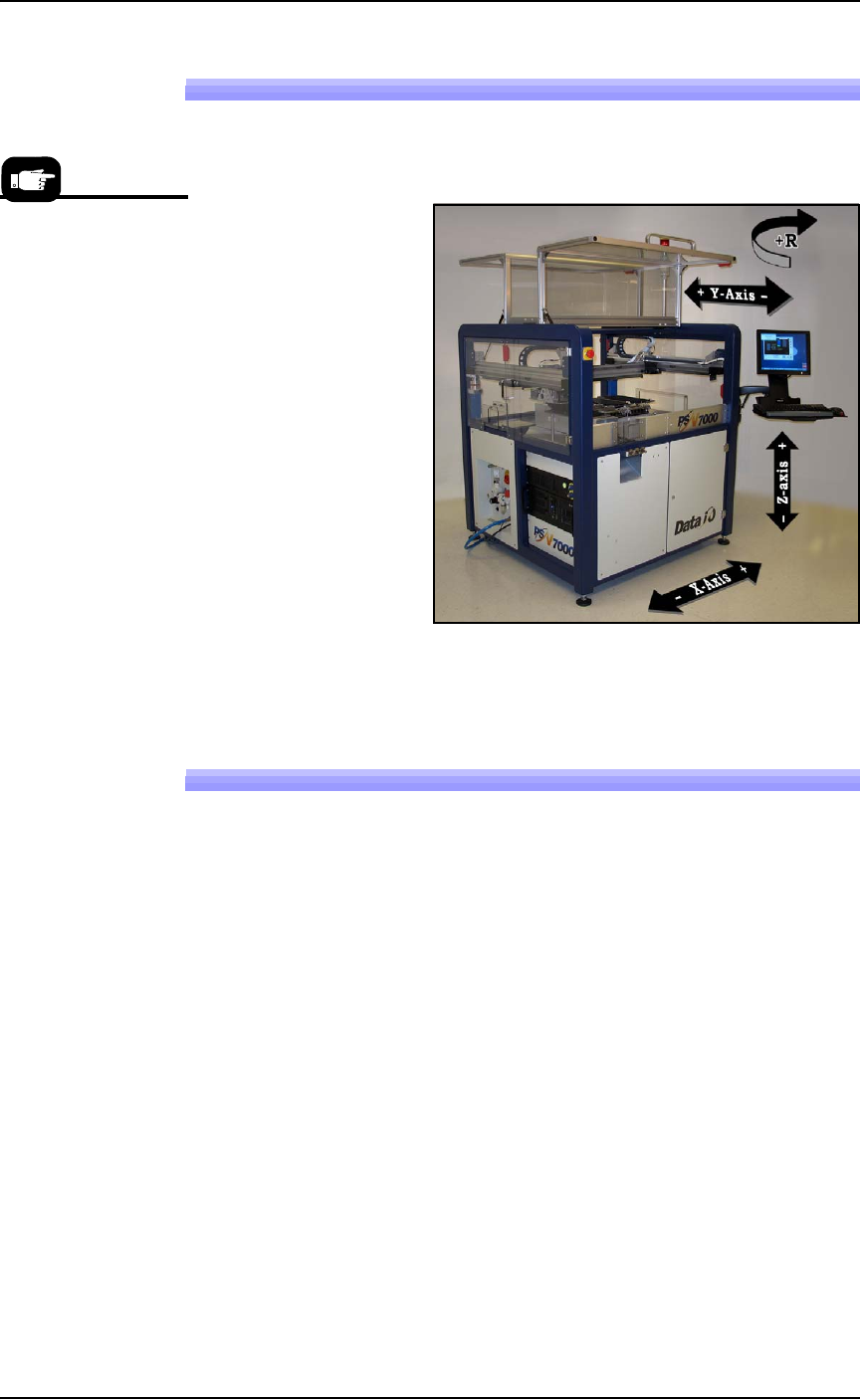
The PSV7000 System gantry operates on three primary axes: X, Y, Z.
An additional axis, called the R-axis (theta), is used by the PNP head
to change device orientation (rotation).
Figure 1-2: These axes describe motion direction on the PSV7000. The
X-Y coordinate 0,0 is at the left front corner.
Basic Machine Functions
The PSV7000 System performs these basic operations when pro-
cessing devices:
1. Pick devices from the input media—
The pick and place head (PNP head) unloads devices from the input
tube, tray, or tape module. These devices are placed into program-
ming sockets in all cases except when Ignore Programmers is selected,
in which case the head takes devices directly to a different media
(repackaging only) or to the shuttle for marking only.
2. Process devices—
Devices in the programming sockets undergo any or all of the fol-
lowing processes as determined by the job. These processes are set in
TaskLink.
• Continuity check
•ID check
•Erase
•Blank check
•Program
• Verify programming
•Read
There’s a glossary (just
before the index) of
terms related to pro-
gramming with the
PSV7000 System.