PSV7000_ Owners Manual_096-0460-001B - 第58页
Setup ■ Setting Up Input and Output Media 2—20 Data I/O • 096-0460-001B back 8. Cut a notch in the tube ends slig htly longer than the device for picking and placing devices. 9. Insert tubes into the T ube-In M odule. No…
■ Setting Up Input and Output Media ◘ Setting Up the Tube Input and Output Media
PSV7000 Owner’s Manual 2—19
back
the far side of the latches using the handle and push down to
secure. Refer to the figures below.
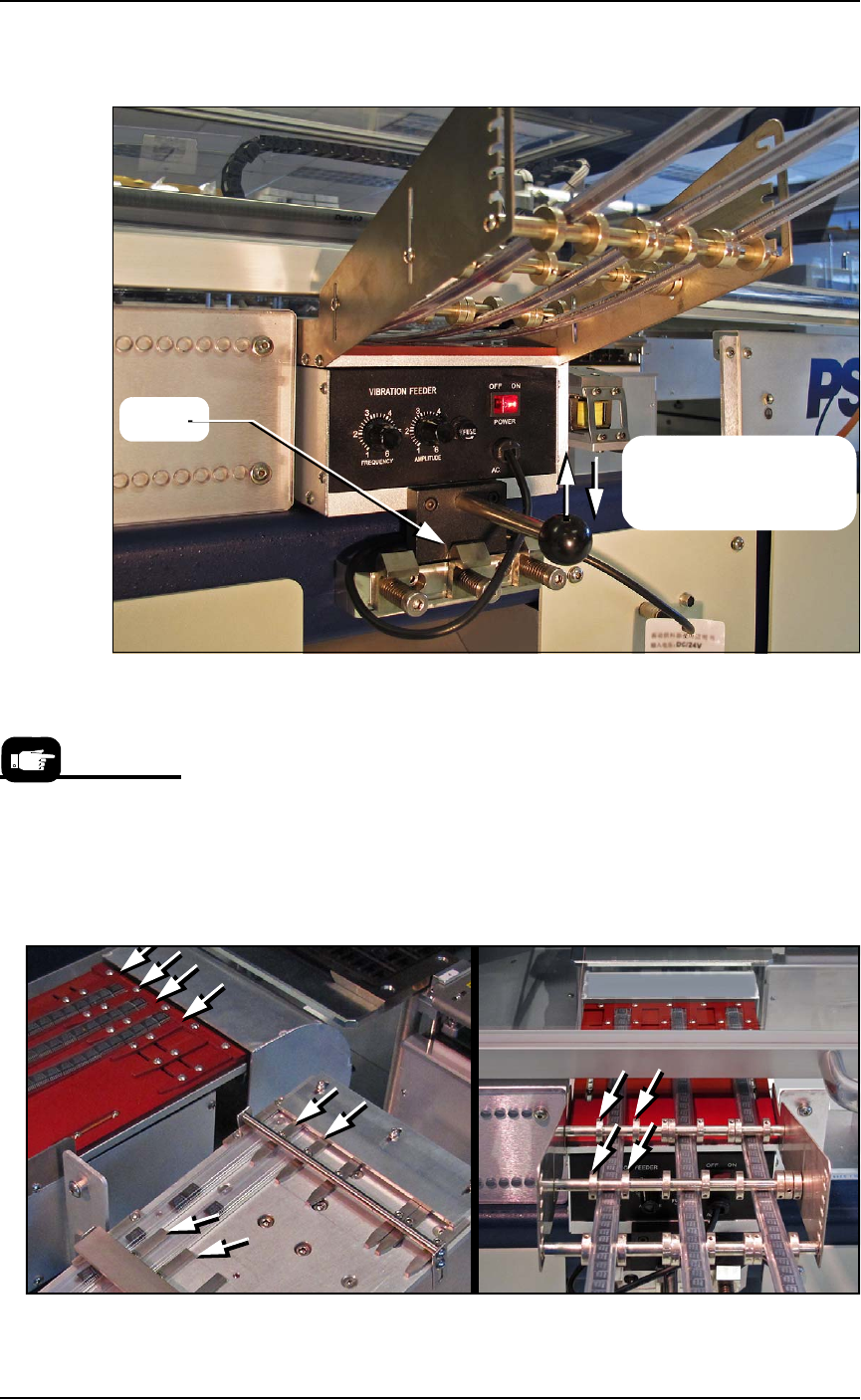
Figure 2-15: Sample Tube Input Module is installed. The Tube Output
module has not yet been installed. If no Tube Output is used, the
access plate must be in place for safety.
5. Insert the communication cable part way into the left socket on
the handler and, while pushing lightly, rotate until the connector
is oriented correctly (it will stop and make a slight click sound
when it goes the rest of the way on).
6. Determine the size of the device tube required.
7. Adjust the flat guide bars and the set-screw collars (guides) to
match the tube locations.
Figure 2-16: Tube input guides.
Latch
Lift over the latch, and
then press down in place
to engage the latch.
To remove the Tube
Feeder communication
cable, grasp the collar
and pull out.
Setup ■ Setting Up Input and Output Media
2—20 Data I/O • 096-0460-001B
back
8. Cut a notch in the tube ends slightly longer than the device for
picking and placing devices.
9. Insert tubes into the Tube-In Module.
Note: Stop-plugs help prevent loosing devices until the tubes are in
place.
10. Teach the tube pick and place locations to the Package file.
11. If using Tube Output, install the output tube module.
11a.Install the mounting base with four screws (3 mm hex key)
from underneath the work surface.
11b.Install one Tube-Out front bracket with two fasteners (2 mm
hex key).
11c.Install the vibrator to the mounting base with four screws
(4 mm hex key) and to the front bracket with four screws
(2.5 mm hex key and wrench).
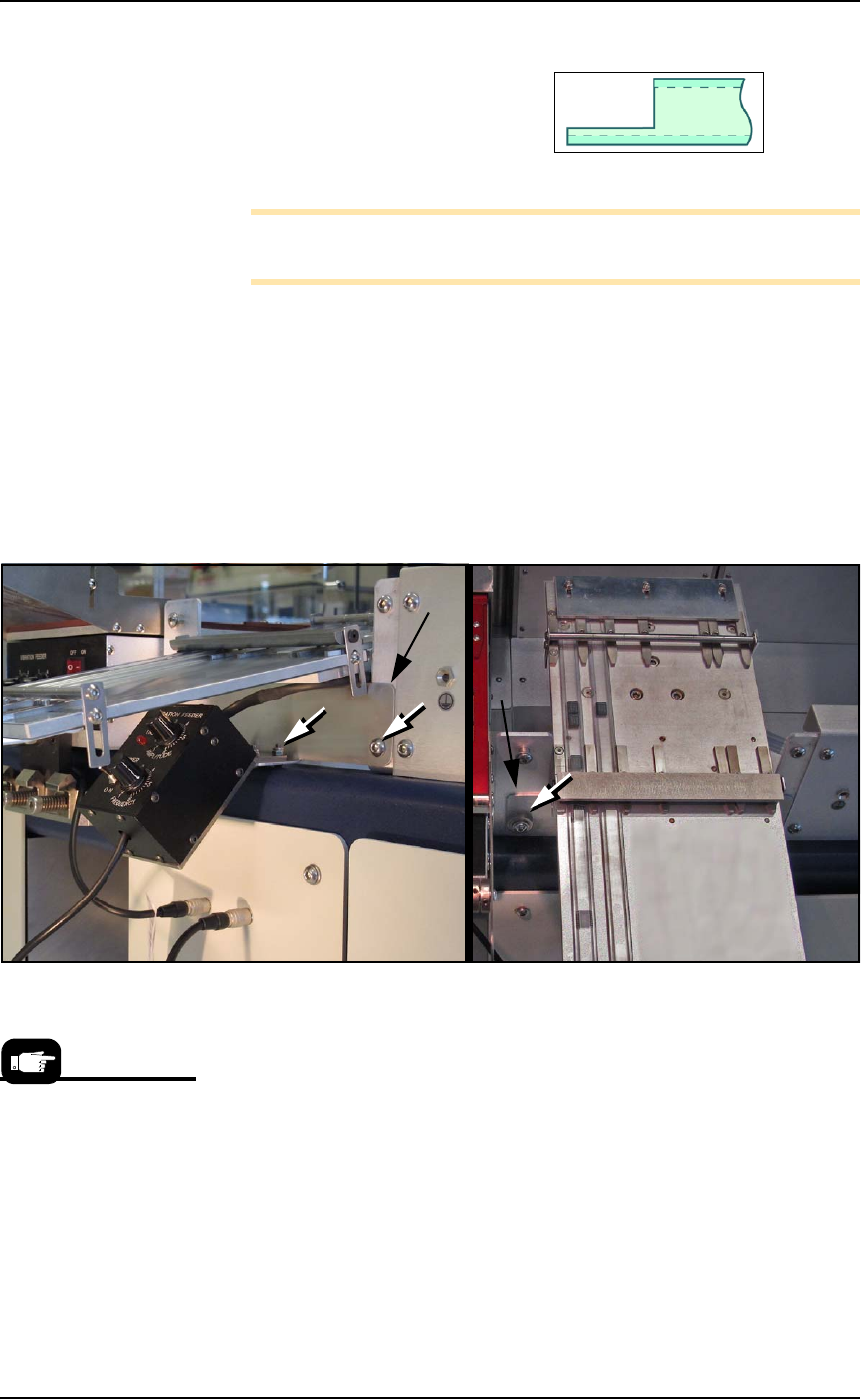
Figure 2-17: Tube Output Module fasteners (white arrows). The
mounting base is not visible in these views. The Tube Out Front Bracket
is indicated with black arrows.
12. Insert the communication cable part way into the right socket on
the handler and, while pushing lightly, rotate until the connector
is oriented correctly (it will stop and make a slight click sound
when it goes the rest of the way on).
13. Restart the PSV7000 System.
14. Edit the winAH400.ini file for tube feeders—
14a.Using Windows Explorer, locate
C:\AH700\winAH400.ini
and m
ake a backup copy, for example,
winAH400backup.ini
.
14b.Open the original file with Microsoft Notepad.
If you have previously
used Tube Feeders you
may already have saved
a winAH400.ini file (with
a temporarily modified
name or in a different
folder) specifically for a
Tube Feeder setup.

■ Setting Up Input and Output Media ◘ Setting Up the Tape Output System
PSV7000 Owner’s Manual 2—21
back
14c.Locate the line
TubeFeeder1=FALSE
and change to
TubeFeeder1=TRUE
14d.Locate the line
TubeFeeder2=FALSE
and change to
TubeFeeder2=TRUE
14e.Save the winAH400.ini file and exit Windows Explorer.
Running the Tube media is covered in the Operator’s Manual, revi-
sion B and later.
Running Tube Input and Output
1. Insert tubes and adjust tube guides.
Note: Ensure that blank devices are loaded into the input tubes
with the correct pin 1 orientation. If pin 1 orientation doesn’t
match pin 1 on the sockets, the correct rotation much be taught in
the Package file.
Pin 1 on Data I/O sockets is almost always toward the far side of
the adapter (the back of the machine). Some BGAs and PLCCs are
marked.
2. Turn the power switch ON at both the Input vibrator module
and output module.
3. Adjust vibration controls if devices do not travel freely in either
tube.
Remember that:
•The Setup window > Options tab must be set to match the work-
space setup. This is covered in the Operator’s Manual.
• The Package File must be taught the Tube locations.
Setting Up the Tape Output System
The PSV7000 System can be configured with an optional Tape Output
System.
The Tape Output System receives programmed devices directly from
the PSV7000 System via the PNP head. The Tape Output System
advances the carrier tape through a mechanism that seals the tape
(using heat or pressure), and rolls the filled tape onto a reel for
delivery to the next stage in the manufacturing process.
On the Gantry window,
the Tube Feeders are
associated with the yel-
low position labels that
read Vib1 and Vib2.