PSV7000_ Owners Manual_096-0460-001B - 第80页
Administrative Functions ■ Administrator Functions 3—10 Data I/O • 096-0460-001B back T o teach locations 1. Run the job in T askLink that uses your new (renamed) P ackage File. 1a. Select a T ask and click Run. 1b. In t…
■ Administrator Functions ◘ Dry Run (Ignore Programmers)
PSV7000 Owner’s Manual 3—9
back
2a. Set security rights for each operator that you do—and do
not—authorize to make AP Pak changes. Changes to User
Rights are made in the Security Dialog.
Note: Only installed options are available for selection on the
Options
tab. If different input media (tube, tape, or tray) is desired,
the winAH400.ini file may need to be edited. See the online Help for
instructions editing the WinAH400.int file or contact Data I/O
support or an authorized technician.
Dry Run (Ignore Programmers)
(Optional) If you want to do a Dry Run or transfer devices from input
media to output media with no programming, click Ignore Program-
mers so it is ON (green); the PNP head will not stop at the program-
mers. Laser marking can be used with Ignore Programmers turned
ON. The default is Off.
Note: Set security rights for each operator to use—or not use—the
Ignore Programmers
option. Changes to
User Rights
are made in
the
Security
Dialog.
Teaching the Workspace Locations
The Package File is a text file containing calibration information that
the PNP head uses to properly pick, rotate and place devices.
After your new Package File is taught, it will contain information
about the specific device package and Socket Adapter as well as the
number of programmers, input and output media, and optional
equipment such as laser marking, if applicable.
A Package File must be created for each device that uses a different
Socket Adapter. If a Package File already exists that can be reused
(same device package, same Socket Adapter, and same input/output
media) a new one is not necessary.
Prerequisites
• A Task and a Package File must exist. For more information, see
topics above.
• A primary device has been selected.
For more information
about Security see Creat-
ing Security Profiles on
page 3-6.
Package Files reside in
the Handler Computer in
folder
C:\AH700\Package
.
Administrative Functions ■ Administrator Functions
3—10 Data I/O • 096-0460-001B
back
To teach locations
1. Run the job in TaskLink that uses your new (renamed) Package
File.
1a. Select a Task and click Run.
1b. In the AH700 Application, click Start.
1c. At the Setup window, make setup selections.
1d. Click System > Gantry. A password may be required—refer
to Creating Security Profiles on page 3-6.
2. To continue, see the AH700 on-screen Help (Teaching Locations >
Printable list of the steps). It covers teaching workspace locations
for all media options.
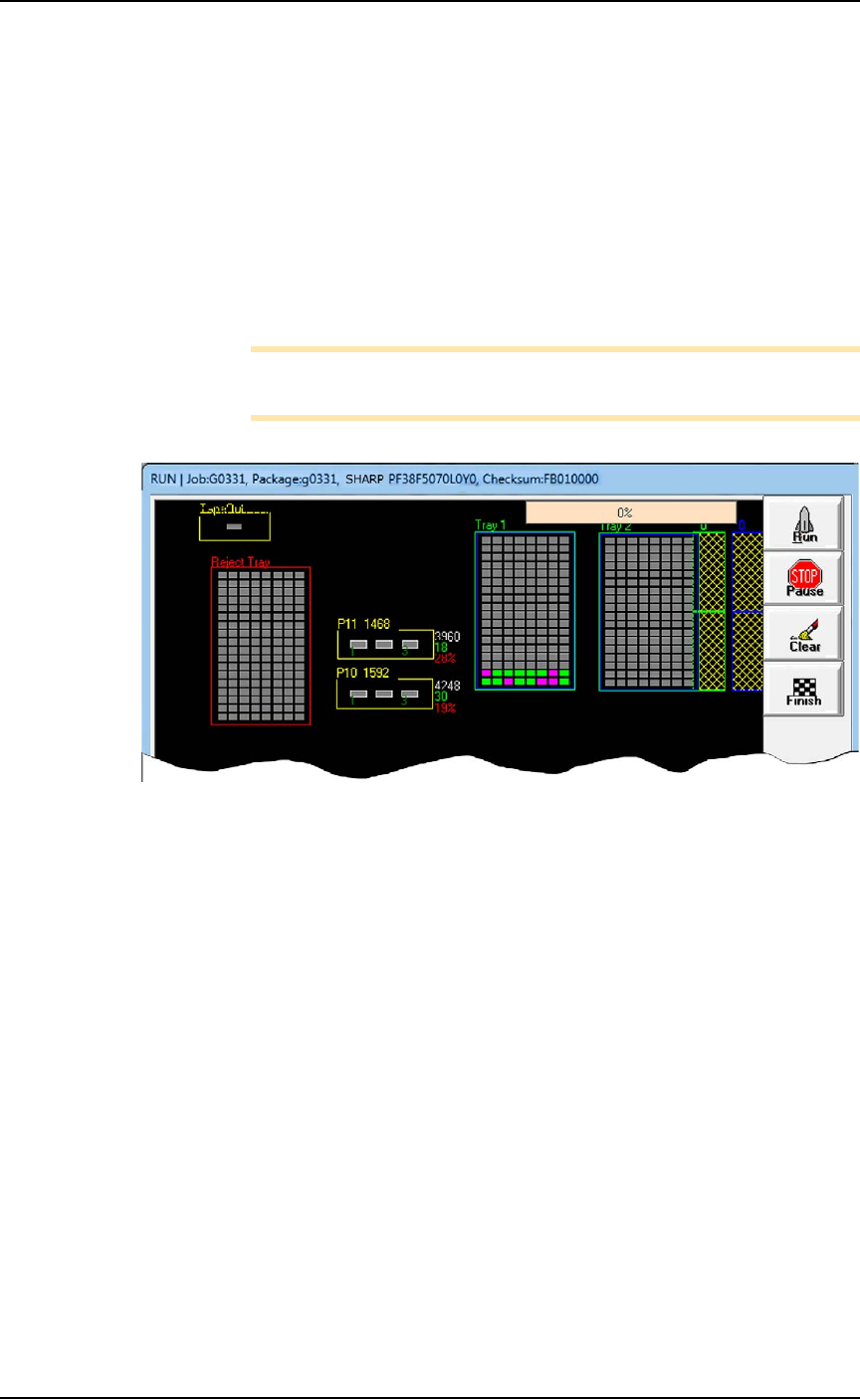
Note: The PSV7000 System can have static trays or a Data I/O
Dual Tray Feeder. Teaching tray locations is the same for both.
Figure 3-2: Run window shown with a Data I/O Dual Tray Feeder
(crosshatch).
Errors
Axis Limit Error
During the process of teaching locations you will be directing the
PNP head to move to various locations inside the work envelope. If
the PNP head is directed to move beyond its X-axis or Y-axis limits,
you will see a red error button.
To resolve axis limit errors:
1. Record the error message—
1a. Note what item was being taught when the error appeared,
such as Programmer 5 or Tray 1 or Tube 2.
1b. Click the Error button to display the error message.
■ Administrator Functions ◘ Optimize Movetimes
PSV7000 Owner’s Manual 3—11
back
.
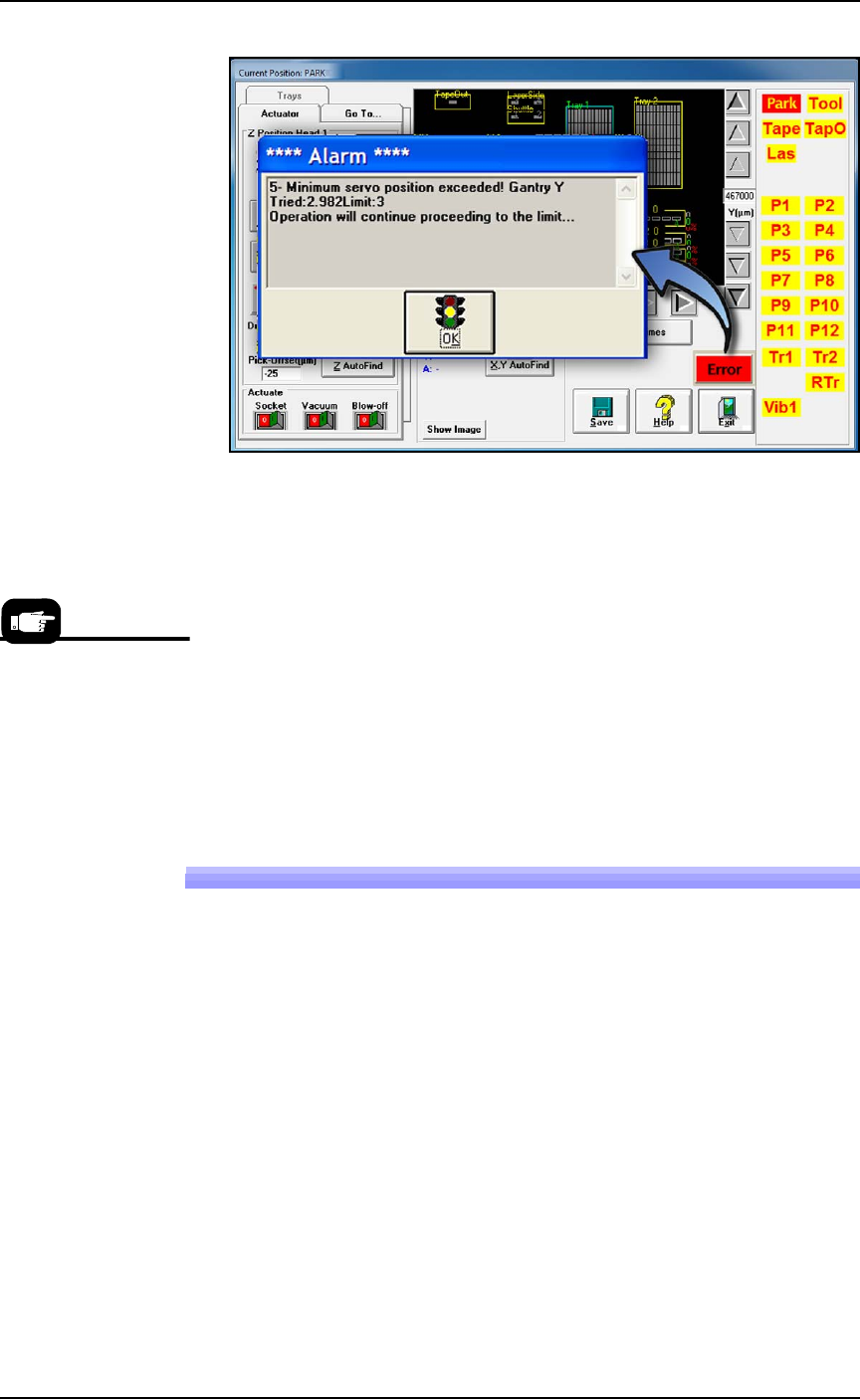
Figure 3-3: Error messages don’t display until you click the red Error
pop-up button to open the Alarm dialog.
1c. Write down the axis (in this case, Y-axis), whether the mini-
mum or maximum position has been exceeded (in this case,
the minimum position), and the “Tried” and “Limit” values
(in this case, Tried = 2.982 and Limit = 3).
1d. Click OK.
2. Contact Data I/O Service or your nearest authorized representa-
tive.
3. The item that was being taught when the error occurred (tray,
programmer, reject bin, etc.) needs to be re-taught. See Teaching
the Package File in the AH700 Help.
Optimize Movetimes
After the equipment locations are taught, you can optimize the move-
ment of the PNP head in the work envelope. This command (Get
Movetimes) calculates programming times versus head travel time to
decide the best PNP head path, especially effective when some pro-
grammers are not used.
To get movetimes:
1. On the Gantry window, click Get Movetimes.
For contact
information see
Contacting Data I/O
on page ix.