00193411-02.pdf - 第122页
5 Operator, Line engineer, Service engineer User M anual SIPLACE HS -60 5.9 Component trolley Software version SR. 503.xx07/2003 US Edition 122 5.9.2 Docking out the component trolley Æ Click on the STOP PROCES SING ic o…
User Manual SIPLACE HS-60 5 Operator, Line engineer, Service engineer
Software version SR.503.xx 07/2003 US Edition 5.9 Component trolley
121
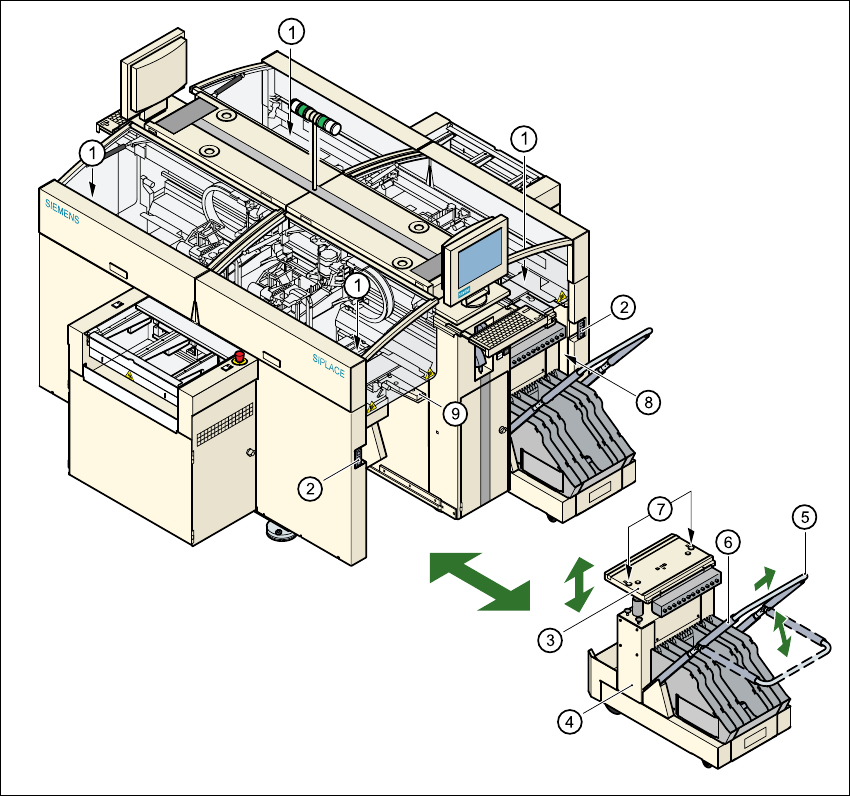
Fig. 5.9 - 2 Docking or undocking the component trolley
5
(1) Button for raising and lowering the component table bed
(2) Plug for connecting the component trolley cable
(3) Component table bed, can be raised or lowered
(4) Component trolley
(5) Bracket
(6) Actuator tube
(7) Centering holes for the centering pins
(8) Gap between the component trolley and the machine frame
(9) Supporting surface for the component table bed
5 Operator, Line engineer, Service engineer User Manual SIPLACE HS-60
5.9 Component trolley Software version SR.503.xx07/2003 US Edition
122
5.9.2 Docking out the component trolley
Æ Click on the
STOP PROCESSING icon in the main view menu. The station will continue to place compo-
nents until the current PCBs are completely populated and have been transported to the inter-
mediate or output conveyor, i.e. until the processing conveyors are empty.
Æ Click in the tool bar in the main view on the symbol for the gantry that you want to move out of
the feeder area using the gantry functions.
Æ Click in the "Gantry functions" view on the Move to set-up position button and press the Start
button as often as you are requested to do so.
The gantry moves from the feeder area to the set-up position.
Æ Open the protective cover of the selected gantry.
Æ Fold up the bracket (see Fig. 5.9 - 1item 5) of the component trolley.
Thus you will lock the raised component table bed in its top end position.
Æ Open the cover over the button used to raise or lower the component table top (see Fig. 5.9 -
1, item 1).
WARNING DANGER OF CRUSHING 5
When raising the component table bed, never reach into the gap between the feeders and
the used tape channel. 5
Æ Hold down the button until the component table bed (see Fig. 5.9 - 1, item 3) reaches its top
end position.
The component table bed latches into the raised position when the button is released.
Æ Unplug the power cable of the component trolley from the socket on the station (see Fig. 5.9 -
1, item 2).
Æ Remove the component trolley.
User Manual SIPLACE HS-60 5 Operator, Line engineer, Service engineer
Software version SR.503.xx 07/2003 US Edition 5.9 Component trolley
123
5.9.3 Docking in the component trolley
WARNING 5
Check that the placement head is outside the range of the component trolley.
CAUTION 5
When docking the component trolley, ensure that the table bed is in its top end position and the
bracket (item 5) is folded up.
Æ Cut off the empty tapes for the feeders.
Æ Make sure that the contact surface (item 9) for the component table bed is clean.
Æ CAREFULLY push the component trolley into the placement system.
Æ Plug the connecting cable of the component trolley into the socket (item 2) on the machine.
Æ Open the cover over the push-button used to raise and lower the component feeder table bed.
Æ Hold down the button (item 1) until the component table bed reaches its top end position.
Æ Check that the centering holes in the component table bed lie precisely over the centering pins
of the placement system.
WARNING DANGER OF CRUSHING 5
When lowering the component table bed, never reach into the gap between the feeders and
the used tape channel. 5
Æ Pull the two actuating tubes (item 6) towards you at the same time and then lower the trolley
bracket (item 5) in order to be able to lower the component table bed.
Æ Ensure that the centering pins engage in the centering holes in the component table bed and
that the component table bed is fully lowered.
Æ Close the cover over the push-button (item 1).
Æ Close the protective cover.
Æ Press the Start button to start the placement system.