00194547-06_InstallationManual_60103SP1.pdf - 第18页
Installation Manual, Station Software Version 601.03 SP1 Edition 06/2006 4.2.1.1 Changing the display settings → Select Start Settings Control Panel Display . → Click the Settings tab. → Make the following settings…

Installation Manual, Station Software Version 601.03 SP1 Edition 06/2006
4.2 Installing the SIPLACE software
4.2.1 Requirements
You must have installed the Windows XP Professional operating system with service pack 2
before installing the station computer version 601 (see section
3).
Caution:
When installing the RMOS operating system (see section
4.5.3 for the CPU076 and section
4.7.1 for the CPU086) it is imperative that the Version 601.03 SP1 installation floppies are
used. The machine will not boot if this is not done.
The default Windows display settings must be changed and the touchscreen must be calibrated.
You must be logged on as the
Administrator in order to be able to carry out this work.
17 of 89
Installation Manual, Station Software Version 601.03 SP1 Edition 06/2006
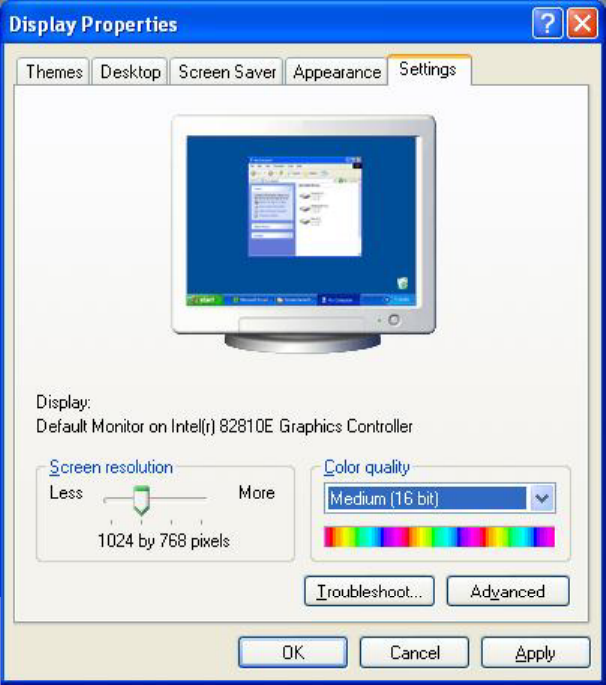
4.2.1.1 Changing the display settings
→ Select Start Settings Control Panel Display.
→ Click the Settings tab.
→ Make the following settings here:
Fig. 4-1: Screen settings
18 of 89
Installation Manual, Station Software Version 601.03 SP1 Edition 06/2006
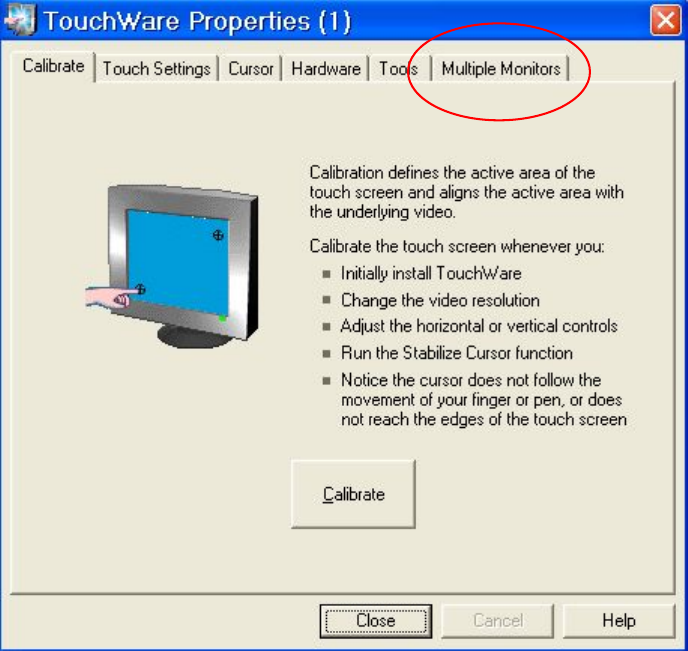
4.2.1.2 Calibrating the touchscreen
Select Start Settings TouchWare, to start the TouchWare Properties applet.
Fig. 4-2: TouchWare Properties
→ Open the Multiple Monitors tab.
19 of 89