M20_Ope_E.pdf - 第109页
Chapter 2 Creating and Editing a Program 2-65 2-7-5-5 Skip Assignment for Repeat Programs Skip assignment for a repeat program can be performed based on the below set of rules: The “ Start Block Placement ” step repres…
Chapter 2 Creating and Editing a Program
2-64
2-7-5 Skip Editor
The skip editor is used to assign program steps (steps of [Placement&Mark Data])to skip. This
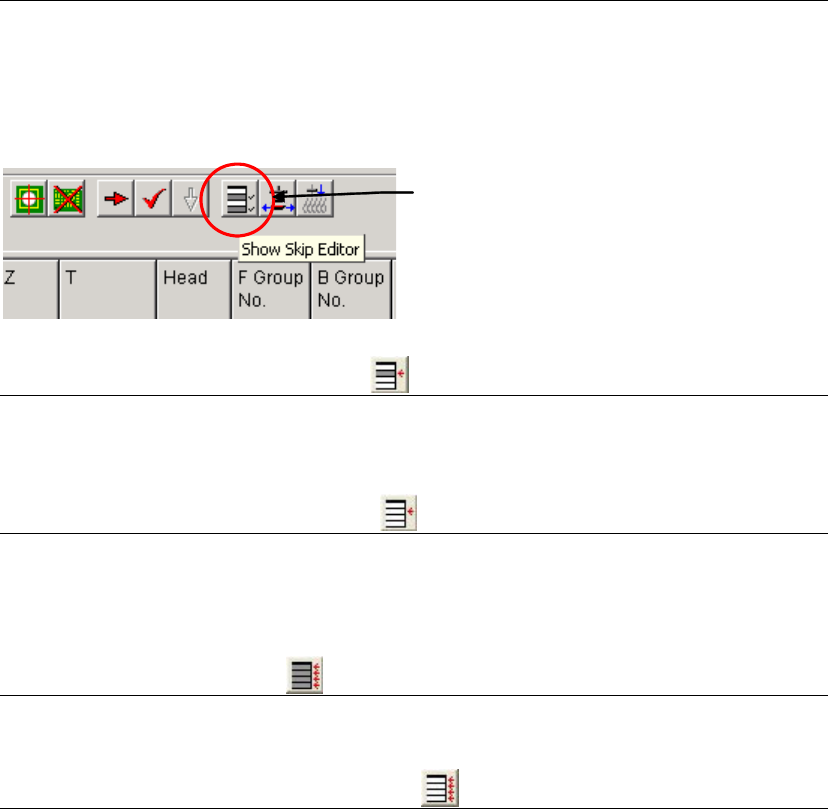
assignment can be performed also durinfg a pausing of a job run. Use four buttons on the skip
editor to assign steps to skip.
Menu: Program>View>ShowSkipEditor
Skip Editor Button
2-7-5-1 Skipping Selected Step(s)
Select a line to skip by clicking or select lines by dragging. The selected line or lines will be
highlighted. Then click the leftmost button. “1” is entered to [Skip] field of the line or lines.
2-7-5-2 Resetting Skip Assignment
Select a line to reset by clicking or select lines by dragging. The selected line or lines will be
highlighted. Then click the second button from the left. “0” is entered to [Skip] field of the line or
lines.
2-7-5-3 Skipping All Steps
Just click the third button from the left (no need to select lines).
2-7-5-4 Resetting All Skip Assignments
Just click the rightmost button (no need to select lines).
Chapter 2 Creating and Editing a Program
2-65
2-7-5-5 Skip Assignment for Repeat Programs
Skip assignment for a repeat program can be performed based on the below set of rules:
The “Start Block Placement” step represents the first board. Skip assignment to this step skips
execution of the first board.
Skip assignment to a “Repeat Offset” step skips execution of the board the step represents.
You can specify a particular placement step to skip within the program block.
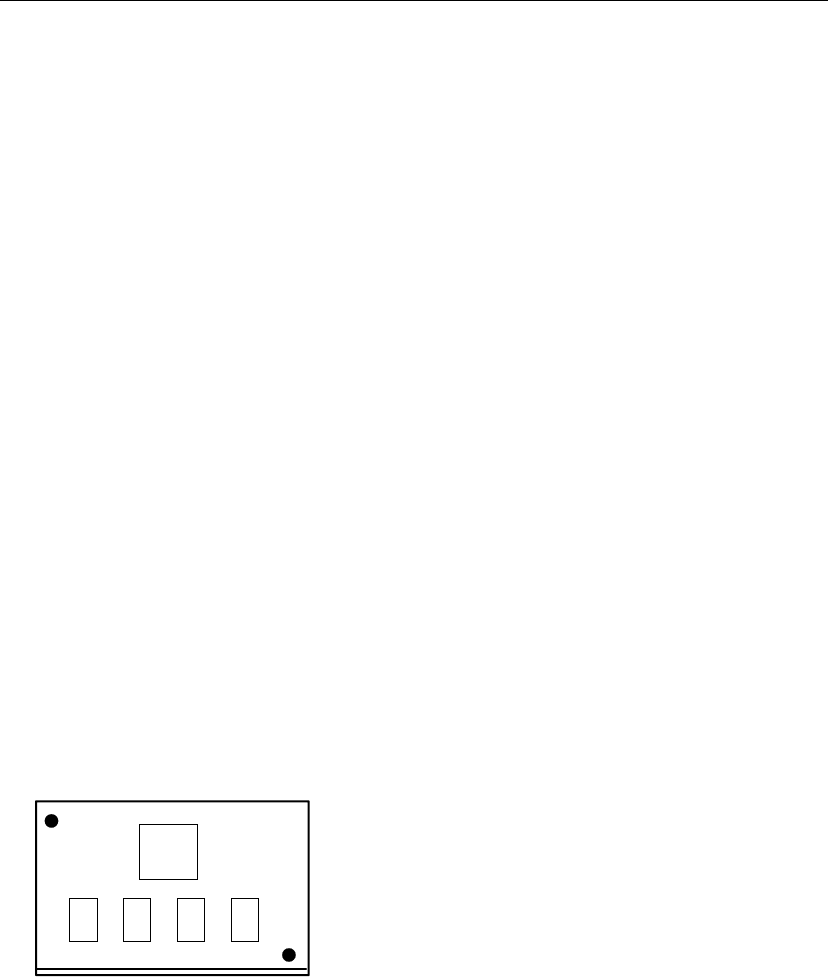
Example:
No. Task:
0001 Fiducial
0002 Fiducial
0003 Start Block Placement
0004 Multiple Pickup
0005 Multiple Pickup
0006 Multiple Pickup
0007 End Multiple Pickup
0008 Single Pickup
0009 End Block Placement
0010 Repeat Offset
0011 Repeat Offset
In the above program:
To skip the first board, assign step number 0003 “Skip”.
To execute only the last board, assign step number 0003 and 0010 “Skip”.
To execute only step number 0005 and 0006 in each board, assign step number 0004, 0007, and
0008 “Skip”.
To skip the first board and execute only step number 0005 and 0006 in the remaining boards,
assign step number 0003, 0004, 0007, and 0008 “Skip”.
④
①
②
⑤⑥
⑧
⑦
0002
0001
0004
0005 0006 0007
0008
Chapter 2 Creating and Editing a Program
2-66
2-7-5-6 Pickup Priority Function
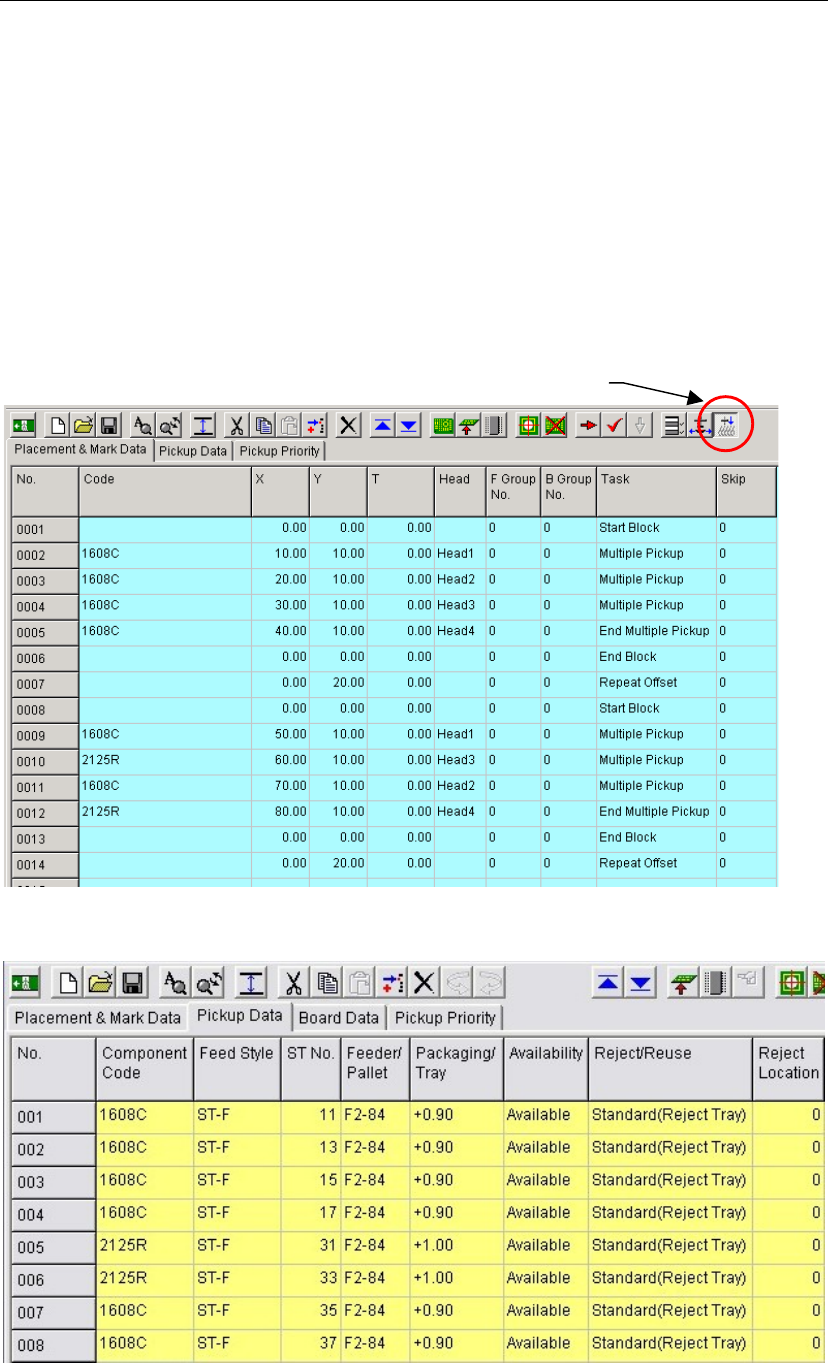
Menu: Select Program>View>ShowPickupPriorityEditor, or click Pickup Priority icon
If the program has two or more of the same components in the pickup data, priority is given to
simultaneous pickup first, then the components are selected in ascending order of ST Nos.
(pickup-point Nos.). As a result, if there are two or more simultaneous pickup lanes, lanes with
low head shift may not be selected. The pickup priority function is provided to define priority
order of ST Nos. to generate high-efficient pickup cycles.
Example: In the following program, 1608C components are picked up simultaneously from ST-F11,
-13, -15 and -17 for placement steps 0002 to 0005. However, for steps 0009 to 0012, 1608C
components are picked up from ST-F11 and -13, and 2125R components from ST-F31 and –33,
respectively. This means that the head moves through approx. 16 lanes.
Now, if the program is modified to pick up 1608C components from ST-F35 and -37 for steps 0009
and 0011, the head moves through approx. eight lanes only, resulting in shorter tact time.
Pickup Priority ico
n