M20_Ope_E.pdf - 第113页
Chapter 2 Creating and Editing a Program 2-69 Note: AND operation is used for the combo box cond itions and the Range condition. For example, "0603C" is selected from the Component Code comb o box and "1&q…
Chapter 2 Creating and Editing a Program
2-68
2-7-6 Data Edit Utilities
2-7-6-1 Group Edit
Menu: Program>DataEditUtilities>GroupEdit
This function allows you to make a grouping of placement steps to edit the steps collectively.
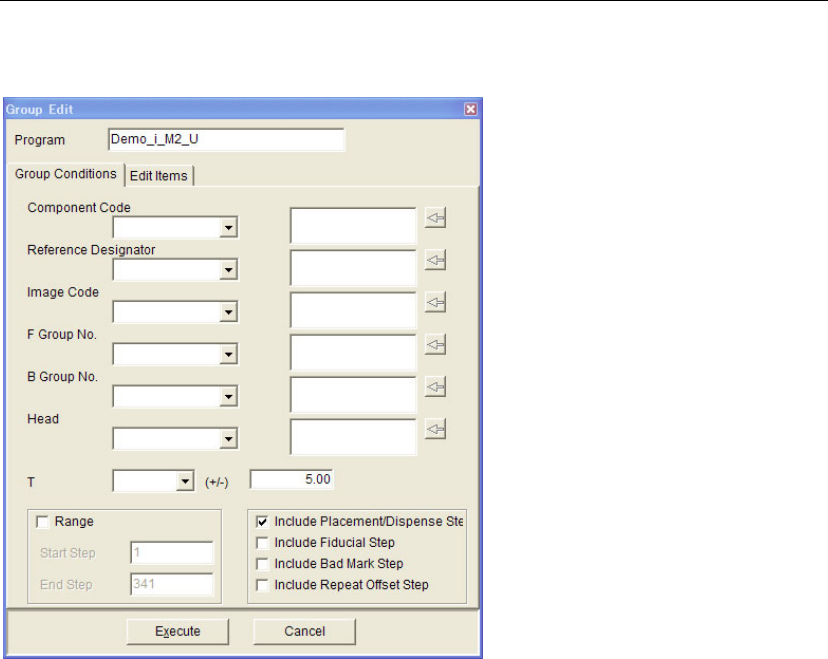
Group Conditions
Conditions of grouping are to be specified in this tab.
Window:
Component Code, Reference Designator, Image Code, F Group No., B Group No., Head:
To add an item in the combo box to a group, click on the item while it is
selected (background color is blue). The item will be added in the box
on the right. Plural number of items can be added. To delete the item(s)
from the box, choose the item and click the [←] button.
T To add the steps with a certain T coordinate, choose one from "0.00",
"90.00", "180.00", "-90.00". You can specify the range in the (+/-) edit
box. For example, if you specify "90.00" in the T combo box and "5.00"
in the edit box, the range for grouping will be from 85.00 to 95.00.
Note: When no items are added in the right-side box, all the items in the comb box will be
unconditionally specified for grouping.
z Range
Start Step Specifies the starting program step for grouping. Normally, the starting
step of the target program is specified.
End Step Specifies the last program step for grouping. Normally, the last step of
the target program is specified.
Chapter 2 Creating and Editing a Program
2-69
Note: AND operation is used for the combo box conditions and the Range condition. For example,
"0603C" is selected from the Component Code combo box and "1" is selected from the F Group No.
combo box, only the steps having both the component code "0603C" and the "1" for the F Group No.
will be the target for grouping.
z [Task] items
Include Placement/Disp... "Multiple Pickup", "End Multiple Pickup", "Single Pickup", "Skip",
"Dispense" in the [Task] cell in the [Placement&Mark Data] will be the
target for grouping.
Include Fiducial Step "Fiducial" steps will be the target for grouping.
Include Bad Mark Step "B Mark Positive Logic" and "B Mark Negative Logic" in the [Task] cell
will be the target for grouping.
Include Repeat Offset … “Repeat Offset” in the [Task] cell in the [Placement&Mark Data] will be
the target for grouping.
Note: OR operation is used for the [Task] items. For example, "Include Placement/Dispense Step" and
"Include Fiducial Step" are selected, both the placement/dispense steps and fiducial steps will be
the target for grouping.
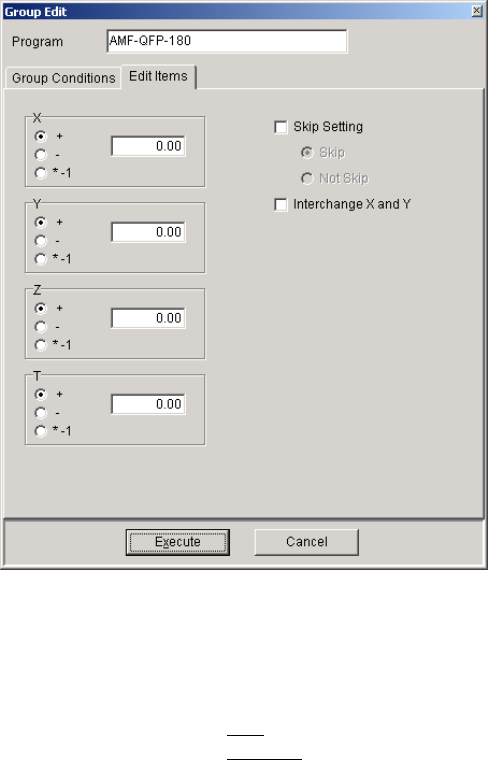
Edit Items
What to edit collectively is to be specified.
Window:
X/Y/Z/T To add offset value(s) to the coordinates, specify the value(s) in the box.
To add, select "+". To subtract, select "-". To change +/- signs, select
"*-1".
Skip Setting Skip
Specifies that the steps of the group will be skipped.
Not Skip
Specifies that the steps of the group will not be skipped.
Interchange X and Y Interchanges X and Y coordinates.
<Execute> button Clicking this button will display the [Confirm Group Edit] window. If
you click the <OK> button in the window, the modification will be
reflected in the program.
Chapter 2 Creating and Editing a Program
2-70
2-7-6-2 PCB Rotation
Menu: Program>DataEditUtilities>PCB_Rotation
This function allows you to create a new program with the coordinates for a rotated PCB by
modifying the coordinates in the original program.
Note: To perform this function, Board Size XY value in Board Data tab must be more than 0.
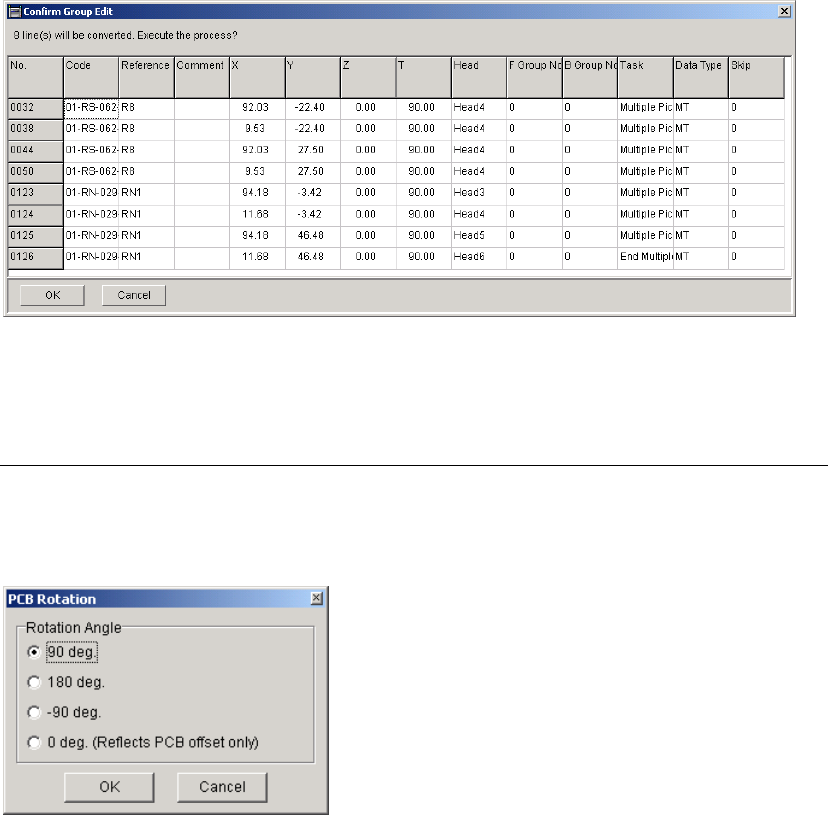
Window:
Rotation Angle When the X and Y values for "Board Origin" in the [Board Data] are not
"0", the offset value(s) will be added to the placement coordinates first,
and then the coordinates will be rotated (modified). When the PCB
rotation has been performed, the X and Y values will be "0".
When "0 deg. (Reflects PCB offset only)" is selected, only the offset
value(s) for the PCB will be reflected in the placement coordinates.
Note: To keep the original program, save the generated program after this function performed as
different file name.