M20_Ope_E.pdf - 第114页
Chapter 2 Creating and Editing a Program 2-70 2-7-6-2 PCB Rotation Menu: Program>DataEditUtilities>PCB_Rotation This function allows you to create a new prog ram with the coordinates for a rotated PCB by modifying …
Chapter 2 Creating and Editing a Program
2-69
Note: AND operation is used for the combo box conditions and the Range condition. For example,
"0603C" is selected from the Component Code combo box and "1" is selected from the F Group No.
combo box, only the steps having both the component code "0603C" and the "1" for the F Group No.
will be the target for grouping.
z [Task] items
Include Placement/Disp... "Multiple Pickup", "End Multiple Pickup", "Single Pickup", "Skip",
"Dispense" in the [Task] cell in the [Placement&Mark Data] will be the
target for grouping.
Include Fiducial Step "Fiducial" steps will be the target for grouping.
Include Bad Mark Step "B Mark Positive Logic" and "B Mark Negative Logic" in the [Task] cell
will be the target for grouping.
Include Repeat Offset … “Repeat Offset” in the [Task] cell in the [Placement&Mark Data] will be
the target for grouping.
Note: OR operation is used for the [Task] items. For example, "Include Placement/Dispense Step" and
"Include Fiducial Step" are selected, both the placement/dispense steps and fiducial steps will be
the target for grouping.
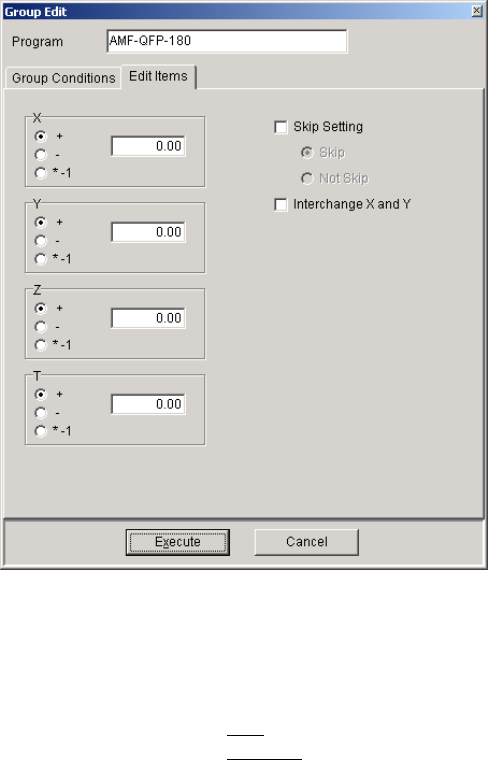
Edit Items
What to edit collectively is to be specified.
Window:
X/Y/Z/T To add offset value(s) to the coordinates, specify the value(s) in the box.
To add, select "+". To subtract, select "-". To change +/- signs, select
"*-1".
Skip Setting Skip
Specifies that the steps of the group will be skipped.
Not Skip
Specifies that the steps of the group will not be skipped.
Interchange X and Y Interchanges X and Y coordinates.
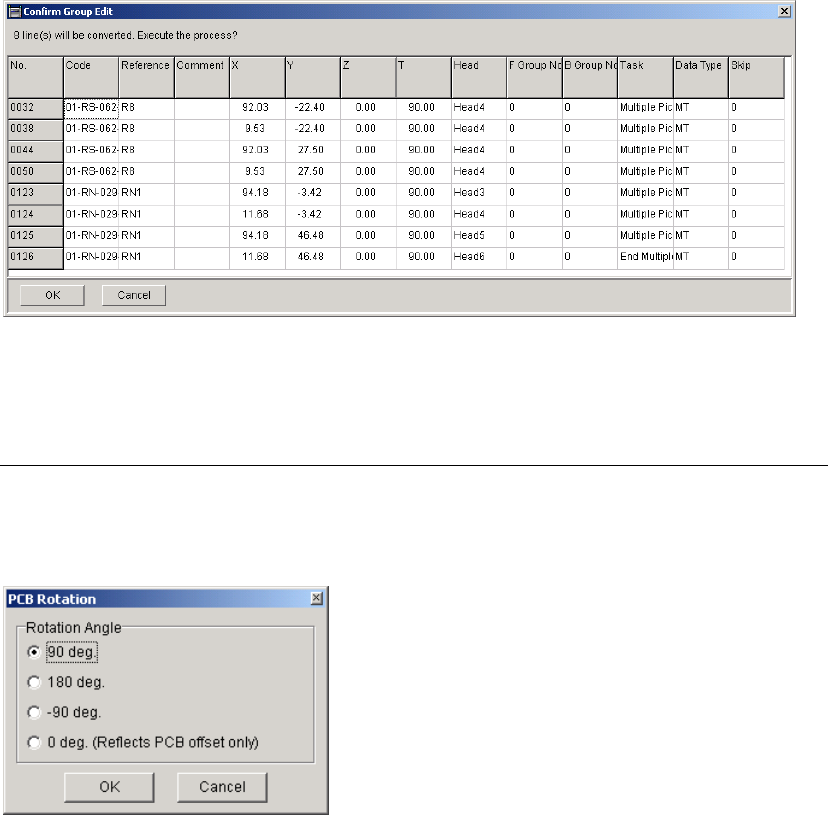
<Execute> button Clicking this button will display the [Confirm Group Edit] window. If
you click the <OK> button in the window, the modification will be
reflected in the program.
Chapter 2 Creating and Editing a Program
2-70
2-7-6-2 PCB Rotation
Menu: Program>DataEditUtilities>PCB_Rotation
This function allows you to create a new program with the coordinates for a rotated PCB by
modifying the coordinates in the original program.
Note: To perform this function, Board Size XY value in Board Data tab must be more than 0.
Window:
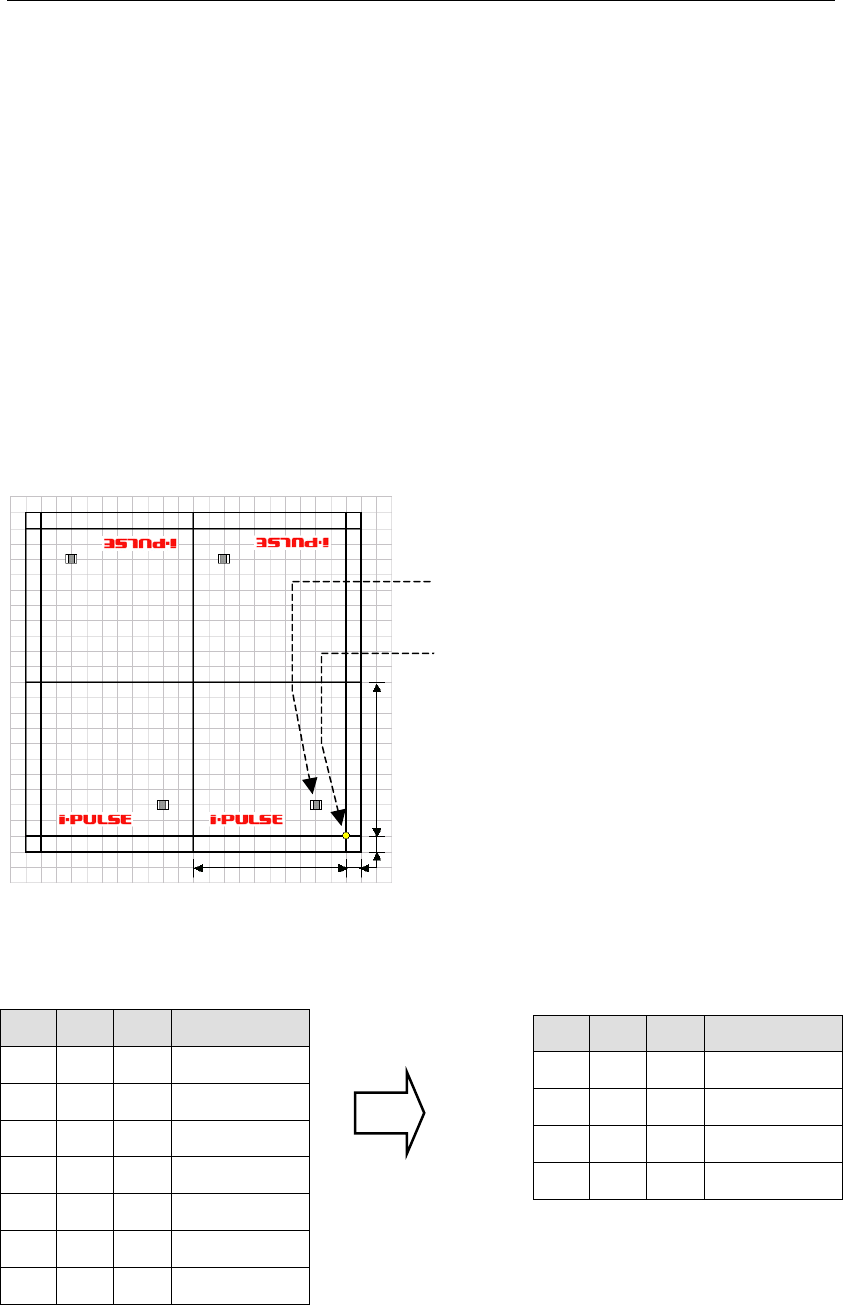
Rotation Angle When the X and Y values for "Board Origin" in the [Board Data] are not
"0", the offset value(s) will be added to the placement coordinates first,
and then the coordinates will be rotated (modified). When the PCB
rotation has been performed, the X and Y values will be "0".
When "0 deg. (Reflects PCB offset only)" is selected, only the offset
value(s) for the PCB will be reflected in the placement coordinates.
Note: To keep the original program, save the generated program after this function performed as
different file name.
Chapter 2 Creating and Editing a Program
2-71
2-7-6-3 Block Data Conversion
Menu: Program>DataEditUtilities>BlockDataConversion
If the program contains block data (repeat data), the program data can be converted with each
repeat offset value reflected on each placement coordinate.
However, the method for creating the original repeat data differs between that when all the panels
share the same origin and when each panel has its own origin.
Furthermore, if a mark step is present in the original repeat data, a mark group No. will be
assigned to each block when data conversion is performed.
Note: When the block data is converted and saved, the original block data will be lost. So, it is
recommended that the original block data be saved in another name and then block data
conversion be performed on that data.
Note: Block data conversion cannot be performed if the program is unsaved or contains data check
errors.
● Example 1 : When all the panels share the same origin (PCB origin X:10, Y:10)
100mm
100mm
10mm
10mm
Origin common to all
the panels
Placement coordinates
(
X:20, Y:20
)
X Y θ Task
Start Block
20 20 0 Single Pickup
End Block
100 0 0 Repeat Offset
100 200 180 Repeat Offset
200 200 180 Repeat Offset
X Y θ Task
20
20 0 Single Pickup
120
20 0 Single Pickup
80 180 180 Single Pickup
180
180 180 Single Pickup
Repeat data before conversion
Actual coordinates after conversion