M20_Ope_E.pdf - 第118页
Chapter 2 Creating and Editing a Program 2-74 Note: If the contacting edges of panels are complicated as shown below, the pitch must be up to the center of the overlapping edges. In this case, a part of the panels appear…
Chapter 2 Creating and Editing a Program
2-73
2-7-6-4 Creating Multi-panel
Menu: Program>DataEditUtilities>CreatingMulti-panel
This function enables easy generation of repeat data based on placement data that contains no
repeat data. Repeat data (panel) can be angled by 0 or 180 degrees from the original placement
data.
Note: There is no restriction on the number of panels. However, an error will occur if the completed
placement data consists of more than 10,000 lines. Furthermore, this function cannot be used if the
original data contains repeat data or if a data check error is present.
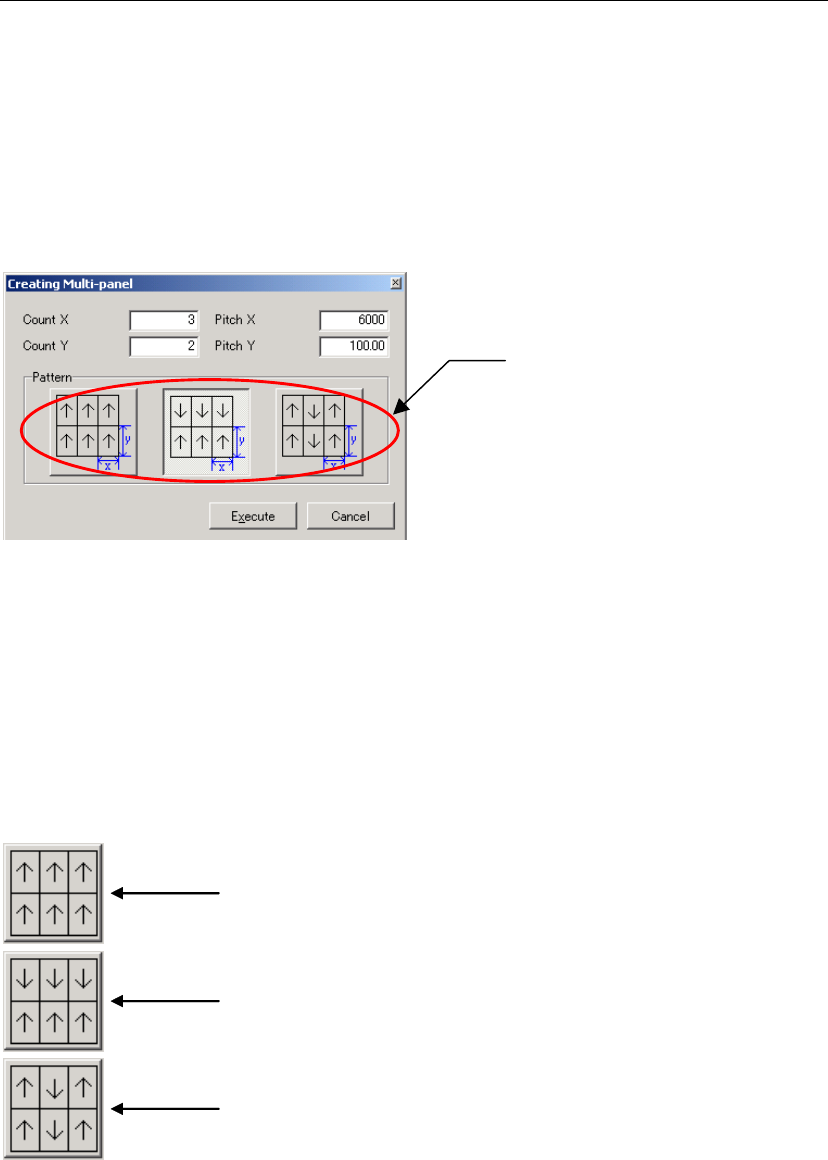
Panel layout pattern
selection button
Item:
Count X / Y Enter the number of panels present in X (horizontal) and Y (vertical)
directions. The original panel must be contained in this number.
Pitch X / Y Enter the panel pitch in X (horizontal) and Y (vertical) directions. The
panel’s edge length must always be entered here even if a number
other than “1” is entered in Count X/Y.)
★Unit: mm
Pattern Select the desired panel layout pattern.
A
ll the panels are placed in the same direction (i.e. at 0 degree from) as the original
placement data.
When panels lined up in X-direction are placed in the same direction (i.e. at 0 degree
from) as the original placement data, and panels lined up in Y-direction are placed in
reverse direction (i.e. at 180 degrees)
Note: Panels in Y direction are angled at 0 and 180 degrees alternately: third-row at 0
degree and fourth-row at 180 degrees.
When panels lined up in Y-direction are placed in the same direction (i.e. at 0 degree
from) as the original placement data, and panels lined up in X-direction are placed in
reverse direction (i.e. at 180 degrees)
Note: Panels in X direction are angled at 0 and 180 degrees alternately: third-row at 0
degree and fourth-row at 180 degrees.
Note: No other patterns are supported by the multi-panel PCB generation function.
To have a pattern other than those, repeat data must be created manually. For details, refer to
“Rotated Multi-Panel PCB”.
Chapter 2 Creating and Editing a Program
2-74
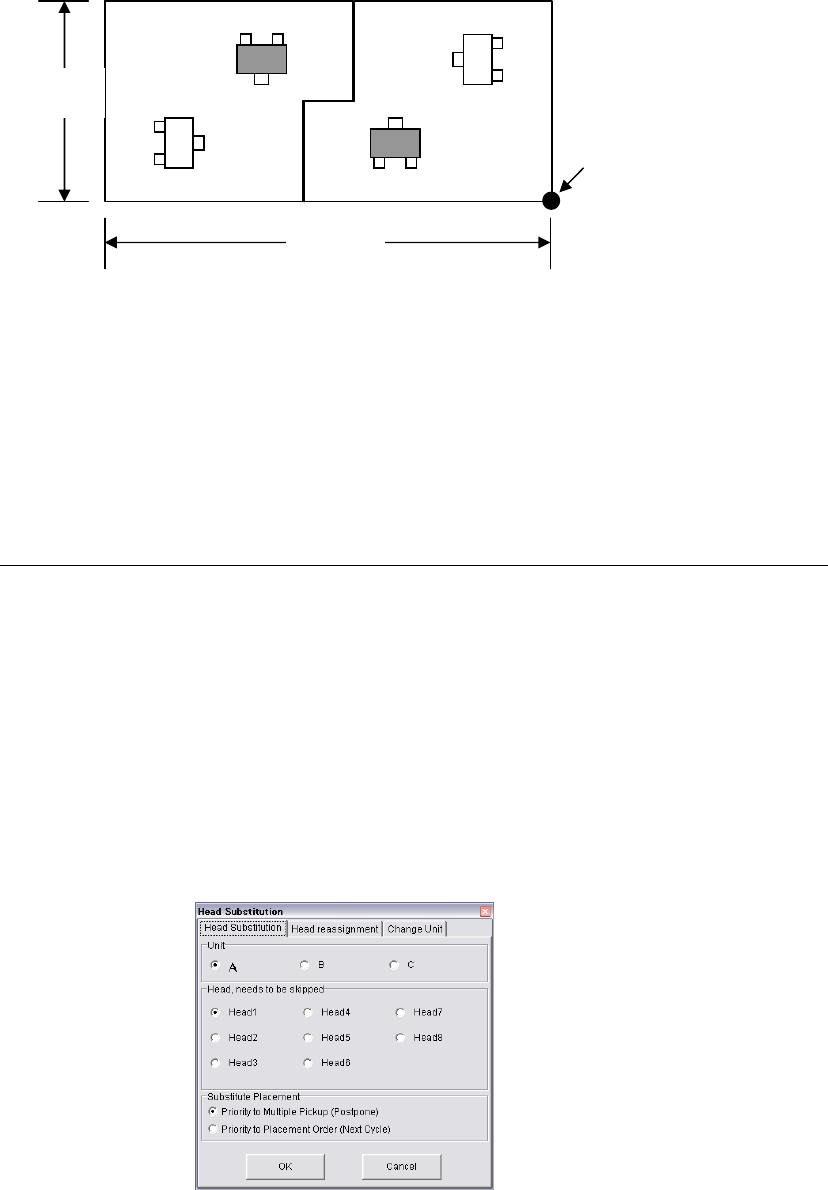
Note: If the contacting edges of panels are complicated as shown below, the pitch must be up to the
center of the overlapping edges. In this case, a part of the panels appears to extend beyond the
pitch range, but this will not cause a problem.
In “Rotated Multi-Panel PCB” given earlier in this manual, offset values are entered to create
repeat data for PCBs consisting of panels rotated at different angles. Please note that, with this
multi-panel PCB generation function, the panel pitch must be entered.
2-7-6-5 Head Substitution
Menu: Program>DataEditUtilities>HeadSubstitution
This function automatically generates a program that uses an alternative head in cases where a
particular head is no longer usable due to breakdown.
Note: When the data is saved after head substitution is performed, the original data will be lost. So, it is
recommended that the original data be saved in another name and then head substitution be
performed on that data.
Note: Executing the head substitution function will not alter feeder arrangement. In addition, the
number of nozzles used will not be increased.
200mm
80mm
PCB origin
Settings in “Creating Multi-Panel” window
Count X 2
Count Y 1
Pitch X 100mm
Pitch Y 80mm
* The number of heads may
vary depending on the
model.
Chapter 2 Creating and Editing a Program
2-75
Head, needs to be skipped
Specify a non-usable head. It is not possible to specify two or more
heads at the same time. If you want to specify two or more heads,
disable all the non-usable heads first in the system parameters, and
then execute the head substitution function for each of non-usable
heads repeatedly.
Note: To cancel them, select System > System Parameter > Parameter > Head/ANC Setup from the main
menu.
Substitute Placement The placement steps for which heads selected in “Head, needs to be
skipped” are designated will be deleted from the corresponding cycle
and assigned to another cycle. Here, select the priority condition to be
given when creating an alternative step instead of the deleted step.
(Priority to Multiple Pickup (Postpone) / Priority to Placement Order
(Next Cycle))
Note : In either case, if non-used heads having the same nozzle are
present within the same cycle, the program will be modified so that
substitute placement is performed using those heads.
● Priority to Multiple Pickup (Postpone)
The deleted placement steps are assigned collectively at the
end of the program. Multiple pickup is performed as much as
possible to reduce the placement tact time. Some restrictions
will apply to the postpone processing. Refer to [NOTE].
● Priority to Placement Order (Next Cycle)
If a head that uses the same nozzle as that of the non-usable
head is designated in the same cycle, the deleted placement
steps are inserted before the next cycle. This enables placement
with the placement order specified in the program taken into
account. However, if there is no head with the same nozzle in
the cycle, the deleted placement steps will be postponed to the
end of the program (multiple pickup). Some restrictions will
apply to the postpone processing. Refer to [NOTE].
Note: Postpone processing for substitute placement are restricted in the following cases.
① If two or more pairs of non-grouped fiducial marks are present, postpone processing will be
performed within the effective range of those fiducial marks.
② If two or more non-grouped bad marks are present, postpone processing will be performed
within the effective range of those bad marks.
③ In the case of repeat data, postpone processing will be performed within the repeat range.
④ If the program handles components exceeding 10.5mm in height, postpone processing will
not be performed in any cases, and the deleted placement steps are inserted before the next
cycle. In this case, if there is no head using the same nozzle, nozzle change will be performed.