M20_Ope_E.pdf - 第144页
Chapter 4 Data Conversio n 4-6 Unit Select data-entry unit (mm/inch) of CAD data. If data-entry unit of CAD data and destination data (program data) differ, mm -inch conversion is executed. O ffset X/Y If CAD-data or…
Chapter 4 Data Conversion
4-5
4-1-3-2 Editing and Creating a CAD Format
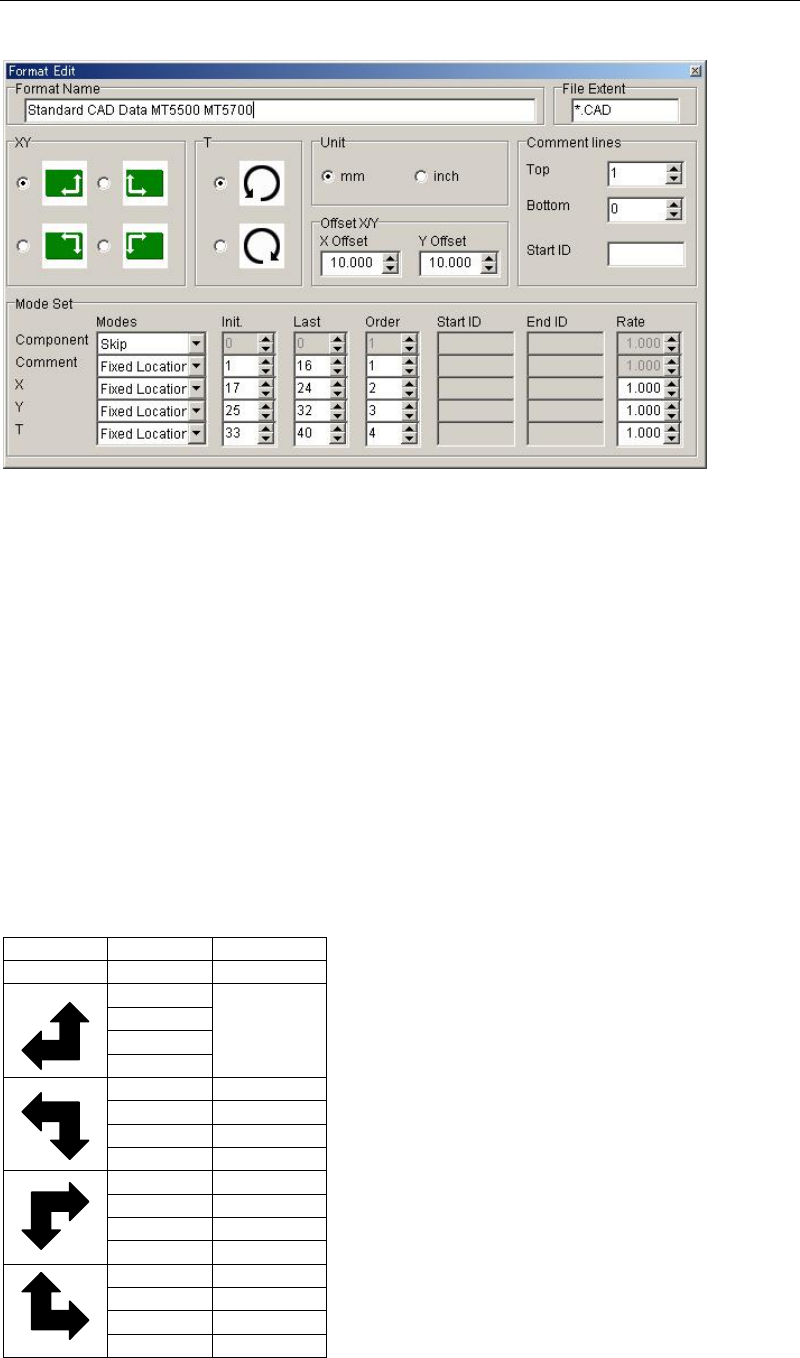
When clicking <Create> button or <Edit> button, [Format Edit] dialog box will appear.
Format Name
Enter CAD format name. Up to 40 characters can be entered. The name entered here is
displayed for [CAD Format Select] dialog box.
File Extent
Enter file extent of a CAD Data file to which the currently edited format is applied. Prefix *.
(asterisk and period) before the extent. Capital letter and small letter are not separately
recognized.
Example: *.pnc *.CCP
For [CAD Data Conversion] dialog box, only the files assigned the file extent entered here are
displayed.
XY
Using the SPACE key, select the X,Y-axis direction of CAD data. (+ direction is indicated by an
arrow.) If the X,Y-axis direction of CAD data and destination data differ, +/- sign of CAD data
is converted according to the X,Y-axis direction of destination data.
Format CAD Data PCB Origin
XY X/Y RF
+/+ Same as
CAD Data
+/-
-/-
-/+
+/+ +/-
+/- +/+
-/- -/+
-/+ -/-
+/+ -/-
+/- -/+
-/- +/+
-/+ +/-
+/+ -/+
+/- -/-
-/- +/-
-/+ +/+
T
Select the rotating direction (clockwise/couterclockwise) for T angle. (+ direction is indicated
by an arrow.) Since the rotating direction of destination data is fixed as couterclockwise
direction, if you select clockwise direction here, +/- sign of CAD data is reversed.
Chapter 4 Data Conversion
4-6
Unit
Select data-entry unit (mm/inch) of CAD data. If data-entry unit of CAD data and destination
data (program data) differ, mm-inch conversion is executed.
Offset X/Y
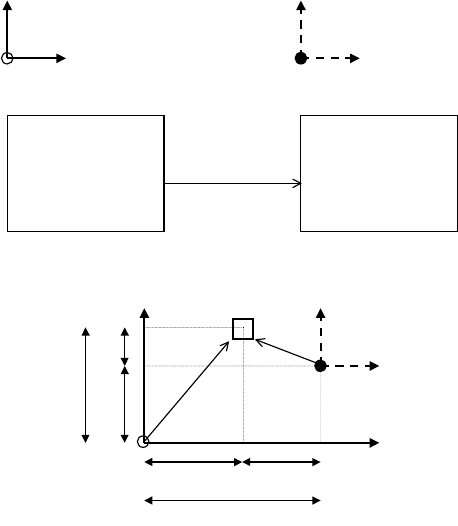
If CAD-data origin is on different coordinates from destination-data origin, enter coordinates
of destination-data origin based on CAD-data origin. When both origins are on the same
coordinates, enter 0 (initial value).
This data should conform to data you entered for UNIT and COORDINATE XY (+/- sign).
Example: Offset X=+Xa, offset Y=+Ya
CAD data coordinates Destination data coordinates
CAD Data Destination data
Component X Y Component X Y
... ...
... ...
?
+Xb +Yb CAD Conversion
?
-Xc +Yc
... ...
... ...
Y Component Y
X
X
X
X
X
Y
Y
Y
Comment lines
Enter the location of COMMENT LINES in the file. COMMENT LINES means CAD data
excepting program-step data and they includes PCB information, etc. Each data has different
format setup.
● Top
Enter how many lines at the top of the file to include COMMENT LINES (0-99).
● Bottom
Enter how many lines at the bottom of the file to include COMMENT LINES (0-99). A line
containing only EOF code (1A)h is not included for this data.
● Start ID
If COMMENT LINES exist in other lines than TOP or BOTTOM, enter identifier characters to
start COMMENT LINES(up to 10 characters).
Note: "line" herein indicates data separated by CR&LF code (0D0A).
Note: A line containing only CR&LF code (0D0A) is recognized as COMMENT LINE though not
specified previously.
Example: COMMENT LINES TOP:2 BOTTOM:2 START-ID.:*

Chapter 4 Data Conversion
4-7
CAD DATA (
↓
=CR&LF (0d0a)h)
●
●
●
●
+
●
●
●
●
1
●
●
●
●
+
●
●
●
●
2
●
●
●
●
+
●
●
●
●
3
●
●
●
●
+
●
●
●
●
4
●
●
●
●
+
●
●
●
●
5
●
TOP B
O
A
R
D
N
A
M
E:
A
B
C
D
EF
G
↓
B
O
A
R
D
O
FFSET : X =
0
.0
m
m,
Y
=0.0
m
m
↓
*****************
P
A
R
TS
M
O
U
N
TED **************
*
N
A
M
EP
A
R
TT
Y
PE X Y T
↓
START ID **** LSI ***
↓
LS101 1SS187 -13. 843 16. 929 0. 00
↓
LS102 1SS187 -
1
5. 519 16. 955 180. 00
↓
↓
****
C
H
IP **
*
↓
R
1
C
R
1/ 4W - 28. 689 7. 544 0. 00
↓
R
2
R
3216 - 42. 596 45. 872 90. 00
↓
R
3
R
32
16 - 44. 094 29. 134 180. 00
↓
↓
BOTTOM
D
A
TE : 1994. 12. 13
↓
TI
M
E: 1
0
: 32: 1
2
↓
[E
O
F]
Mode Set
Specify data search method for non-standard-format CAD data.
● Modes
Data search mode (1-04)
Skip mode: Data is not used.
Fixed location: Detect data by INIT.,LAST and ORDER. Set the initial and last column number
or each data in a line.
END-ID. mode: Detect data by ORDER and END-ID.
By detecting END-ID., the system recognizes the end of data.
Note: It is invalid to locate data of END-ID. after data of START-ID.mode. The system cannot
distinguish one data from the other.
START-ID. mode: Detect data by ORDER and START-ID.
By detecting START-ID.,the system recognizes the starting of data.
START/END-ID. : Detect data by ORDER, START-ID.and END-ID.mode By detecting
START-ID. ,the system recognizes the starting of data. Then by detecting END-ID., the system
recognizes the end of data.
● Init.
Initial column number in a line (1-510)
Used for fixed location mode. Entry value should be the same or less than that of LAST (last
column.number) of the same data. Also each data location in a line assigned by INIT./LAST
should not overlap each other.
● Last
Last column number in a line (1-510)
Used for fixed location mode. Entry value should be the same or larger than that of
INIT.(Initial column.number) of the same data. Also each data location in a line assigned by
INIT./LAST should not overlap each other.
● Order
Data location order (1-99)
ORDER is required for all the data search mode except for 0=Skip mode. ORDER should be
entered in consecutive order from 1. If you want to skip one or more items in a line, you need
not conform to this convention. (See Note.)
● Start ID
Start-identifier letters (up to 10 letters) Used for START-ID.mode and SART/END-ID.mode.
Space(s) only (with no other letter) are not allowed.