M20_Ope_E.pdf - 第145页
Chapter 4 Data Conversio n 4-7 CAD DATA ( ↓ =CR&LF (0d0a)h) ● ● ● ● + ● ● ● ● 1 ● ● ● ● + ● ● ● ● 2 ● ● ● ● + ● ● ● ● 3 ● ● ● ● + ● ● ● ● 4 ● ● ● ● + ● ● ● ● 5 ● TOP B O A R D N A M E: A B C D EF G ↓ B O A R D O F F …
Chapter 4 Data Conversion
4-6
Unit
Select data-entry unit (mm/inch) of CAD data. If data-entry unit of CAD data and destination
data (program data) differ, mm-inch conversion is executed.
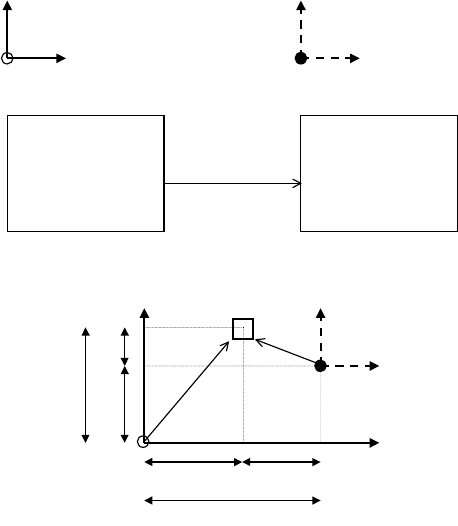
Offset X/Y
If CAD-data origin is on different coordinates from destination-data origin, enter coordinates
of destination-data origin based on CAD-data origin. When both origins are on the same
coordinates, enter 0 (initial value).
This data should conform to data you entered for UNIT and COORDINATE XY (+/- sign).
Example: Offset X=+Xa, offset Y=+Ya
CAD data coordinates Destination data coordinates
CAD Data Destination data
Component X Y Component X Y
... ...
... ...
?
+Xb +Yb CAD Conversion
?
-Xc +Yc
... ...
... ...
Y Component Y
X
X
X
X
X
Y
Y
Y
Comment lines
Enter the location of COMMENT LINES in the file. COMMENT LINES means CAD data
excepting program-step data and they includes PCB information, etc. Each data has different
format setup.
● Top
Enter how many lines at the top of the file to include COMMENT LINES (0-99).
● Bottom
Enter how many lines at the bottom of the file to include COMMENT LINES (0-99). A line
containing only EOF code (1A)h is not included for this data.
● Start ID
If COMMENT LINES exist in other lines than TOP or BOTTOM, enter identifier characters to
start COMMENT LINES(up to 10 characters).
Note: "line" herein indicates data separated by CR&LF code (0D0A).
Note: A line containing only CR&LF code (0D0A) is recognized as COMMENT LINE though not
specified previously.
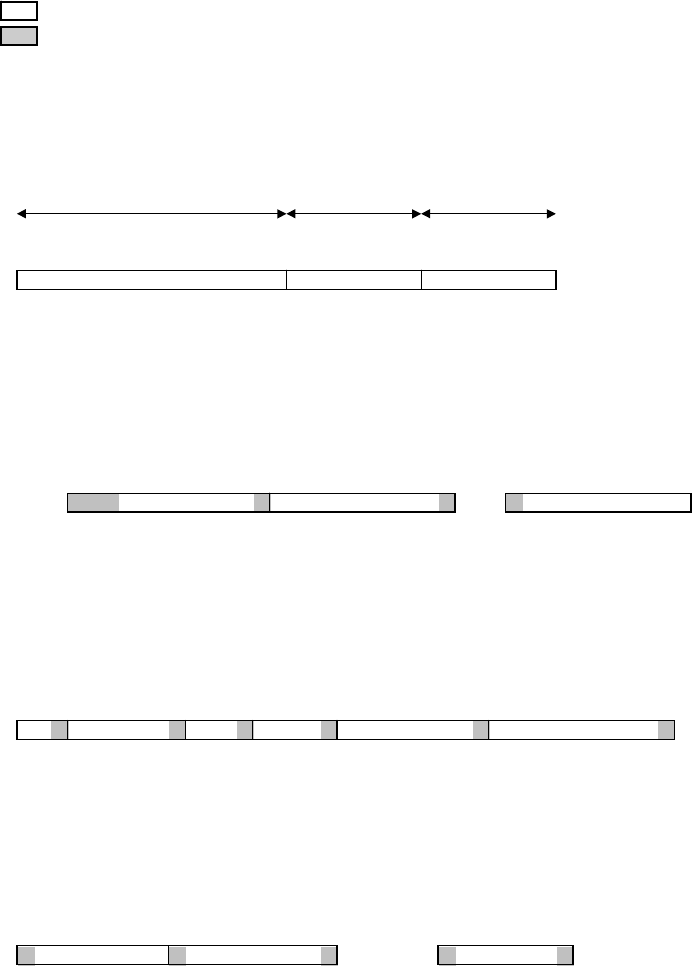
Example: COMMENT LINES TOP:2 BOTTOM:2 START-ID.:*

Chapter 4 Data Conversion
4-7
CAD DATA (
↓
=CR&LF (0d0a)h)
●
●
●
●
+
●
●
●
●
1
●
●
●
●
+
●
●
●
●
2
●
●
●
●
+
●
●
●
●
3
●
●
●
●
+
●
●
●
●
4
●
●
●
●
+
●
●
●
●
5
●
TOP B
O
A
R
D
N
A
M
E:
A
B
C
D
EF
G
↓
B
O
A
R
D
O
FFSET : X =
0
.0
m
m,
Y
=0.0
m
m
↓
*****************
P
A
R
TS
M
O
U
N
TED **************
*
N
A
M
EP
A
R
TT
Y
PE X Y T
↓
START ID **** LSI ***
↓
LS101 1SS187 -13. 843 16. 929 0. 00
↓
LS102 1SS187 -
1
5. 519 16. 955 180. 00
↓
↓
****
C
H
IP **
*
↓
R
1
C
R
1/ 4W - 28. 689 7. 544 0. 00
↓
R
2
R
3216 - 42. 596 45. 872 90. 00
↓
R
3
R
32
16 - 44. 094 29. 134 180. 00
↓
↓
BOTTOM
D
A
TE : 1994. 12. 13
↓
TI
M
E: 1
0
: 32: 1
2
↓
[E
O
F]
Mode Set
Specify data search method for non-standard-format CAD data.
● Modes
Data search mode (1-04)
Skip mode: Data is not used.
Fixed location: Detect data by INIT.,LAST and ORDER. Set the initial and last column number
or each data in a line.
END-ID. mode: Detect data by ORDER and END-ID.
By detecting END-ID., the system recognizes the end of data.
Note: It is invalid to locate data of END-ID. after data of START-ID.mode. The system cannot
distinguish one data from the other.
START-ID. mode: Detect data by ORDER and START-ID.
By detecting START-ID.,the system recognizes the starting of data.
START/END-ID. : Detect data by ORDER, START-ID.and END-ID.mode By detecting
START-ID. ,the system recognizes the starting of data. Then by detecting END-ID., the system
recognizes the end of data.
● Init.
Initial column number in a line (1-510)
Used for fixed location mode. Entry value should be the same or less than that of LAST (last
column.number) of the same data. Also each data location in a line assigned by INIT./LAST
should not overlap each other.
● Last
Last column number in a line (1-510)
Used for fixed location mode. Entry value should be the same or larger than that of
INIT.(Initial column.number) of the same data. Also each data location in a line assigned by
INIT./LAST should not overlap each other.
● Order
Data location order (1-99)
ORDER is required for all the data search mode except for 0=Skip mode. ORDER should be
entered in consecutive order from 1. If you want to skip one or more items in a line, you need
not conform to this convention. (See Note.)
● Start ID
Start-identifier letters (up to 10 letters) Used for START-ID.mode and SART/END-ID.mode.
Space(s) only (with no other letter) are not allowed.
Chapter 4 Data Conversion
4-8
● End ID
End-identifier letters (up to 10 letters) Used for END-ID.mode and START/END-ID.mode.
Space(s) only (with no other letter) are not allowed. As for the last item in a line, if no END-ID.
is entered, CR&LF code (0D0A) is recognized as END-ID. instead. However, this code cannot
be entered as END-ID, enter any letters as dummy END-ID.
Note: To skip one or more items in a line, two alternatives are available.
1.Specify Fixed location mode for all the items.
2.Provided the same END-ID. are entered for every item in a line, specify END-ID. mode for
all the items and enter the same END-ID. for them.
In both cases, the system recognizes items to skip by skipped ORDERs.
The following shows example CAD data and the required settings for them (CAD FORMAT
SET). The example CAD data conform to the below conventions:
↓ CR&LF code (0A0D)h
? Data to skip (unnecessary data)
Data search range
START-ID. or END-ID.
(x) ORDER
Example1: [CAD Format Set]
Component
:
Mode=Fixed Location Order=1 Init.= 1 Last=16
X
:
Mode=Fixed Location Order=2 Init.=17 Last=24
Y
:
Mode=Fixed Location Order=3 Init.=25 Last=32
Component X Y
●●●●
+
●●●●
1
0
●●●●
+
●●●●
2
0
●●●●
+
●●●●
3
0
●●●●
+
●●●●
4
0
●
02CZ +43.244 40.868
↓
1SS322 62.294 23.851
↓
1SS322 -162.294 128.296
↓
(01) (02) (03)
Example2: [CAD Format Set]
Component
:
Mode=Start/End ID Order=1 Start ID=NT: End ID=/
X
:
Mode=End ID Order=2 End ID=/
Y
:
Mode=Start ID Order=3 Start ID=/
●●●●
+
●●●●
1
0
●●●●
+
●●●●
2
0
●●●●
+
●●●●
3
0
●●●●
+
●●●●
4
0
●
POINT: 02CZ/ +43.224/ ??/ 40.868
↓
POINT:1SS322/62.294/????/
23.
851
↓
POINT: 1SS322/ -
1
62.294/ ??/ 128.296
↓
(01) (02) (03)
Example3: [CAD Format Set]
Component
:
Mode=End ID Order=2 End ID=/
X
:
Mode=End ID Order=5 End ID=/
Y
:
Mode=End ID Order=6 End ID=/
●●●●
+
●●●●
1
0
●●●●
+
●●●●
2
0
●●●●
+
●●●●
3
0
●●●●
+
●●●●
4
0
●
??/02CZ/???/??/+43.244/40.866
↓
???/1SS322/??/???/62.294
/
23.
851
↓
??/1SS322/???/????/ -
1
62.294/128.296
↓
(01) (02) (03) (04) (05) (06)
Example4: [CAD Format Set]
Component
:
Mode=Start/End ID Order=3 Start ID=[ End ID=]
X
:
Mode=Start ID Order=1 Start ID=X
Y
:
Mode=Start/End ID Order=2 Start ID=Y End ID=K
●●●●
+
●●●●
1
0
●●●●
+
●●●●
2
0
●●●●
+
●●●●
3
0
●●●●
+
●●●●
4
0
●
X+43.244Y+40.868K?????????[02CZ]
↓
X+62.294Y
+23.
851K??????[1SS322]
↓
X-
1
62.294Y+128.296
K
??????[1SS322]
↓
(01) (02) (03)