M20_Ope_E.pdf - 第148页
Chapter 4 Data Conversio n 4-10 4-1-4 Appendix 4-1-4-1 Applicable CAD Data Applicable CAD data for the enhanced CAD data conversion shoul d meet the following requirements. ● CAD data should conform to ASCII codes. (text…
Chapter 4 Data Conversion
4-9
● Rate (Data correction rate)
CAD data and destination data (program data/pre-optimization data) may have different
data-entry unit. For this case, enter data correction rate by which to multiply CAD data into
destination data in correct unit.
Example: If convert CAD data=123.456inch with the below listed correction rates, the destination data
will be as follows.
CAD Data CAD Format Destination Data
Unit Rate Unit
inch mil 1/10 mil mm
10.000 1234.56 1234560 12345600 31357.824
01.000 123.456 123456 1234560 3135.7824
00.100 12.3456 12345.6 123456 313.57824
123.456 inch 00.010 1.23456 1234.56 12345.6 31.357824
00.001 0.123456 123.456 1234.56 3.1357824
02.000 246.912 246912 2469120 6271.5648
00.500 61.728 61728 617280 1567.8912
Note: It is invalid set such RATE as to make the number of integer places of destination data exceeds
the limit. As for the decimal part, exceeded places are rounded off.
After entering data for the Format Edit dialog box...
① Close the Format Edit dialog box by clicking its <X> button. The confirmation dialog
appears asking you whether to save the setting. Click <Yes> button.
② The CAD Format Select dialog box becomes active. Click the CAD format name saved in
the previous step and click <Select> button.
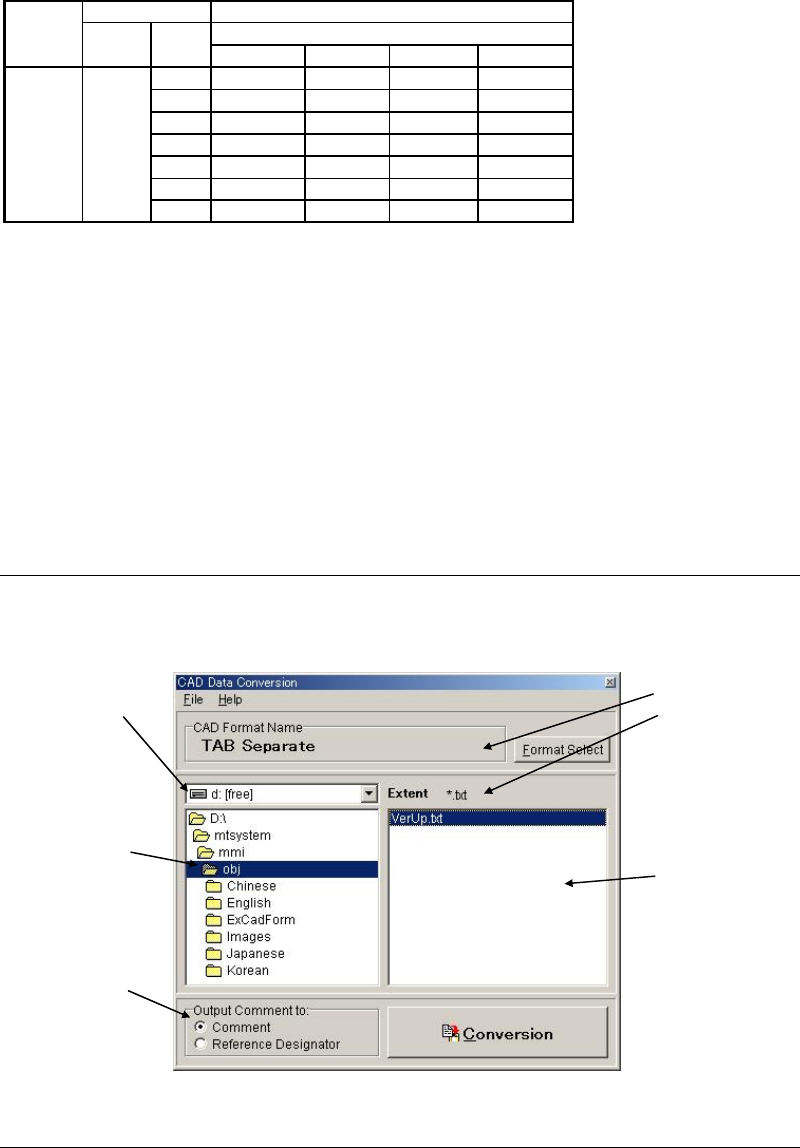
③ The CAD Data Conversion dialog box becomes active. Make sure the CAD format name
selected in the previous step is shown under [CAD Format Name].
4-1-3-3 Selecting a CAD Data
Select a CAD data.
4-1-3-4 Executing Convertion
Click <Execution> button to execute conversion. After the execution, save the data.
Note: You can change a file name. However, saving the renamed file to a different folder is not
allowed.
The saved data can be loaded to the program editor (Program>File>Open).
Select the drive
including CAD data
you want to use.
Select the folder
including CAD data
you want to use.
Select the file
Including CAD data
you want to use. Only
the files with the
specified extent will
appear.
The selected format and
extent should be
displayed.
Select to which data of
the program data
Comment is output.

Chapter 4 Data Conversion
4-10
4-1-4 Appendix
4-1-4-1 Applicable CAD Data
Applicable CAD data for the enhanced CAD data conversion should meet the following
requirements.
● CAD data should conform to ASCII codes. (text file)
Numerals: "0"(30)h ~ "9"(39)h "+"(2B)h, "-"(2D)h, "."(2E)h
Other characters: "(space)"(20)h/(09)h*, "~"(7E)h, etc. * TAB code (09)h represents a
space.
● File specifications
Ending of file: EOF code (1A)h
Ending of line: CR&LF code (0A0D)h
Line length: Max.512 bytes (Including CR&LF code)
Numerical data: Expressed in decimal
COMMENT LINES: CR&LF code or any identifier letters are entered at the beginning.
● Placement information for one side of board and that for the other side should not be
included in the same file. If so, you need to separate each information into different files,
or to modify the converted data.
● Placement and dispense information should not be included in the same file. If so, you
need to separate each information into different files, or to modify the converted data.
● As for placement step, X,Y-data should represent coordinates of placement point.
Normally, the Tenryu placement head sucks the parts-center and its coordinates
correspond to placement point. (Coordinates of parts-corner or parts-lead are invalid.)
As for dispense step, X,Y-data should represent coordinates of dispense point.
Chapter 4 Data Conversion
4-11
4-1-4-2 Standard CAD Data Layouts
The following standard formats are pre-registered.
Standard CAD Data for MT-5500 MT-5700
File Style: Text file
File Name: *.* Long file name is supported.
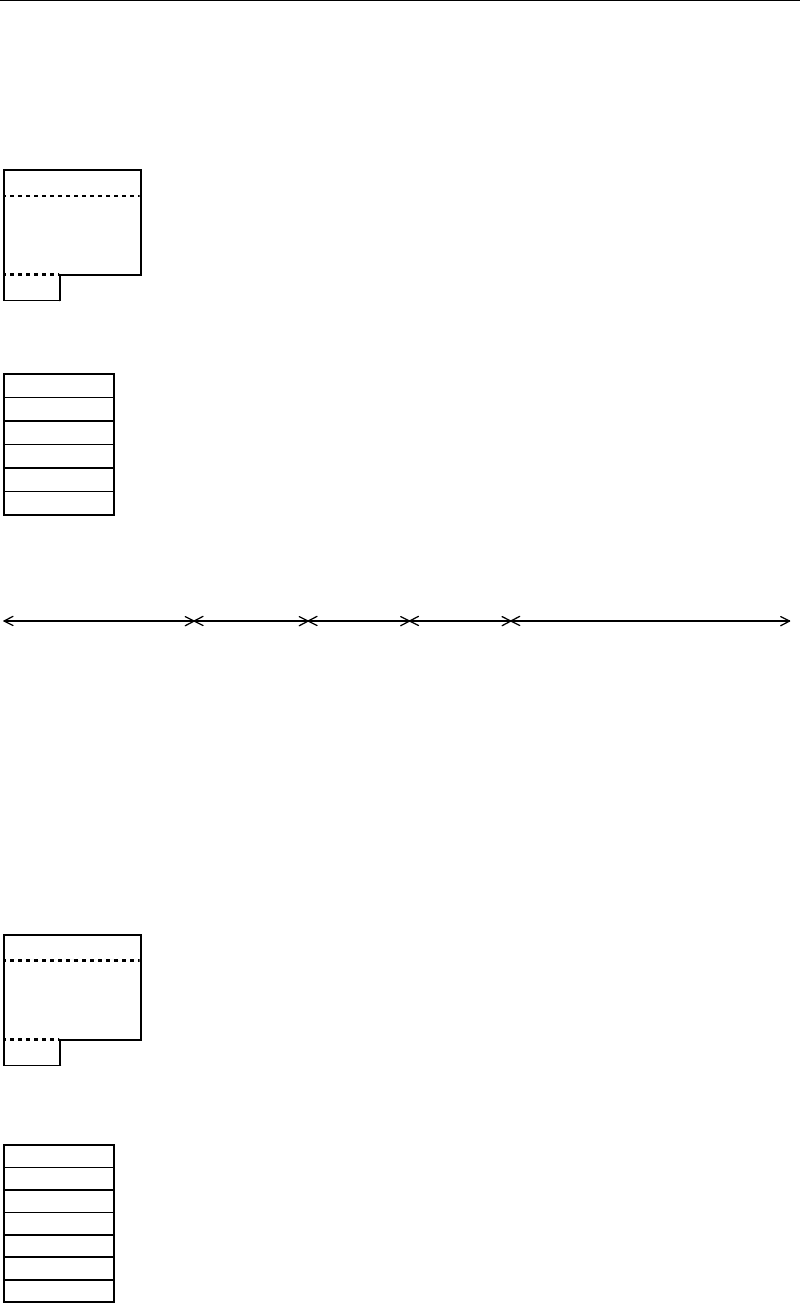
File Layout:
Data record 64 bytes per step x n
.
n is determined by number of steps
.
of destination data.
.
EOF (1A)h
Data Record Layout:
Comment 16 bytes 16 or less letters
X 8 bytes +/- XXX.XXX[mm]/[inch]
Y 8 bytes +/- XXX.XXX[mm]/[inch]
T 8 bytes +/- XXX.XXX[mm]/[inch]
Reserve 22 bytes (space)x22
Control code
2 bytes
(0DOA)h
Sample CAD Data:
Comment
X
Y
T Reserve
●
●
●
●
+
●
●
●
●
1
●
●
●
●
+
●
●
●
●
2
●
●
●
●
+
●
●
●
●
3
●
●
●
●
+
●
●
●
●
4
●
●
●
●
+
●
●
●
●
5
●
●
●
●
+
●
●
●
●
6
●
●
●
●
+
ZD1 - 43. 244 40. 868 270. 000
↓
D1 - 62. 294 23. 851 270. 000
↓
D2 - 62. 294 28. 296 270. 000
↓
D3 - 62. 294 32. 741 270. 000
↓
D4 - 62. 294 37. 186 270. 000
↓
D7 - 49. 594 28. 931 270. 000
↓
TR1 - 32. 868 53. 251 0. 000
↓
TR2 - 36. 259 34. 646 270. 000
↓
Standard CAD Data for MT-5800 TOPs
File Style: Text file
File Name: *.* Long file name is supported.
File Layout:
Data record 64 bytes per step x n
.
n is determined by number of steps
.
of destination data.
.
EOF (1A)h
Data Record Layout:
Component 16 bytes 16 or less letters
X 8 bytes +/- XXX.XXX[mm]/[inch]
Y 8 bytes +/- XXX.XXX[mm]/[inch]
T 8 bytes +/- XXX.XXX[mm]/[inch]
Comment 16 bytes 16 or less letters
Reserve 6 bytes (space)x6
Control code
2 bytes
(0DOA)h
Sample CAD Data: