M20_Ope_E.pdf - 第205页
Chapter 5 Libraries 5-55 5-1-5-6 Dimensions Settings and Others Common Settings z Dimensions Settings Enter dimensions-related data of the scan target. When placing a cursor at a setting field, an explanatory graphic f…
Chapter 5 Libraries
5-54
5-1-5-5 Multiple-view Process
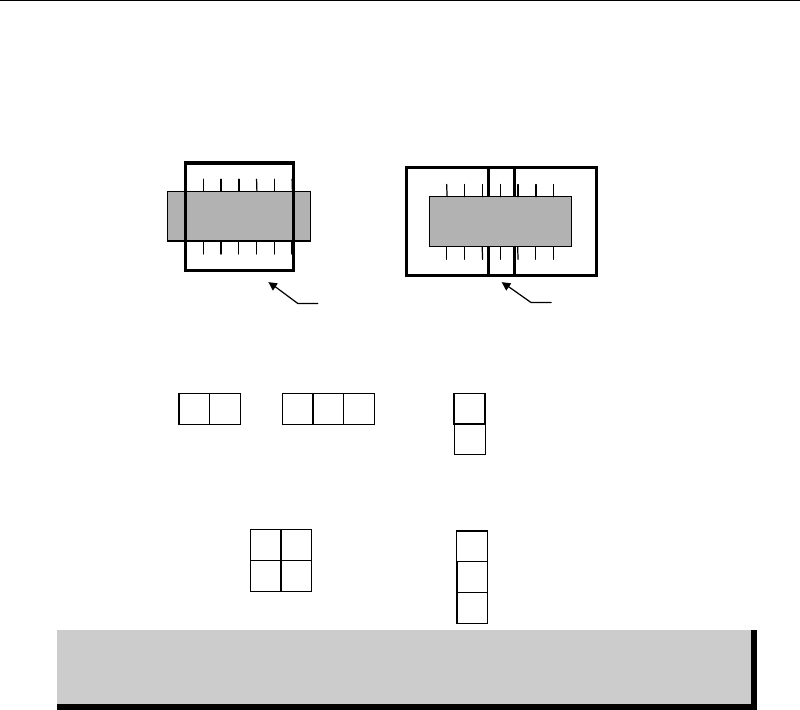
Usually, the component image is captured as a whole picture. But when the component is too
large for the camera view, it can be captured separate pictures. In multiple-view process, the
head moves over the fixed camera for the number of views you have specified.
The figure below lists available view division patterns:
Component image data is created based on its packaging state. Therefore, view
division direction, horizontal or vertical, must be selected based on the
component packaging direction.
2
1
1
3
2
Three
vertical views
1
2
Two
vertical views
32
1
Three
horizontal views
Two
horizontal views
21
34
Four views
Multiple-view process allows for
covering the overall component.
Component is too large for
the camera view...
Camera view
overlapping
Chapter 5 Libraries
5-55
5-1-5-6 Dimensions Settings and Others
Common Settings
z Dimensions Settings
Enter dimensions-related data of the scan target. When placing a cursor at a setting field, an
explanatory graphic for the setting and its description are displayed in sub-windows.
Note: An item displayed in yellow suggests its setting is out of the valid range.
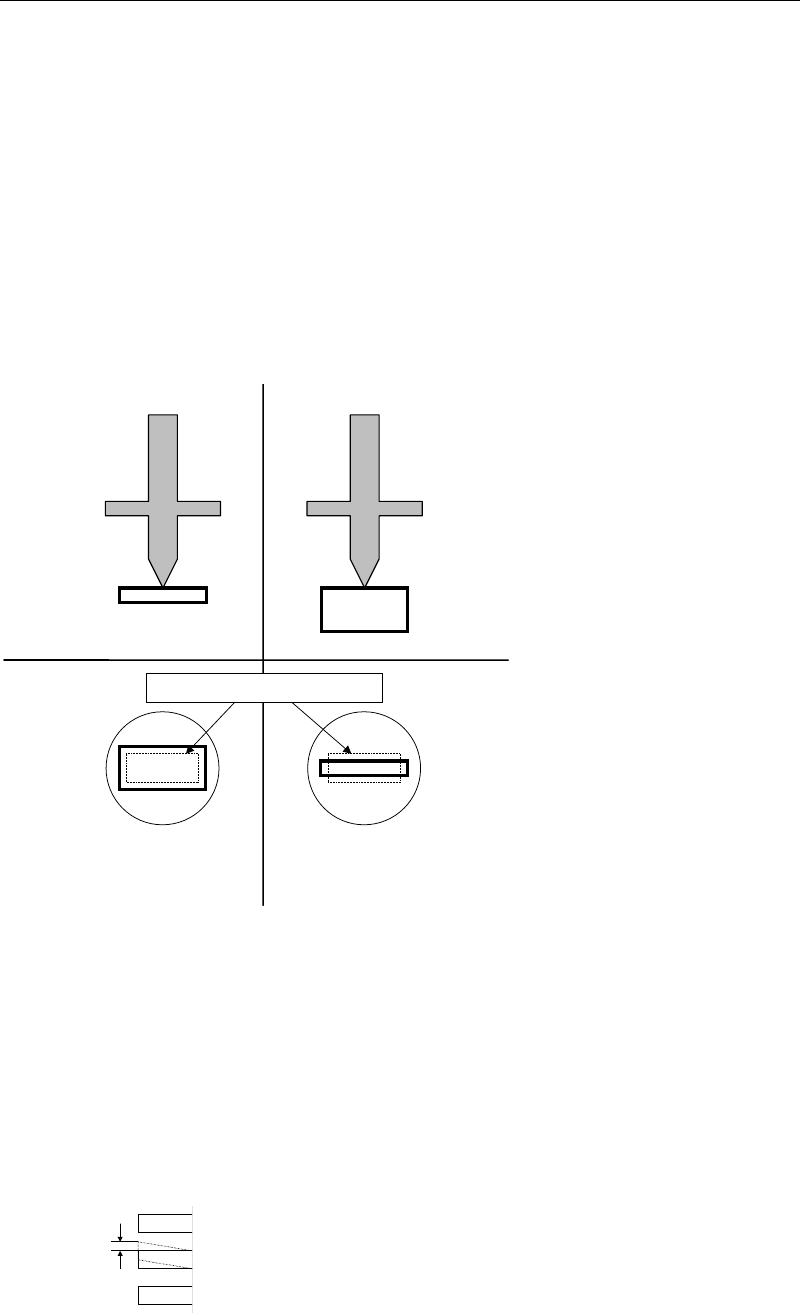
z Size Permission (1-100%)
The permission applied to the body size. Smaller the setting is, more severe the requirement
will be. Normally, specify 20% at "Size Perm." Set 30% at "Size Perm." for chip components with
the shorter side of less than 2.0mm, such as 1005 chip and 1608 chip. If the size of a component
is considerably irregular, use 40%.
Tilt placement: Permission
limit is exceeded.
Î
Retry
Normal placement
Bottom view
Side view
Nozzle
Minimum permission limit (dotted line)
z Offset Permission (1-100%)
The permission applied to the pickup position relative to the nozzle center. The default value
of 10% is set at "Offset Perm." for SOP, SOJ, PLCC, LCC, and QFP. If the offset is large, increase
this value.
z Lead Bend Permission
The permission applied to the horizontal lead bending.
Note: Default values are entered at Offset Permission and Lead Bend Permission in advance.
Chapter 5 Libraries
5-56
5-1-5-7 Missing Leads Assignment
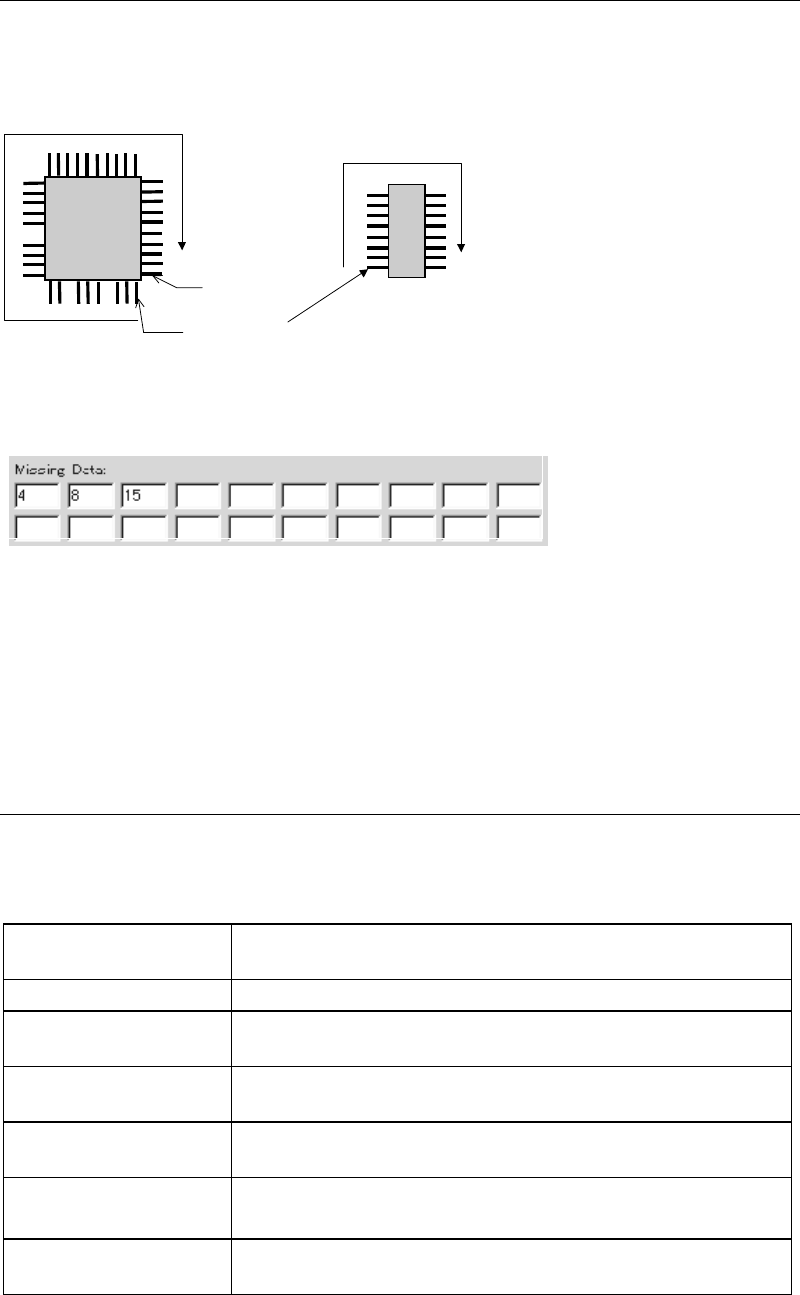
When the component has missing leads, click View>MissingData to open the View dialog box.
Then enter missing lead numbers to the Missing Data fields. As shown in the below
illustrations, leads are numbered clockwise. (Numbering is performed based on the monitored
component image.) The result of your entry is graphically shown in the View dialog box.
The first lead
(
No.1
)
The last lead
Example 1 Example 2
The missing lead setting for Example 1 shall be as shown below (you can enter settings in any
order):
When you finish entering for a field, press <TAB> key to move to the next field.
The graphic shown in the View dialog box reflects the settings of the mold size, overall size,
lead count, lead width, and lead pitch, providing a good overview of the current settings.
Settings for Chip, Blob process, CPL process, Connector, BGA, and BGA/CSP are respectively
described in the following sections.
5-1-5-8 Chip Components
In the Image Data dialog box of Chip, select a component type by clicking <Mode> button.
Available component types are as followings. (Refer to the “Details of Vision Processing
Modes” for the details of each mode.)
Edge-midpoint Search
For older version data which uses this mode for standard chip
recognition (Re-processed by CPL in case of an image error).
Corner Search Used for components that can be recognized at corners only.
Overall Chip Process
Used for special components which cannot be processed by CPL.
This process time takes longer for heavy loading
.
Electrolytic Capacitor
Used for components with two reflective electrodes at the ends,
such as electrolytic capacitor.
CPL
Used for standard chip components. (This mode is normally
used.)
Edge-midpoint Search
(Non Recovery)
Normal Edge-midpoint Search mode without re-process by CPL.
Glass Melf
Used for cylindrical-shape-glass-encapsulated components with
two reflective electrodes at the ends