M20_Ope_E.pdf - 第220页
Chapter 5 Libraries 5-70 z Ball Pitch Perm. An error occurs when the measured ball pitch is out of the range of, Specified ball pitch +/- Ball pitch permission. Larger the value, less severe the requirement will be. When…
Chapter 5 Libraries
5-69
z Component
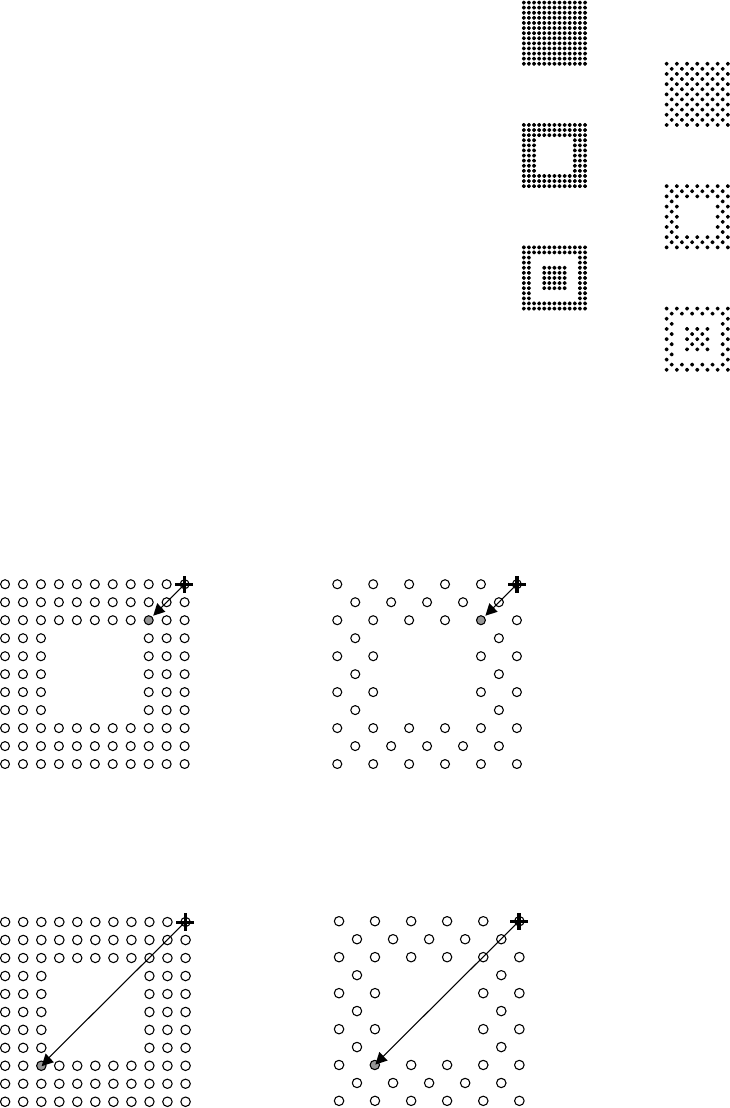
Click <Mode> button to select a ball alignment pattern.
0: Full grid, matrix
1: Full grid, staggered
2: Perimeter grid, matrix
3: Perimeter grid, staggered
4: Partial grid, matrix
5: Partial grid, staggered
z Upper-right Ball Coordinate (When [Component] is 2 or 3)
Note: For information on how to identify the ball position, see Missing Ball Assignment later in this
section.
Enter the ball position number of the upper right corner of the innermost ball square. For both
examples shown below, the setting shall be “0303”.
z Lower-left Ball Coordinate (When [Component] is 2 or 3)
Enter the ball position number of the lower left corner of the innermost ball square. For both
examples shown below, the setting shall be “0909”.
0
2
4
1
3
5
Chapter 5 Libraries
5-70
z Ball Pitch Perm.
An error occurs when the measured ball pitch is out of the range of,
Specified ball pitch +/- Ball pitch permission.
Larger the value, less severe the requirement will be.
When
Measured ball pitch < Specified ball pitch - Ball pitch permission,
or
Measured ball pitch > Specified ball pitch + Ball pitch permission,
an error occurs.
Unit:mm, Standard: 0.2
z Ball Circum. Perm.
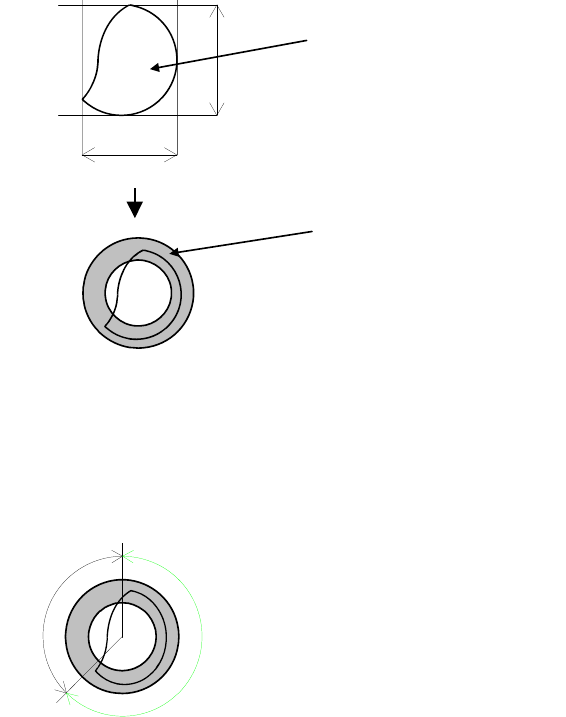
Check is made on how much the ball circumference measured in the process of [Ball Check]
>Presence&Damage is in the circumference permission range determined from actually
measured ball size. Larger the value, less severe the requirement will be.
Unit: %, Standard: 40
Circumference
Actual measured ball size=(A+B)/2
Circumference permission range
This permission is determined in percent. Even if the ball is proper, the circumference may be
slightly out of the range.
Example: Improper ball:
The circumference is about 45% out of the range. When the setting is 40, the error mark is
displayed.
OK
NG
Circumference permission = NG/(OK+NG)
Note: This function is only available when “Still” is selected in [F.Camera On-The-Fly Capture].
Chapter 5 Libraries
5-71
z Ball Size Perm.
An error occurs when the measured ball size is out of the range of the Ball Size Permission in
the process of [Ball Check]>Presence&Damage. Larger the value, less strict the requirement
will be.
Unit: %, Standard: 40
Note: When
Measured ball size < Theoretical ball size x (100 - Ball size permission) ÷ 100
or
Measured ball size > Theoretical ball size x (100 + Ball size permission) ÷ 100,
an error occurs.
Theoretical ball size = Ball size x Ball reduction ratio ÷ 10
z Ball Reduction
Standard: 100
Unit: %
Note: Used for compensating the measured ball size when the imaged ball is reduced in size due to
lighting conditions.
z Ball Check
4: No Cheks
Ball checks are not performed.
5: Presence (outmost)
Vision-align the component based on its outermost ball square. Check for ball presence only
for the outermost ball square.
6: Presence&Damage(all)
Vision-align the component based on its outermost ball square. Check for ball presence, ball
size, and ball diameter for all the balls.
7: Presence(all)
Vision-align the component based on its outermost ball square. Check for ball presence for
all the balls. Faster than the process 6.
z Missing Ball Assignment (View>MissingData)
When the Component setting is either:
0: Full grid, matrix
1: Full grid, staggered
2: Perimeter grid, matrix
3: Perimeter grid, staggered
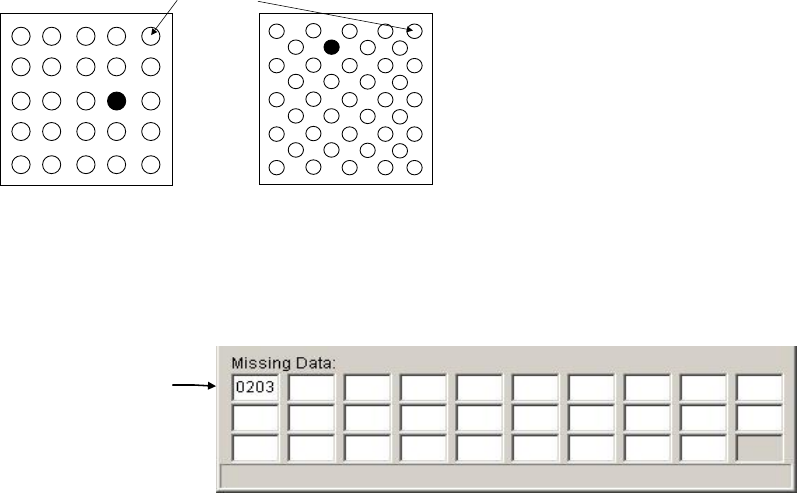
When balls are missing in the filled circle positions, their positions are:
BGA on the left: (X=02, Y=03)
BGA on the right: (X=06, Y=02)
The first ball
(
00
,
00
)
The missing ball setting for the BGA on the left is shown below. The first two digits indicate the
X position, the last two indicates the Y position. Enter the setting from the leftmost of the top
line.
Missing balls